On the afternoon of April 23rd, 2026, I was running errands when my phone buzzed with a message in the Auto-Coder WeChat user group.
A user called "Flying Disabled Person" @'d me with a single line:
"Master Zhu, is there a scheduling bug?"
Right after, they sent a screenshot.
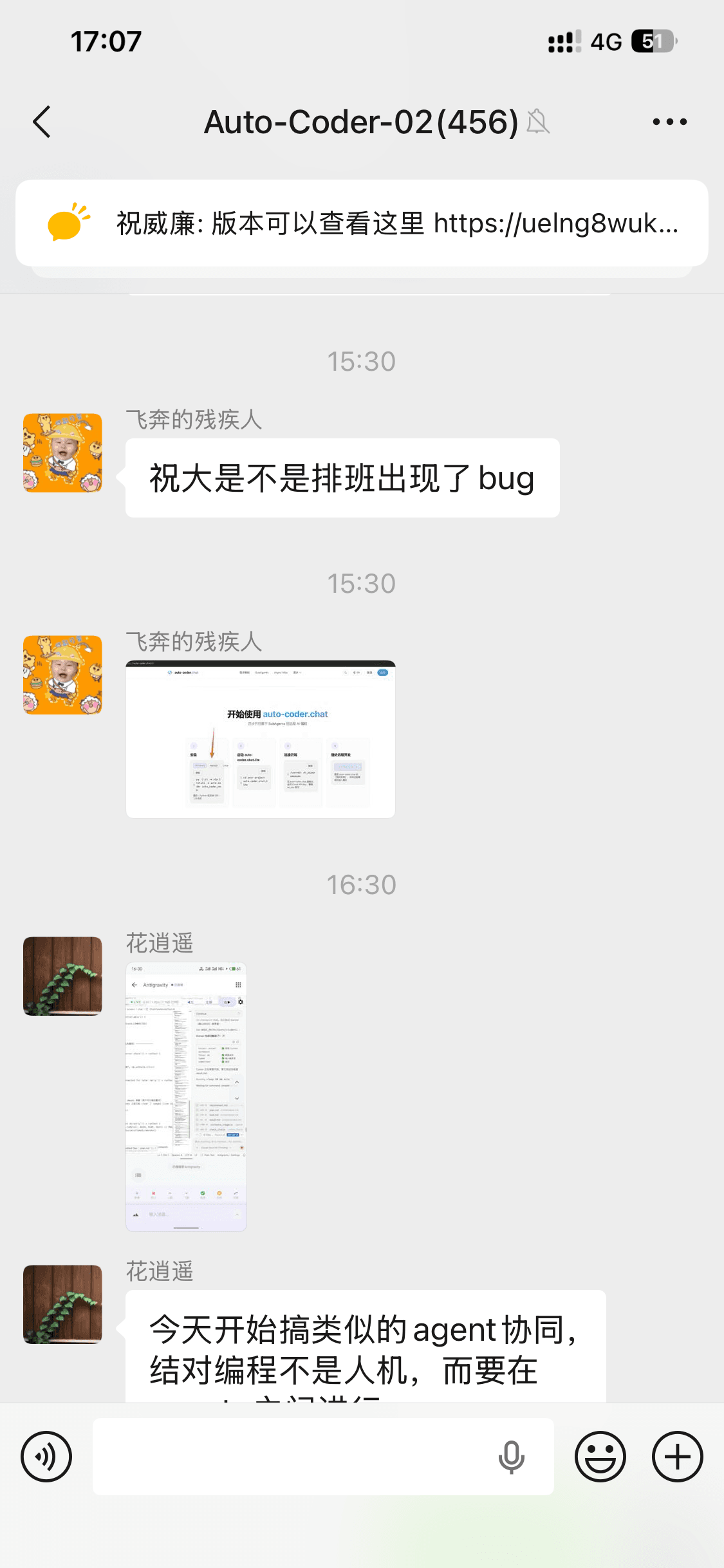
I zoomed in to look.
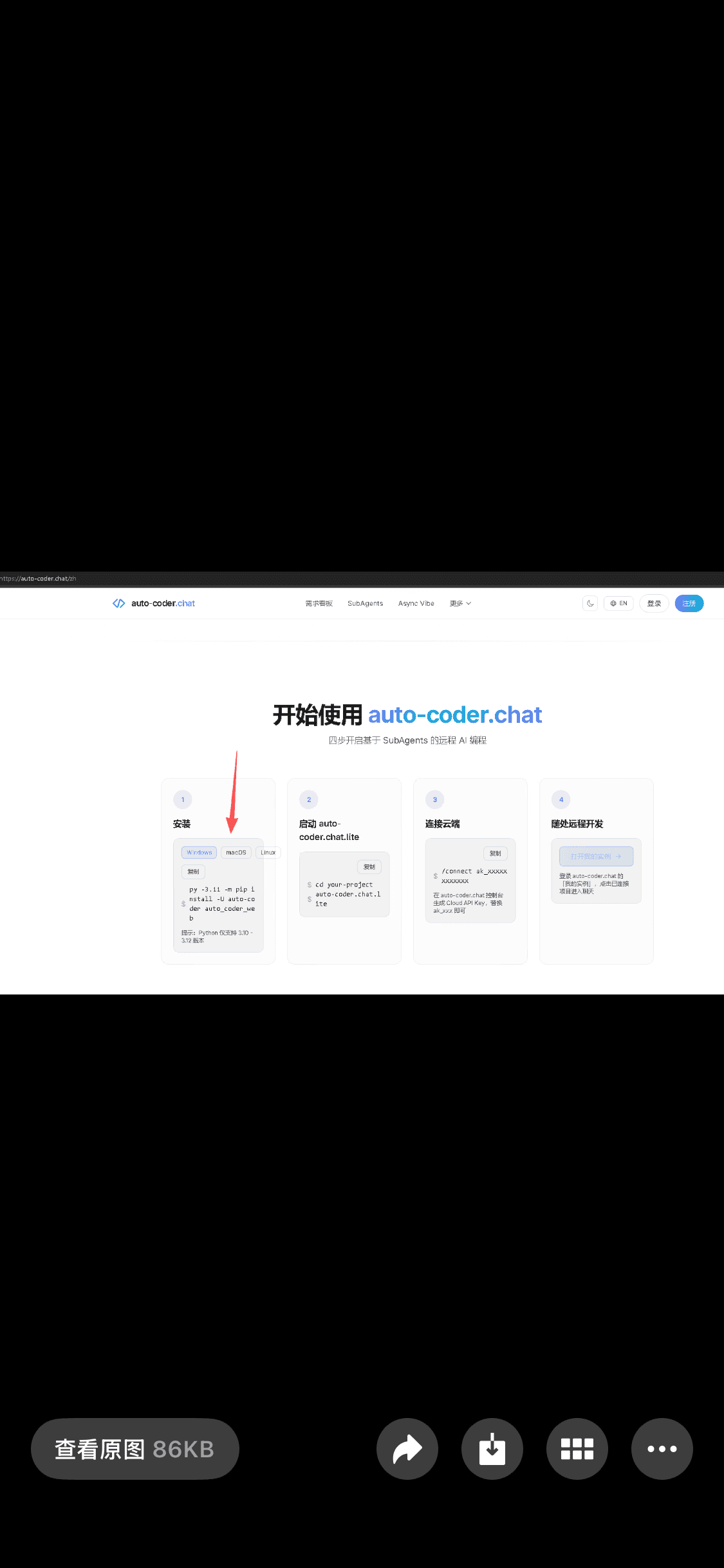
The auto-coder.chat homepage on PC — the 4 step cards in the "Get Started" section were clearly squeezed out of shape. The first card's "Install" area was deformed, the "Copy" button had been pushed below the "OS selector," and the command text couldn't hold a single line. Mobile was fine. Desktop at the 1024px–1280px range was a disaster.
In the old days, my next moves would've been:
- Say "Got it, I'll look when I'm back" in the group
- Find paper or a memo app to jot it down so I don't forget
- Open my laptop when I'm home, reproduce the bug
- Write up the requirement, change code, test, push, deploy
- Tell the user "fixed" the next day
The full loop was at minimum several hours, sometimes the next day.
But It's April 2026, and This Is Not How It Works Anymore
I long-pressed the screenshot to save it to Photos. Then I opened Safari and went to the auto-coder.chat Kanban.
The time was 17:04.
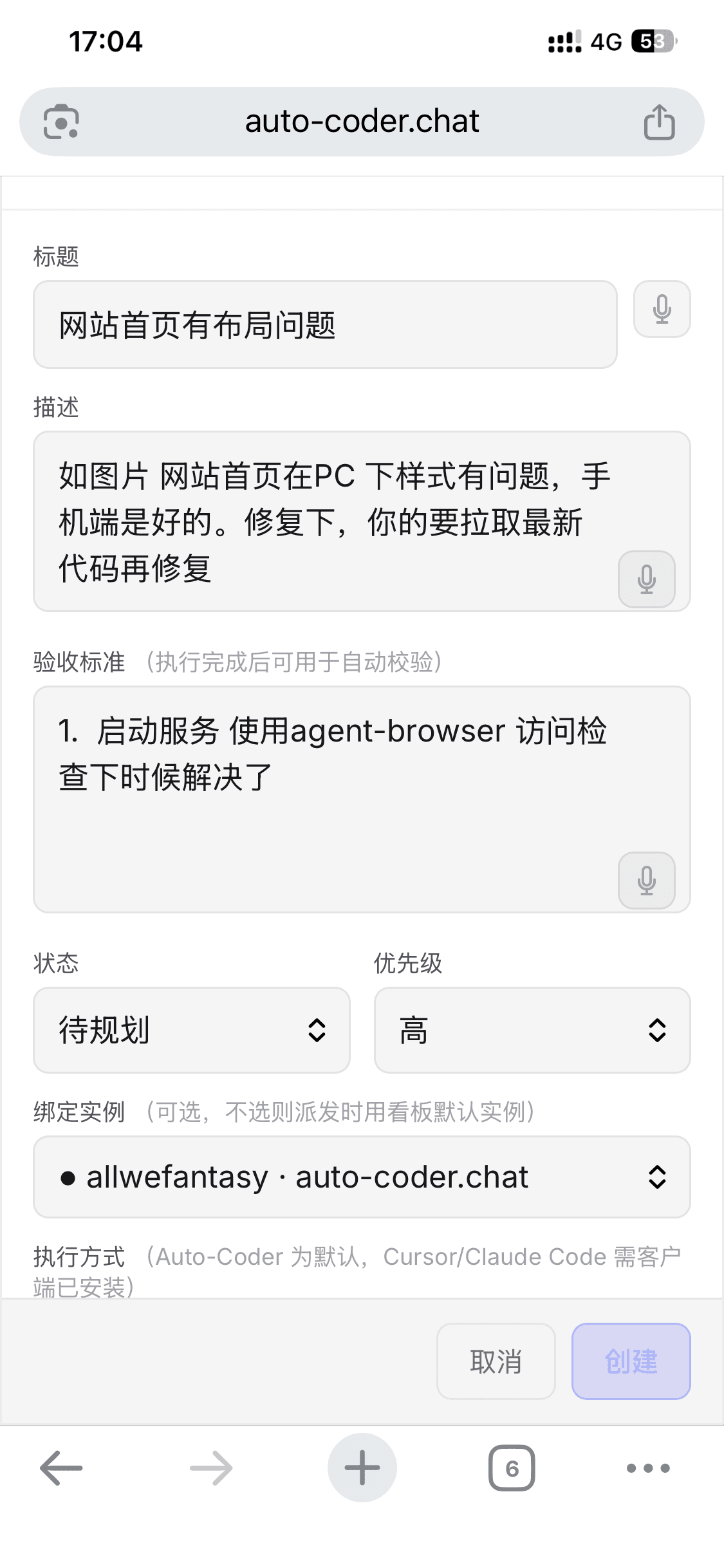
Filled the form:
- Title: Homepage has layout problems
- Description: As shown in image — homepage has styling issues on PC, mobile is fine. Fix it. Pull latest code before fixing.
- Acceptance criteria: Start the service, use agent-browser to visit and verify whether it's fixed
- Priority: High
- Bind Instance:
allwefantasy · auto-coder.chat
Scrolled down:
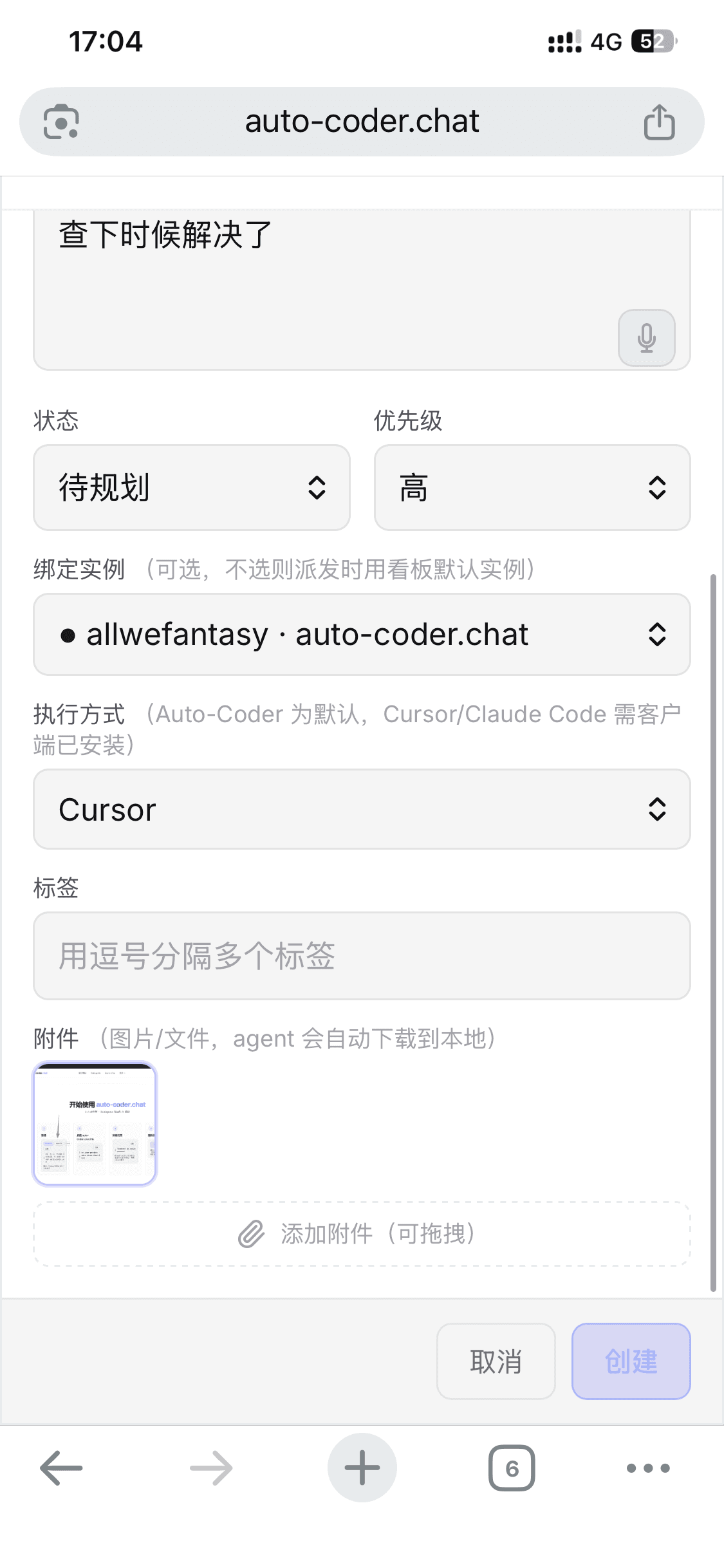
- Execution mode: Cursor (dispatched from my phone, letting the Cursor on my home laptop take over)
- Attachment: dragged in that screenshot the user sent me — the agent will auto-download it locally
Total form-filling time: under 90 seconds.
Hit "Create."
17:04 — The Card Lands in "To Plan"
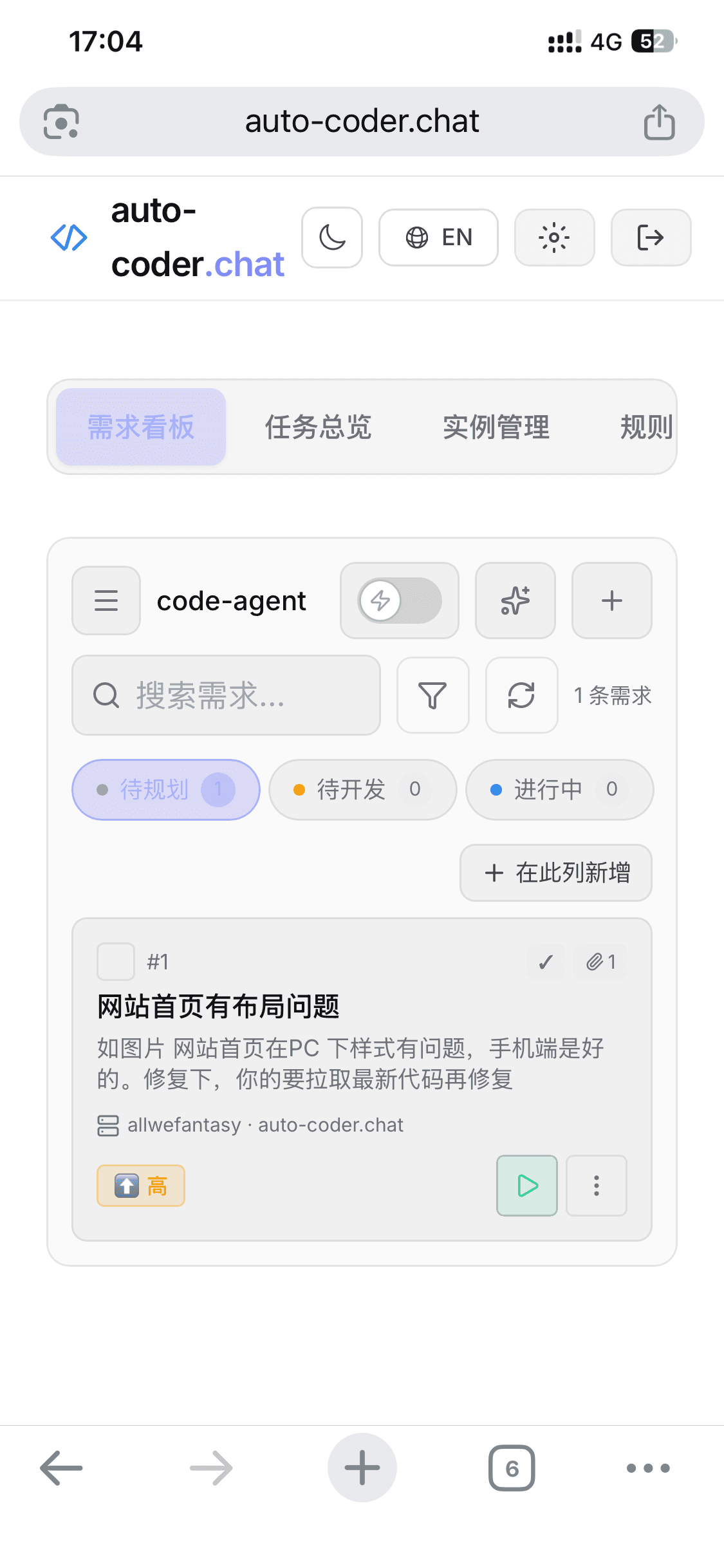
Card #1 is in position. I tapped the green ▷ run button in the bottom-right.
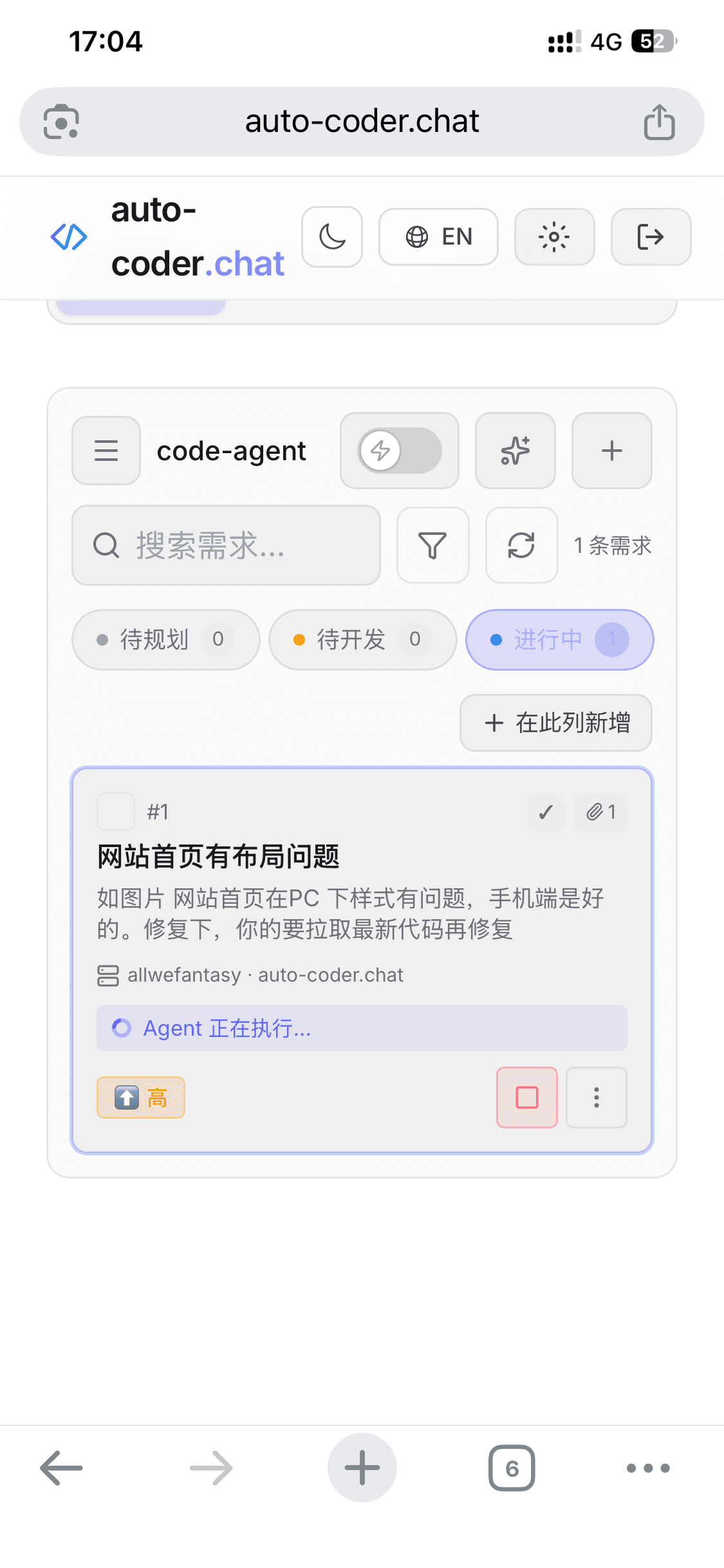
The card instantly jumped from "To Plan" to "In Progress" with an Agent is running... status bar.
At this point, my physical interaction with this bug is over.
I slipped my phone back into my pocket and went back to my errands.
17:11 — Seven Minutes Later, Everything Has Already Happened
I finished my errand, pulled out the phone, opened the Kanban.
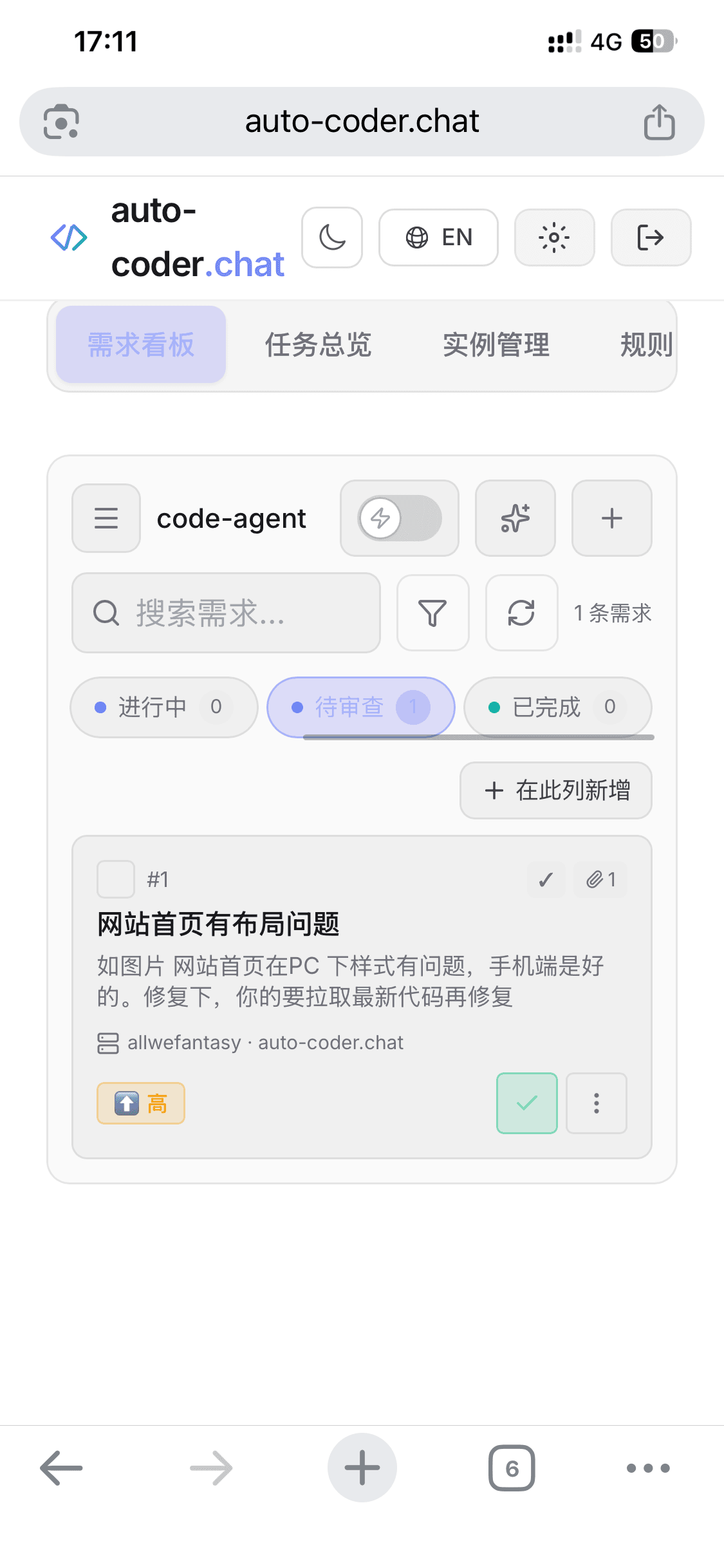
Card #1 had already moved from "In Progress" to "To Review", with a green ✓ in the bottom-right. That means —
- The Agent, on my home Cursor, pulled the latest code
- Reproduced and fixed the layout bug
- Started the dev server, used agent-browser to visit and verify the fix (that's what my acceptance criteria asked for)
- Self-verification passed, parked the card in "To Review" awaiting my nod
I tapped into the card details:
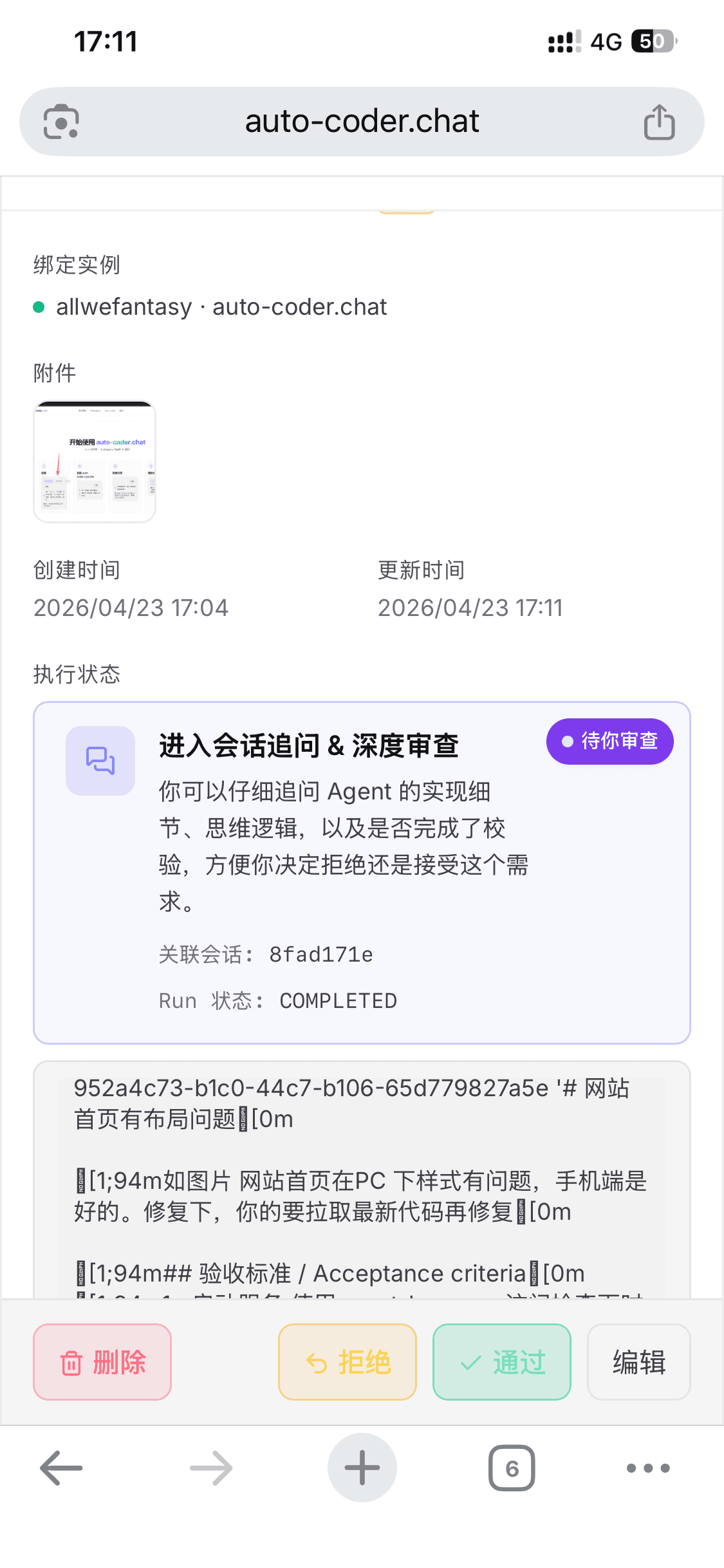
The execution status section was clear —
- Enter conversation for follow-up & deep review — pending your review
- Linked conversation:
8fad171e(tap in to see the agent's full repair trajectory) - Run status: COMPLETED
- Three action buttons at the bottom: Delete / Reject / Approve / Edit
I scrolled down to see the "root cause" the agent wrote.
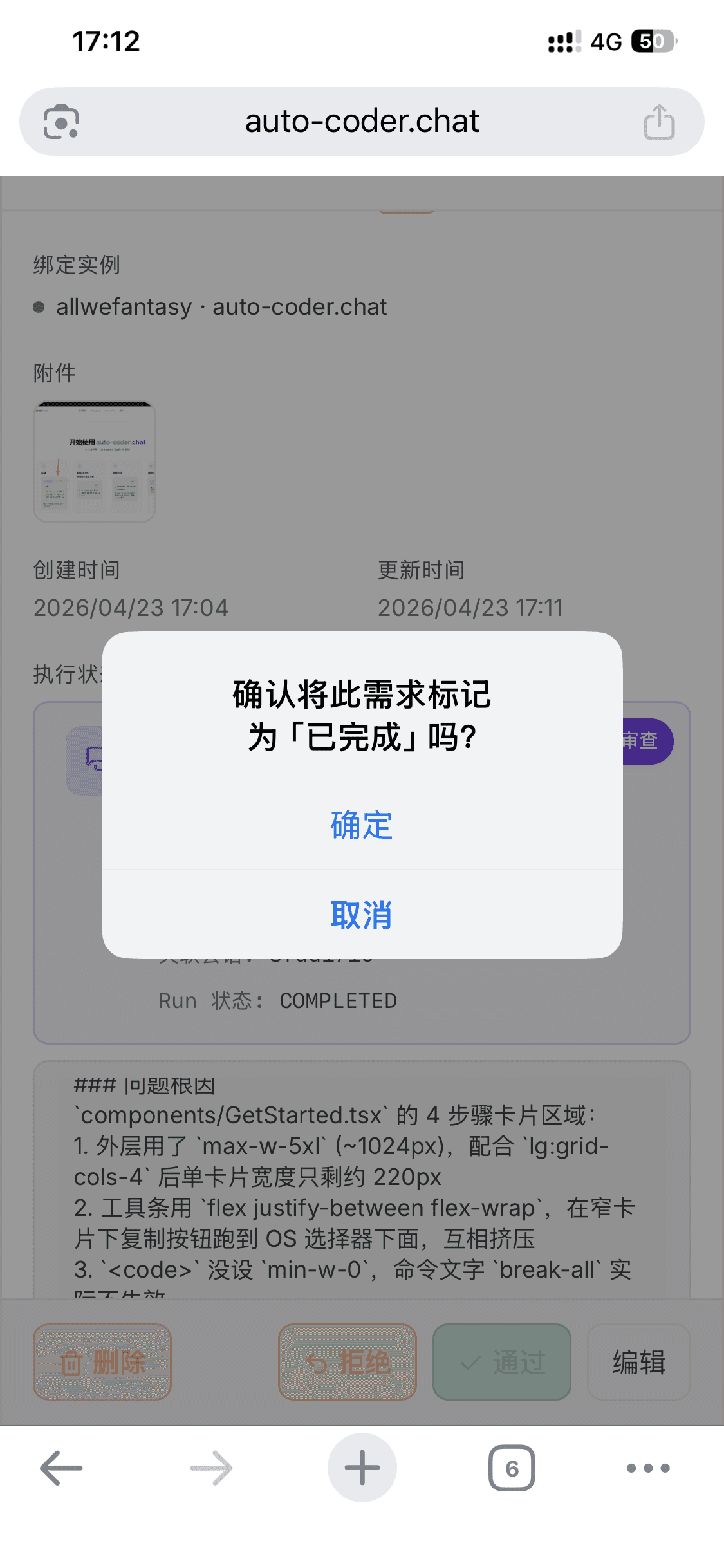
The root cause analysis the Agent wrote, verbatim:
### Root Cause
The 4-step card area in `components/GetStarted.tsx`:
1. Outer wrapper uses `max-w-5xl` (~1024px); combined with `lg:grid-cols-4`,
   each card ends up only ~220px wide
2. The toolbar uses `flex justify-between flex-wrap`, so in narrow cards
   the Copy button falls below the OS selector, squeezing each other
3. `<code>` has no `min-w-0`, so `break-all` on command text doesn't
   actually take effect
Down to the exact file, exact CSS classes, three specific causes.
Not a vague "fixed ✓". Something that lets me judge in 5 seconds whether the agent's understanding matches what I'd conclude reviewing myself.
I ran through it mentally: max-w-5xl + lg:grid-cols-4 → single card 220px → toolbar collapses → <code> missing min-w-0 → break-all doesn't work. Yes, that's exactly the root cause.
I hit "Approve."
Confirm marking this requirement as "Completed"?
Confirm.
17:12 — Issue Approved
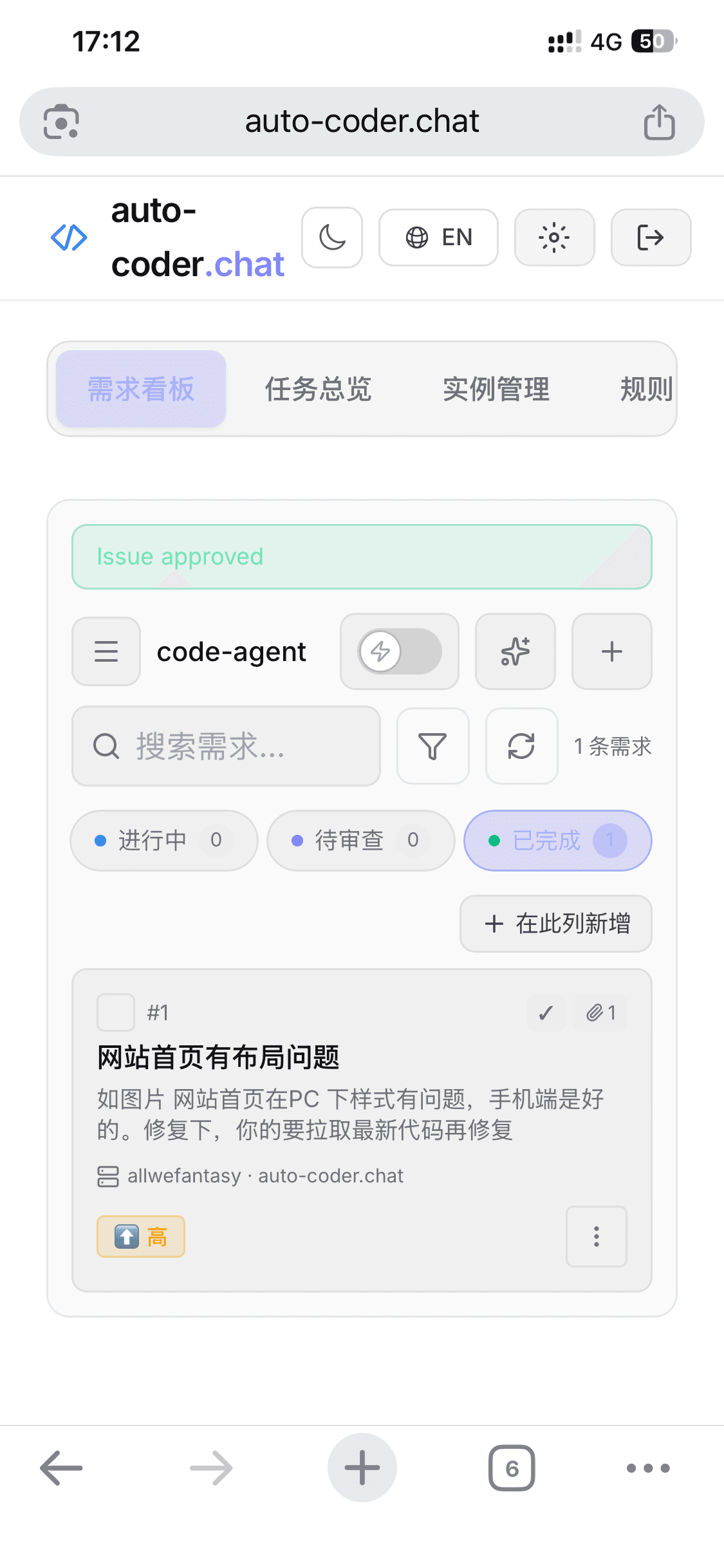
Green banner Issue approved appears. Card drops to "Done" with a count of 1.
Full timeline:
| Time | Event |
|---|---|
| 15:30 | User posts bug screenshot in the group (the user had been sitting on it; I only started that afternoon) |
| 17:04 | I open the Kanban, create an issue, attach the screenshot |
| 17:04 | Card enters "To Plan," I hit ▷ |
| 17:11 | Card auto-flows to "To Review," agent has fixed and self-verified |
| 17:12 | I read the root cause, hit "Approve," card moves to "Done" |
From the moment I decided to handle it → to the bug being solved in production, about 8 minutes. The whole thing on my phone. I never touched a computer.
What This Would've Looked Like in the Old Days
I've been building software for 12 years, and I know exactly what a "PC 1024px–1280px layout bug" looks like in the traditional flow:
- Go home, boot up, pull code — 5–10 minutes
- Open browser, reproduce, open devtools — 5 minutes
- Locate
GetStarted.tsx4-step area, realizemax-w-5xl+lg:grid-cols-4blows up at this width — 10–15 minutes - Change CSS, try a few approaches, check other breakpoints aren't broken — 15–30 minutes
git diffto verify changes are clean, commit + push — 5 minutes- Wait for CI, wait for deploy, verify in production — 10–20 minutes
Fastest 50 minutes, slowest 90 minutes. And this all requires "an uninterrupted work block" — which in practice means after you're home, showered, family settled, you finally sit down to work.
Today's loop is:
See bug → screenshot it → open mobile Kanban → 90s to fill form → tap ▷ → phone back in pocket → 7 minutes later check the root cause → "Approve"
The bug solved itself between my errands.
What's Making This Possible
Don't be fooled by the surface-level "fixed a bug in 8 minutes." This works only because three things are simultaneously true:
-
Kanban as the format — a bug isn't a chat thread; it's a structured card with "title / description / acceptance criteria / attachment." Everything the agent needs to know to get started is in place at creation time. I don't need to "add context later tonight."
-
Bundled Agent + Subagent architecture — when I hit ▷, my home Cursor (a Code Agent) does the work, not some remote cloud service. Code, keys, engineering environment, debugging — all stay on my machine. Subagent compression pushes execution cost down to cents, so "casually filing a card" doesn't turn into "bill anxiety."
-
Agent self-verification + written root cause — my acceptance criterion said "start the service and check with agent-browser," and the agent really started the service, really browsed it, really judged whether the fix worked. And it wrote a CSS-class-level root cause for me. This step blocks the "AI claims it's done but isn't" failure mode from ever reaching my review queue.
Remove any one of these and 8 minutes doesn't happen:
- Without a Kanban, the bug is a chat thread — I'd have to remember to handle it tonight
- Without a bundled Agent + dispatch, I'd have to SSH from my phone, open a session, feed prompts
- Without self-verification + root cause, I'd have to pull the code and read the diff myself before trusting it
This Is What the Future of Requirement Management Looks Like
Over the two years of Auto-Coder, I've seen too many "AI coding demo videos" — a person sitting at a computer, telling Claude Code or Cursor one line, and minutes later, code appears.
That kind of demo is "AI helps me write code."
What happened to me today is something else — "I wasn't there, and AI walked a requirement from idea to commit for me."
Future engineering collaboration will no longer be "engineer sits at desk and works with AI." It will be:
- You see a bug report on the subway, file a card from your phone in 60 seconds
- You think of a new feature at dinner, drop it into the Kanban, come back from dinner and it's in review
- You list a week's worth of requirements before bed, half of them are committed by morning
- Your 5-engineer team isn't at their desks, and cloud machines relay the work through 30 cards
The granularity of requirement management is compressing from hours/days to minutes.
It's this fast not because the model got dramatically smarter (though Opus 4.7 did), but because the collaboration medium changed: from chat windows to kanbans, from "must-sit-at-desk" to "a few taps on a phone," from "I review every line AI writes" to "AI writes the root cause + I nod."
This is the mobile version of the software industrial pipeline.
Bonus Shot — What It Looks Like When Cards Pile Up
The 8-minute story showed one card. But real work doesn't come one card at a time.
Here's what my phone looks like right now:
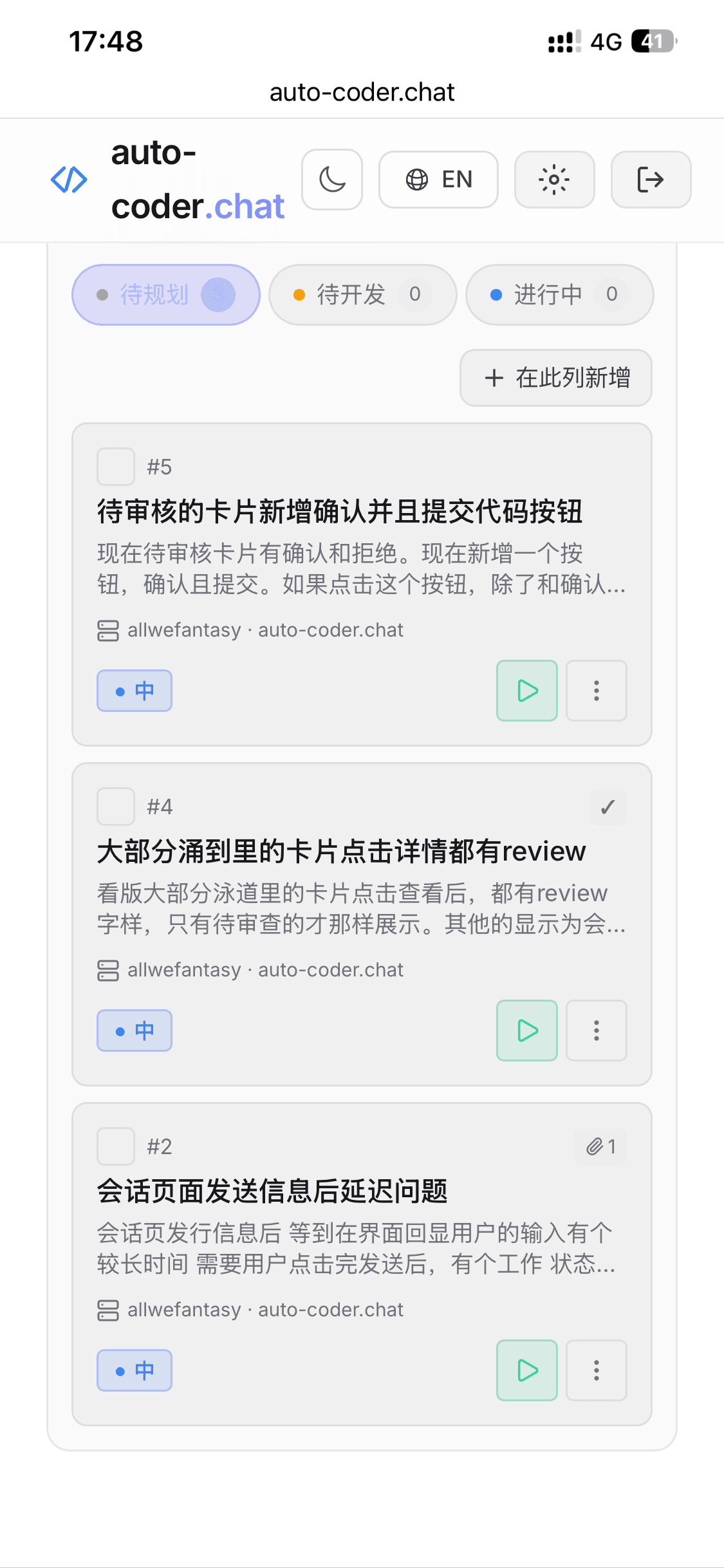
Time: 17:48 the same day — 36 minutes after fixing the layout bug. The To Plan column already has 3 more cards:
- #5: Add "Approve and Commit" button to cards awaiting review (feature improvement)
- #4: Most lane cards' detail-click should show a review (UI consistency)
- #2: Chat page message-send latency issue (bug, with 1 screenshot attached)
Each landed in 60–90 seconds. Some I found myself while using the product, some from users casually mentioning things in the group, some from a glance at a competitor's product that triggered an idea.
Old days, these 3 requirements would've been 3 items floating in my head / memo app / WeChat favorites — one or two would inevitably get forgotten. Today they're all on the Kanban, sorted by priority. When I flip on "Auto-Relay," the agent will work through the "To Do" column one by one.
When I come back from errands and open my phone — I often find 1–2 cards already in "To Review" waiting for my nod.
This is the real value of the Kanban — it turns the messy, drop-prone, memory-dependent chain between "idea" and "production capacity" into a conveyor belt that never loses a card.
Team Scenario: Every Role Has Its Place
The 8-minute story involves only "me." But what auto-coder.chat's Kanban really wants to do is let a whole team — PM, boss, QA, engineer, Agent — each find their seat.
Here's the division of labor:
┌─────────────────────────────────────────────────────────────┐
│  To Plan        To Do         In Progress     To Review    Done  │
│  ────────      ────────      ────────       ────────    ──────── │
│                                                                  │
│  Product PM ──┐                                                  │
│  Boss       ──┼─→ Engineer reviews ─→ Agent auto ─→ Engineer   ┐ │
│  QA         ──┘  + rewrites req        relay          review  │ │
│  Self       ──┘  → drag to "To Do"    → "To Review"   + QA in │ │
│                                                                │ │
│                                        → "Done" ──────────────┘ │
└─────────────────────────────────────────────────────────────────┘
Gate 1 · Anyone Can File "To Plan"
Product managers, bosses, QA, customer support, even ops — anyone can open the Kanban, create a card, drop it in "To Plan."
They don't need to know git, prompts, or whether the project is Vue or React.
They only need to do one thing: explain what they want clearly. Via typing, voice input, or dropping a screenshot.
The "To Plan" column is essentially the requirements inbox between the team and the AI.
Gate 2 · Engineer Is the "Requirement Gatekeeper"
Once a requirement lands, the engineer has both the right and responsibility to review it.
- Description too vague? Open the card and rewrite it with the PM.
- Missing acceptance criteria? Add "after starting the service, API X returns Y" — mechanical, verifiable conditions.
- Priority wrong? Adjust.
- Big card splittable into 3 small cards? Split it.
- Some requirements shouldn't be built at all? Close, with a reason.
After editing, the engineer drags the card from "To Plan" to "To Do" — that physical drag is the engineer telling the AI, "This card's state is now clean; you can take it."
This is called "requirement review" in traditional teams, often a multi-person meeting that takes hours. On the Kanban, it's editing a card's fields + one drag, done in minutes per card.
Gate 3 · Agent Auto-Relays, Never Sleeps
Flip on the ⚡ Auto-Relay switch at the top of the Kanban.
After that, the Agent takes over —
- Picks the top card from "To Do" by priority + manual ordering
- Auto-starts execution, card enters "In Progress"
- Finishes, self-verifies against acceptance criteria, writes root cause
- Verification passed → card auto-flows to "To Review"
- Scheduler immediately grabs the next card from "To Do"
Engineers review requirements / edit cards by day. Agents execute / self-check by night — two-shift operation.
A 5-person team can have 30–50 cards in flight, with agents relaying on multiple cloud machines. When you walk in the next morning, "To Review" usually has several cards waiting for your nod.
Gate 4 · Engineer Reviews First, QA Follows
When the Agent finishes, cards enter "To Review." This gate has two steps:
- Engineer reviews the Agent's root cause — like I did with the layout bug, check whether the analysis is correct and the diff is clean. If the Agent went off-track, either "Reject" to send it back, or edit the card to add stricter acceptance criteria and re-run.
- QA steps in — once the engineer confirms "code-level OK," QA pulls the branch for regression / end-to-end / business validation. This can be manual, or the test cases can be in the card's "acceptance criteria" so the Agent runs them too.
Card only enters "Done" after QA passes and the engineer nods.
End-to-End Picture
| Role | Where they act | Action |
|---|---|---|
| PM / boss / QA / anyone | To Plan | File card |
| Engineer | To Plan → To Do | Review requirement, clarify, drag |
| Agent (auto-relay) | To Do → In Progress → To Review | Execute, self-verify, write root cause |
| Engineer | To Review | Review Agent output: Approve / Reject / Re-run |
| QA | To Review | Business regression |
| Engineer | To Review → Done | Drag to confirm (triggers Hook auto-commit) |
The key to this division isn't "AI replaces humans" — it's "each role stops doing what they're worst at":
- Product people don't have to force themselves into tech jargon — just say what they want
- Engineers don't write massive amounts of CRUD every day — just guard the two gates: requirement review + result review
- QA doesn't chase engineers asking "done yet" — just watch the "To Review" column
- Agents don't sit in front of one engineer waiting for instructions — pull work from the queue
That's auto-coder.chat's Kanban's answer to "future engineering team" — humans focus on review and decisions, Agents focus on execution and self-check, and the conveyor belt runs itself.
How to Try It Fast
Open your phone browser (or desktop — either works) and go to:
Download the desktop client for your platform, log in, enter the Dashboard, and you'll see the "Requirement Kanban" tab.
Next time someone @s you in a group asking "is there a bug?" — don't just say "I'll check when I'm back." Open the Kanban right there, file a card, drop in the screenshot, hit ▷.
Leave the rest to the pipeline.
Closing Thoughts
Our original motivation behind the auto-coder.chat Kanban is simple —
Let every developer put their engineering capacity "in their pocket" — on the subway, in a café, on a bullet train during a work trip.
No desk required, no laptop-always-on, no "wait till I'm home." A requirement comes in, 60 seconds to file, a few minutes later you're reviewing root cause.
Make software development as natural as replying to WeChat messages.
Try the auto-coder.chat Kanban: auto-coder.chat
All screenshots in this article come from a real bug-handling session on the afternoon of April 23rd, 2026. Timestamps are unedited.