Before We Start
In April 2026, I spent half a day using app.infinisynapse.cn end-to-end.
Not watching demo videos. Not scrolling through landing page screenshots. I actually signed up, connected data sources, asked questions, waited for results, inspected deliverable files, clicked through the live dashboard, configured models, swapped engines, tried templates, and switched to mobile view.
My motivation was simple. Over the past year-plus, products shouting "AI data analysis" have been popping up everywhere. Julius, camelAI, ChatBI, all sorts of "LLM-wrapped BI" products, plus Cursor / Claude Code dragging in a CSV and spitting out a dashboard. Every one of them calls itself a "Data Agent." But the ones that can actually run serious analysis in real enterprises? You can count them on one hand.
InfiniSynapse is one of the serious players in this space in China. I've read all its public documentation and tracked several of its releases. This time I decided to do something different — with no agenda, I would use it exactly like a brand-new user would, from zero, and write down what I actually saw.
What follows is my honest observation as a deep trialer. Twelve screenshots, all from my own session.
First Impression: It Doesn't Look Like a BI Tool
I opened app.infinisynapse.cn, logged in, and the first thing that hit me wasn't "this is a BI tool" — it was "this is a workbench for analysis tasks".
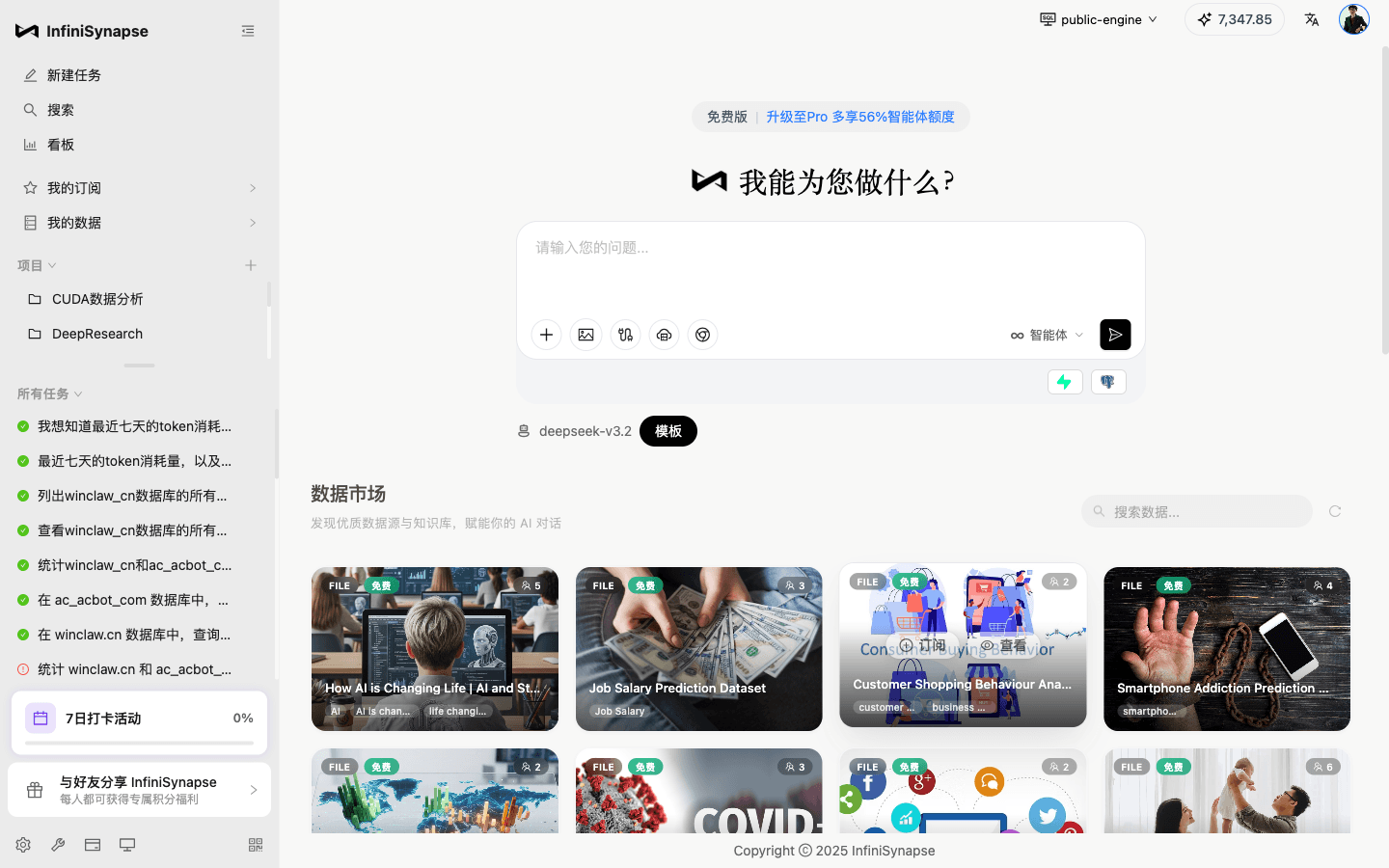
On the left is a task list ("I want to know the token consumption of the last seven days...", "List all tables in winclaw_cn database...", "Compare winclaw_cn and ac_acbot..."). In the middle is a clean question box. Below that is a "Data Marketplace" card. The whole UI orbits around "Ask → Task → Deliver" — not "drag a widget → drop a dimension → configure a chart."
This matters because it tells you what the product is trying to be — it's building an analyst, not a tool for analysts.
The model defaults to deepseek-v3.2, tagged as a "Template". Below the question box are plugin, attachment, image, and flow-editor entry points. Top-right corner shows a 7,347.85 balance.
It's a clean, focused, nothing-hidden entry point.
I Asked a Real Question — How Does the Agent Think?
I asked something slightly non-trivial:
"I want to know the token consumption of the last seven days, plus the number of active devices per day. Then plot them together on a chart."
This question was chosen deliberately — it requires:
- Figuring out which table holds token consumption data
- Figuring out which table holds active device data (different semantics, needs deduplication)
- Aggregating by day
- Merging the two measures onto one chart
I hit send. And watched the Agent's reasoning unfold:
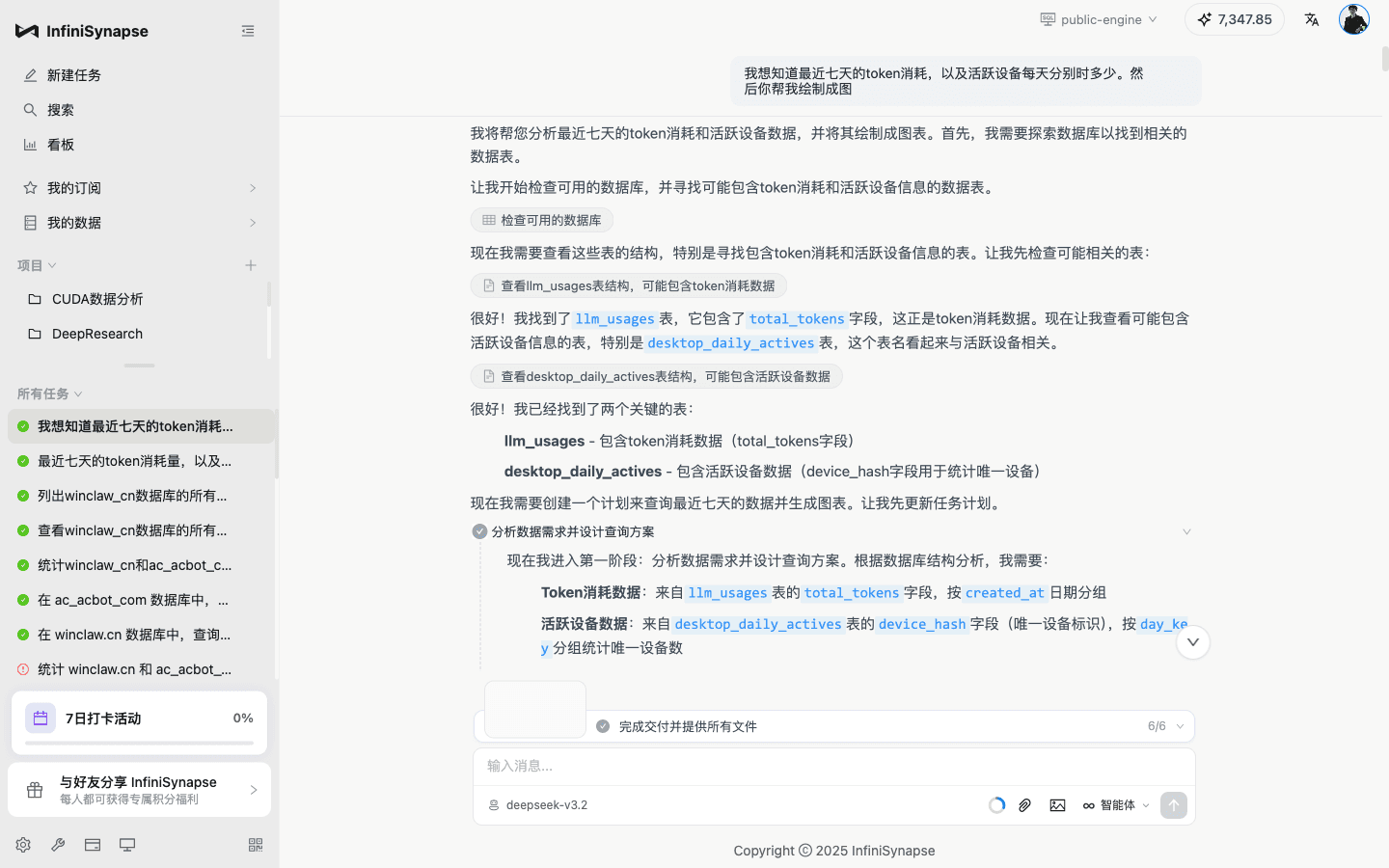
I want to pull this section out specifically, because it's completely different from most "ChatBI" products I've used:
"I'll help you analyze the last seven days of token consumption and active device data and chart them. First, I need to explore the database to find the relevant tables."
"Let me start by examining the available databases, looking for tables that might contain token consumption and active device information."
"Excellent! I found the
llm_usagestable, which contains thetotal_tokensfield — this is exactly the token consumption data.""Now let me check tables that might contain active device information, specifically
desktop_daily_actives— the table name suggests it's about active devices.""Great! I've found the two key tables... Now I need to update the task plan."
"Now I'm entering Phase 1: analyzing data requirements and designing the query plan..."
Note a few details:
- It plans first, then acts. Not fumbling forward one step at a time.
- It reads field names to infer semantics. "
total_tokensfield — this is token consumption data" — that's field-level business understanding. - It adjusts its plan mid-flight. "Now I need to update the task plan."
- It doesn't just spit SQL — it first clusters the question into two measures.
This is what the product docs call "proactive planning + small-step probing + self-correction." Plenty of products claim this capability, but only when you see the full reasoning chain do you realize it's not marketing speak.
What It Actually Delivered
When the task finished, the UI changed to "Task Complete" with a "View all files in this task" button, plus a few recommended follow-ups:
- Do you want to extract the SQL into an offline job?
- I think you might have missed something — want me to look again?
- Map it to a table and compute with SQL
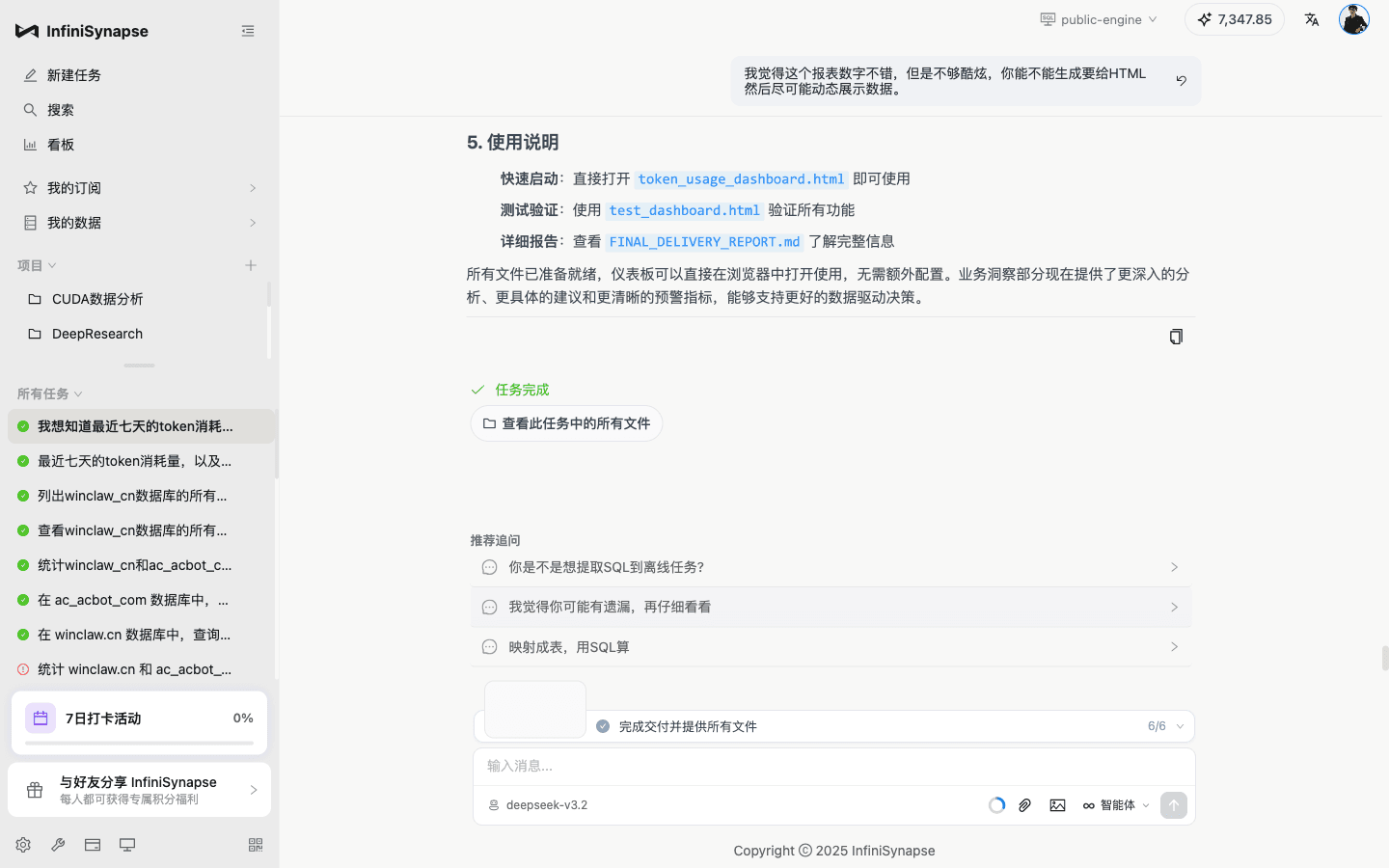
Those three follow-ups are worth more than the words "Task Complete" themselves. They're not generic "anything else?" prompts — they're context-aware professional suggestions based on this specific task:
- "Extract SQL into an offline job" — turn a one-off analysis into a scheduled job
- "I think you missed something" — proactively question its own result
- "Map it to a table and compute with SQL" — solidify a dynamic result into an intermediate table
This is what analysts say to each other — not what a ChatBI wrapper says.
I clicked "View all files in this task":
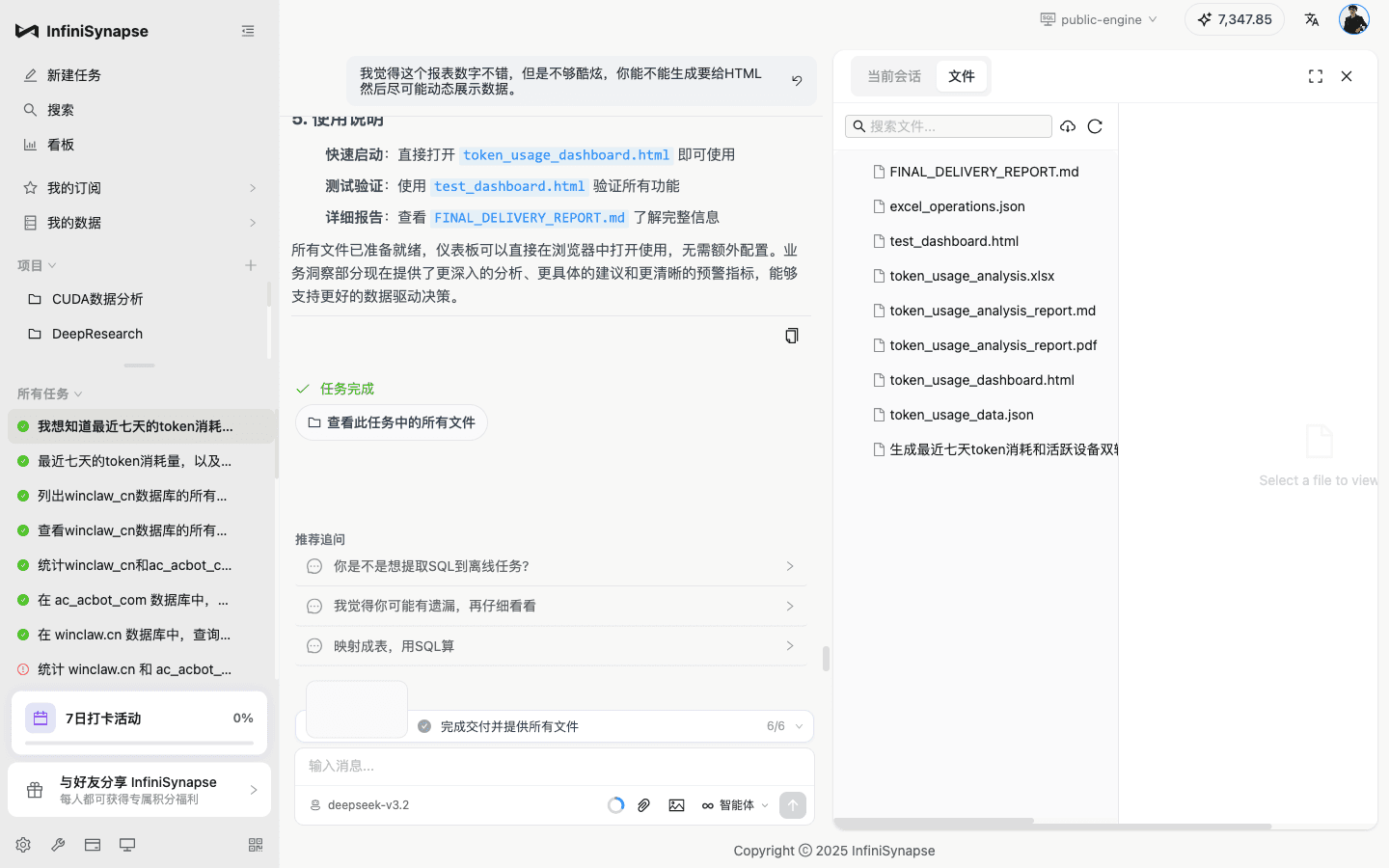
One natural-language question, and what actually landed was this entire bundle:
FINAL_DELIVERY_REPORT.md— final delivery reporttoken_usage_analysis_report.md— complete analysis reporttoken_usage_analysis_report.pdf— same report as PDF (can go straight to the boss)token_usage_analysis.xlsx— Excel data file (multiple sheets)token_usage_dashboard.html— an interactive live dashboardtest_dashboard.html— the dashboard's self-test pagetoken_usage_data.json— raw data (for secondary analysis)excel_operations.json— log of Excel generation operationsGenerate last-seven-days token consumption and active devices dual-axis...— intermediate artifacts
This is exactly that line from the docs I kept running into — "Spend a bit more token, and do the analysis completely, write the report completely." It doesn't just hand you an "answer" and walk away. It lays out the full shape of an analyst's deliverable: a PDF for the boss, an Excel for a colleague to edit, a JSON for secondary analysis, a SQL to be persisted into the system.
Most products stop at "answer." InfiniSynapse stops at "deliverable." The gap between these two isn't about engineering effort — it's about product philosophy.
For concreteness, here's a closer look at the deliverables list:
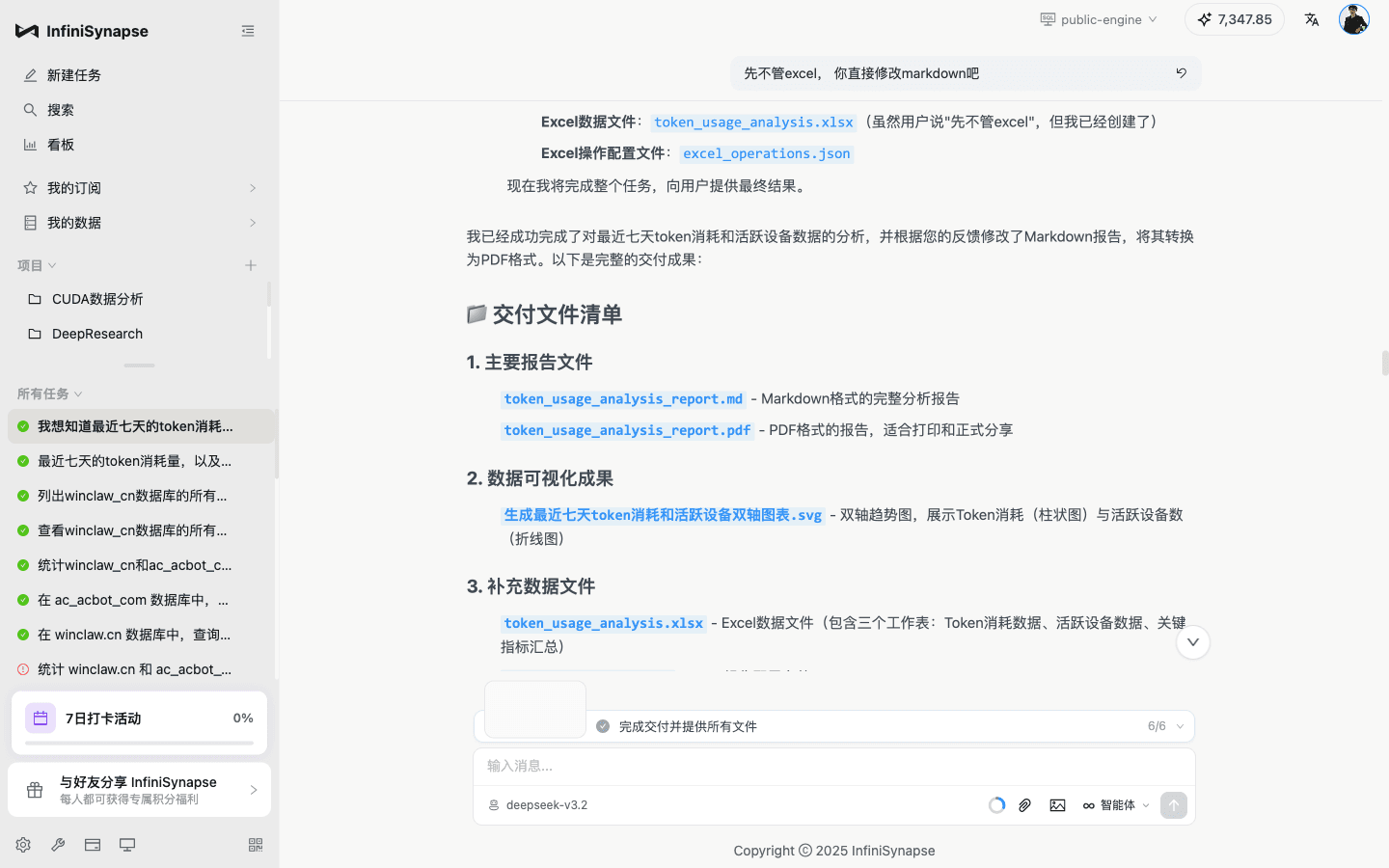
At the end, it even writes itself a "Deliverables Manifest," classified into "Main Report Files / Data Visualizations / Supplementary Data Files." This is what a real analyst puts on the last slide of a PPT deck.
The Live Dashboard — Not a PNG, But a Re-runnable App
I opened token_usage_dashboard.html:
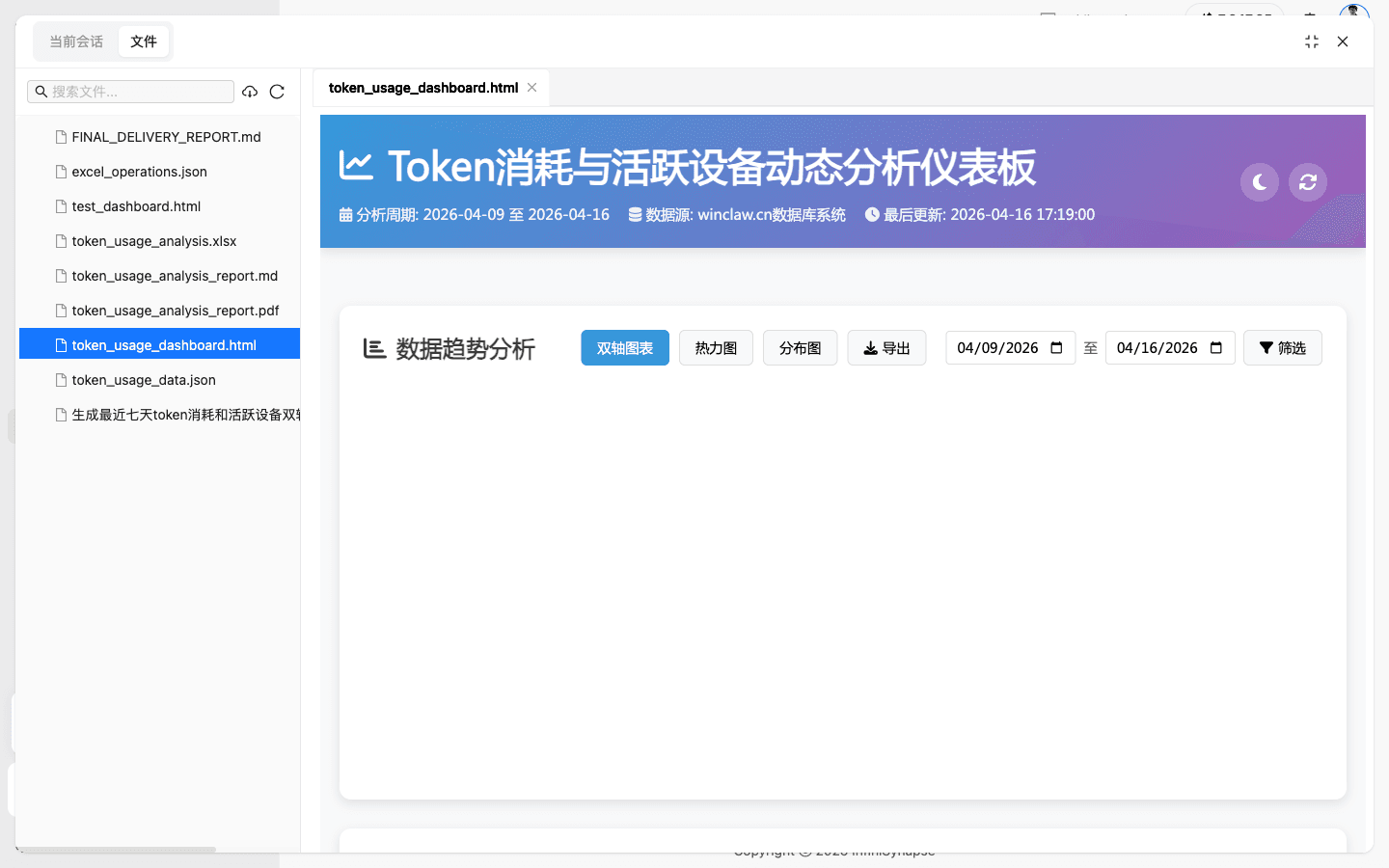
Note the controls at the top:
- "Dual-Axis / Heatmap / Distribution" — three view modes
- Two date pickers on the sides (
04/09/2026to04/16/2026) - "Export" button
- "Filter" button
- Header shows "Data Source: winclaw.cn Database System · Last Updated: 2026-04-16 17:19:00"
And more importantly — this is a standalone HTML file. I can download it to my laptop, send it to a colleague, and they can double-click it to keep filtering, keep switching views, keep exploring.
This isn't a screenshot. It isn't a static PDF. It's a "small, distributable, interactive analysis application."
InfiniSynapse calls it "live data visualization" — the docs say "visualizations are alive and can be re-run." Before seeing this screen, I thought it was marketing talk. After seeing it, I think the description is actually conservative — it's not just "re-runnable"; it's literally a distributable mini-app.
If I were leading a BI team, this alone would make me tell the team to try it: no more deploying a BI platform and managing logins, no more explaining "how do you use this chart." One HTML file handles it all.
The Kanban — Where Analysis Accumulates
The Kanban is where every chart you've made lives:
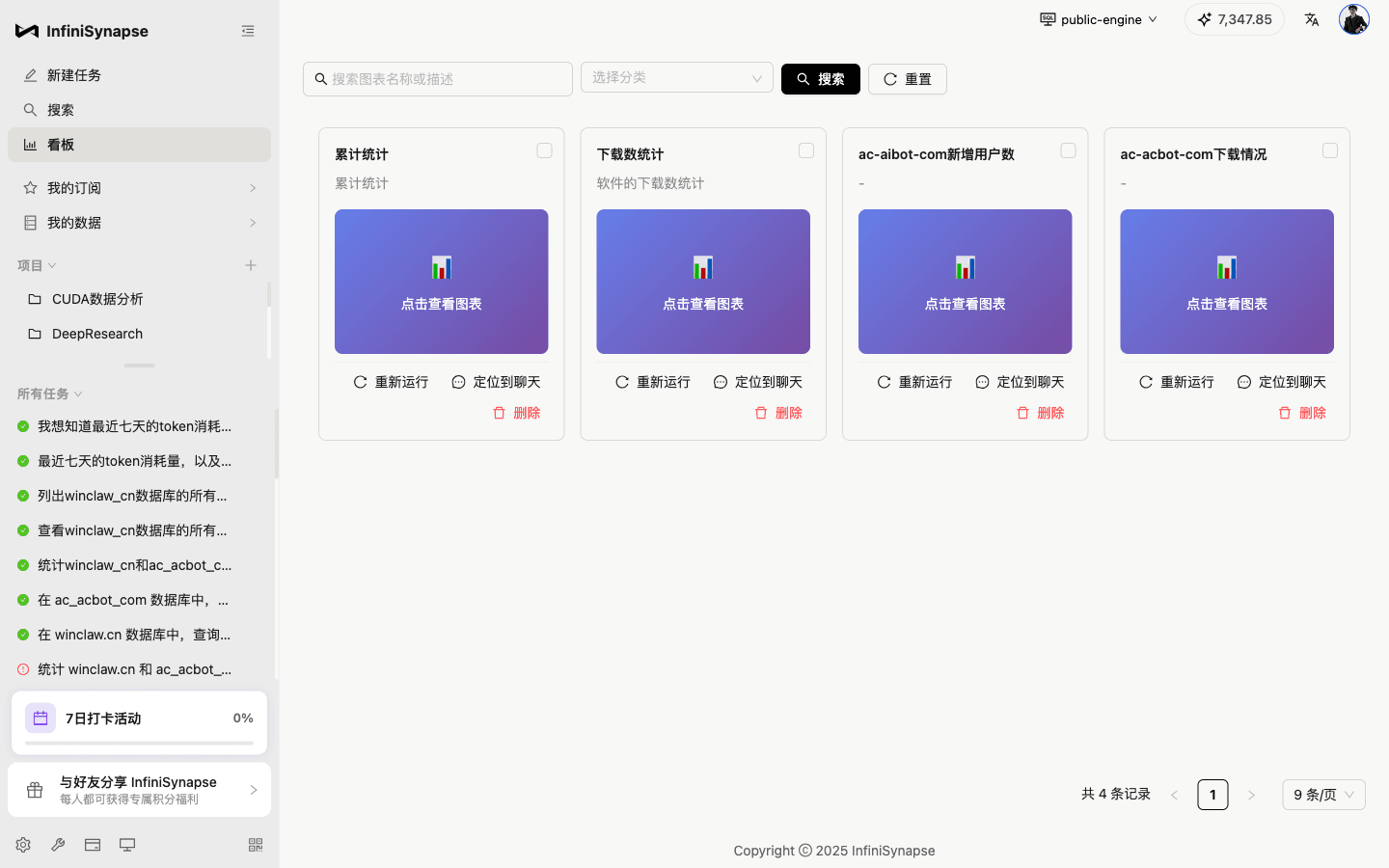
Each card has two actions:
- Re-run — run it again with the latest data
- Jump to chat — go back to the conversation context where this chart was produced
This is a very "done-analysis-before" design. Because analysts have two high-frequency real-world scenarios:
- "That chart from last week — run it again with today's data" → Re-run
- "How exactly was this computed? I need to double-check the semantics" → Jump to chat
Putting these two actions on the card face shows the product team understands the analyst's workflow. This is the kind of detail you don't come up with by reading slides — it comes from someone who's actually done this every day.
Data Sources — Heterogeneous, Chinese-Native, Many Types
Next I looked at "My Data → Data Sources":
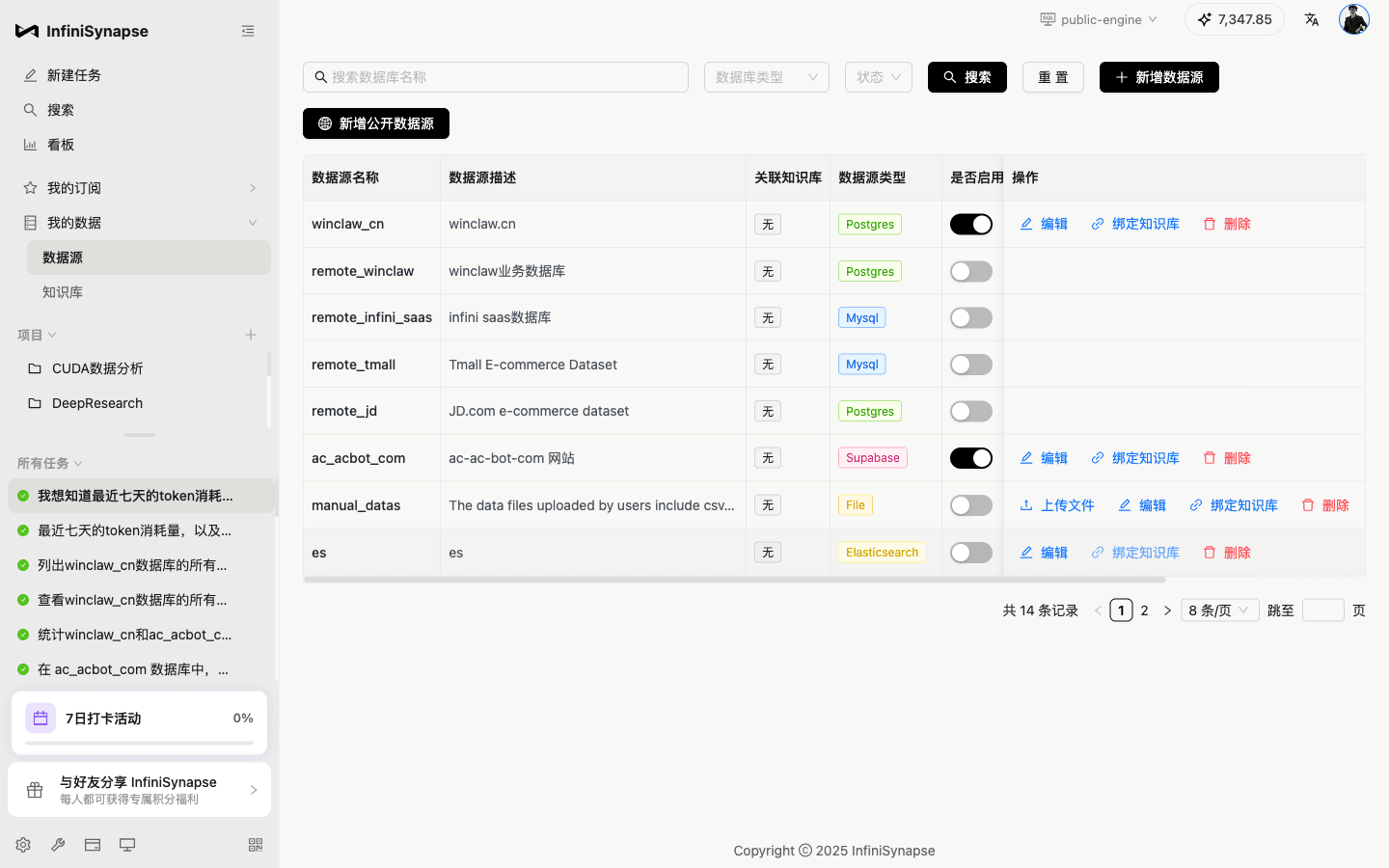
Among the 14 sources I saw:
winclaw_cn(Postgres),remote_winclaw(Postgres)remote_infini_saas(MySQL),remote_tmall(MySQL)remote_jd(Postgres)ac_acbot_com(Supabase)manual_datas(local files)es(Elasticsearch)
Each has three actions: "Edit / Bind Knowledge Base / Delete." "Bind Knowledge Base" is a rare feature — it means "I can make the Agent follow our company's own docs for this table's business meaning, field definitions, and measurement semantics."
I clicked "Add Data Source" to see the supported types:
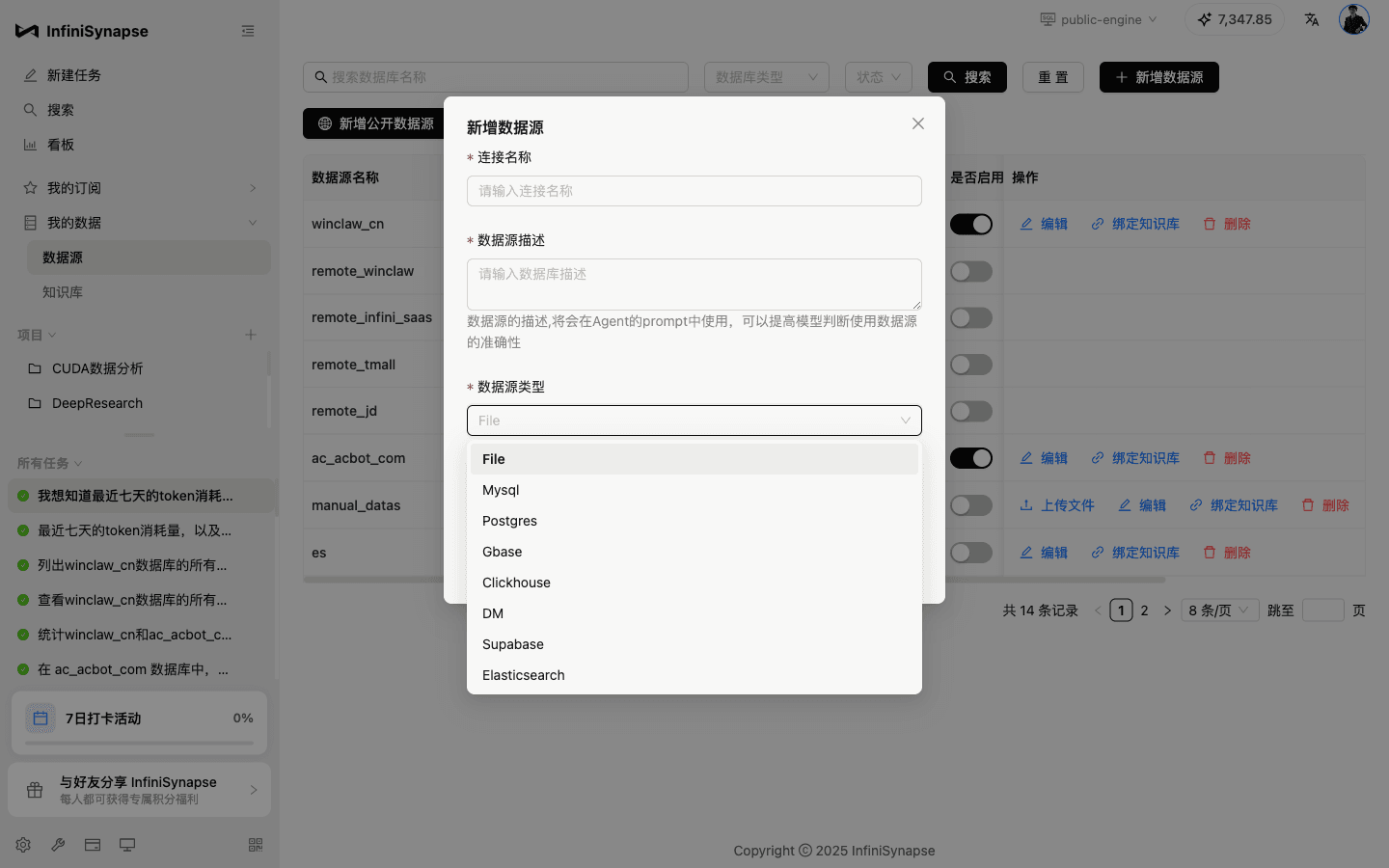
Full list:
File, MySQL, Postgres, Gbase, Clickhouse, DM (Dameng), Supabase, Elasticsearch, MongoDB, Snowflake
Two details I have to call out:
- Gbase and DM are first-class. China-domestic databases are treated as full first-class citizens. Anyone doing enterprise sales in China knows why this matters — state-owned enterprises, finance, government systems all run on these. Many overseas-pedigree Data Agents will never enter this market, precisely because of this.
- Full coverage from structured to semi-structured — relational (MySQL/Postgres/Gbase/DM/Snowflake), columnar (Clickhouse), document (MongoDB), search engine (Elasticsearch), files (CSV/Excel). An Agent needs to know how to query all these types AND do joined analysis across them. That's not "just integrate an SDK."
Knowledge Base — Not Just RAG, But "Organizational Memory"
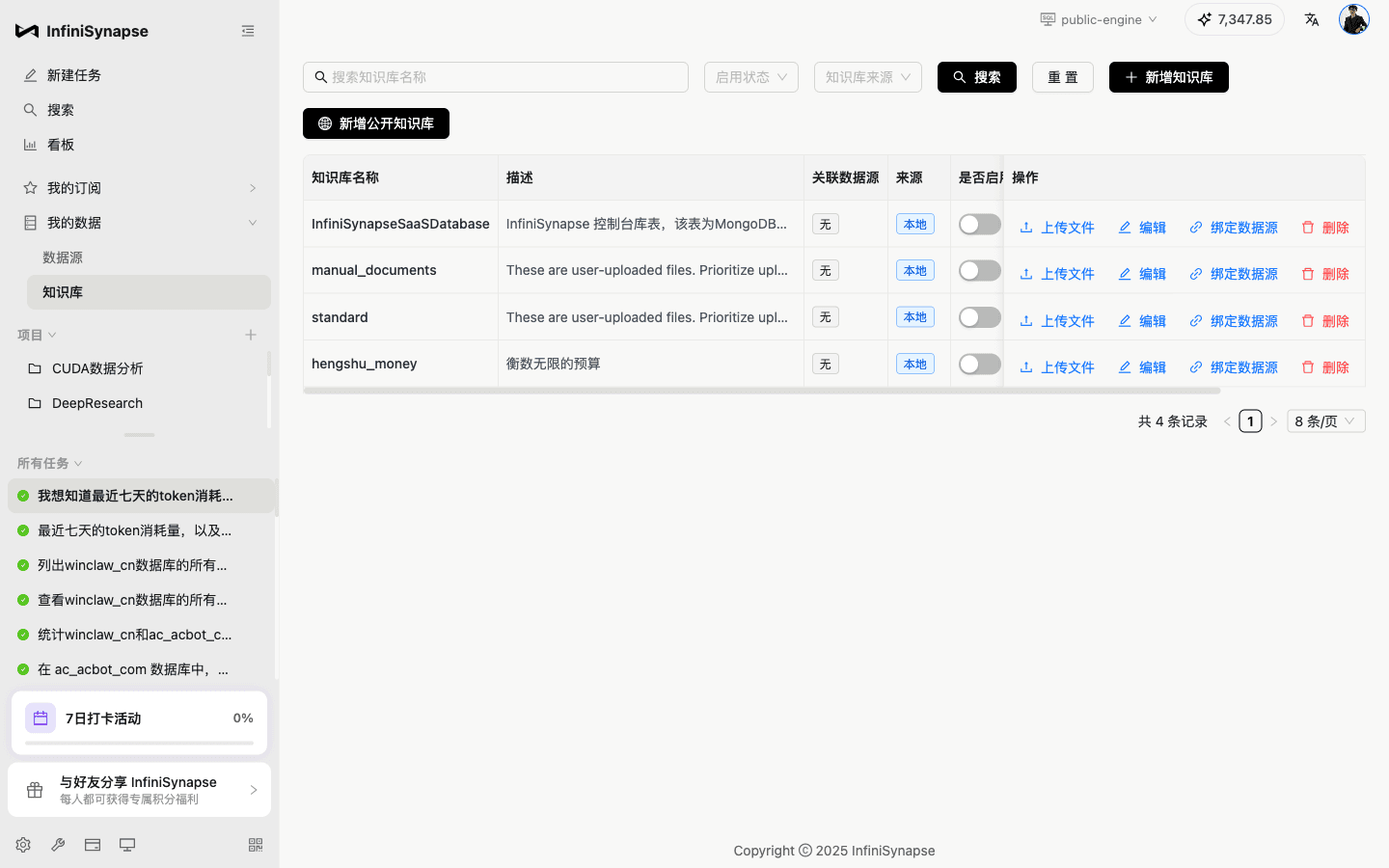
The KB list shows four: "InfiniSynapseSaaSDatabase" (console schema docs, linked to MongoDB), "manual_documents" (user-uploaded docs), "standard" (standard docs), "hengshu_money" (HengshuInfinite's budget docs).
Pay attention to this one — "InfiniSynapseSaaSDatabase console schema, table actually MongoDB" — this treats the database's own schema metadata as knowledge base content. This is what the docs call "InfiniRAG — fusing business documents, table metadata, user preferences, and historical analysis all together."
I was skeptical of the phrase "4th generation LLM-Native knowledge base" when I read the docs. After seeing this UI, I get it — it's not "slice PDFs into vectors for retrieval." It's treating "our company's data assets + business knowledge + historical analysis memory" as one unified context fed into the Agent.
Each KB entry can also "Bind to a Data Source" — meaning when the Agent queries that table, it automatically pulls the relevant business context. This design reminds me of a phrase: "Data doesn't speak for itself; it needs business context to translate it." That's what InfiniRAG does.
Models and Engines — Transparent Pricing, Agent/Plan Modes
I clicked the "Agent" tab next to the send button to look at the model config:
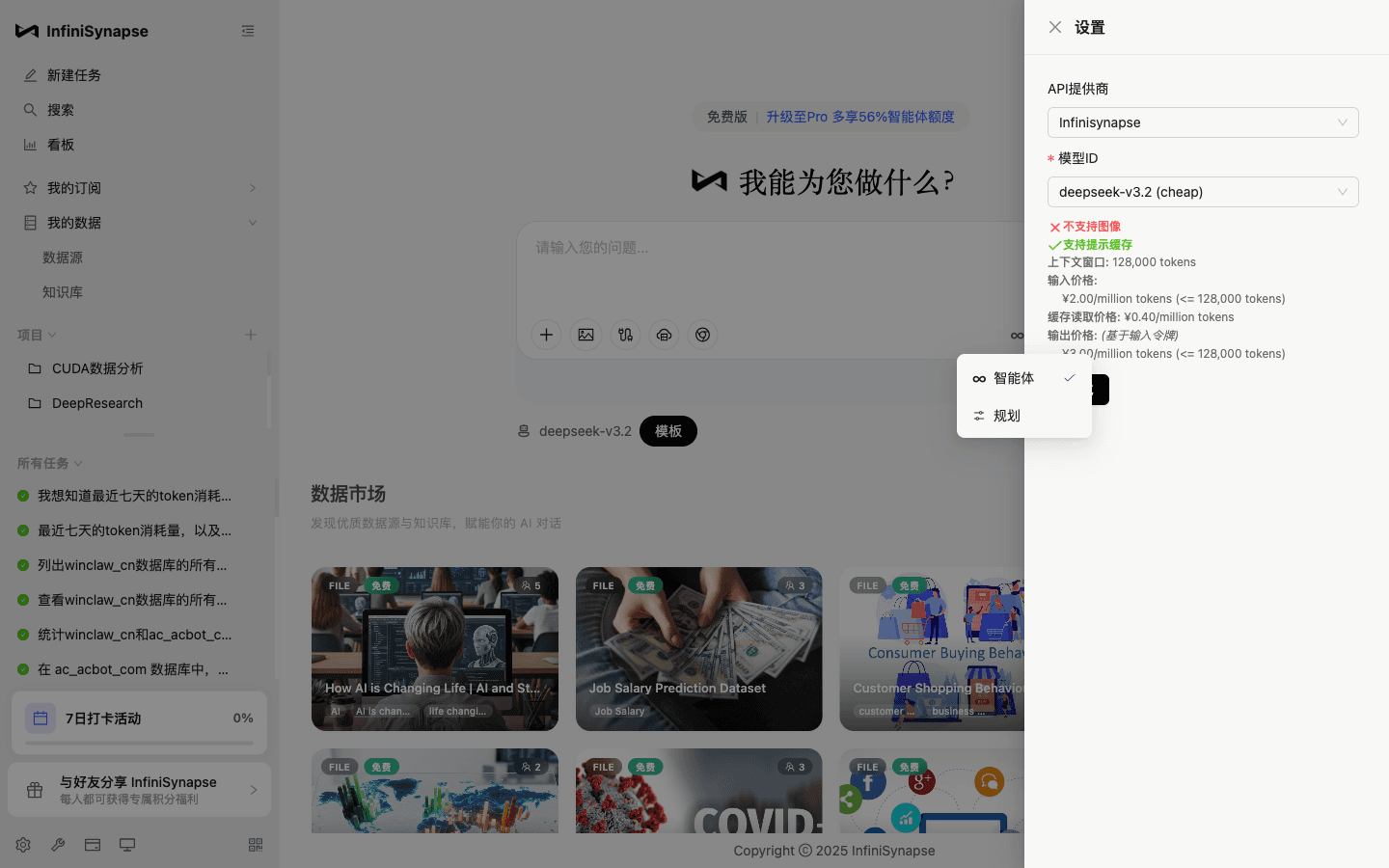
A few things surprised me:
- Pricing is spelled out right there: "Input price ¥2.00 / million tokens (≤ 128K), cache read price ¥0.40 / million tokens, output price..." Publishing unit price, cache price, and context length directly in the product is a sign of both confidence and honesty.
- Prompt cache support — for workflows that probe the same data source repeatedly, this pushes cost way down.
- It runs on DeepSeek V3.2 under the hood — a domestic, cheap model. This is crucial. InfiniSynapse's whole philosophy is "do the analysis completely, so more tokens get burned," which means you have to pick the lowest-cost-per-token model. Something priced like Claude / GPT at $15/M tokens can't sustain the "complete delivery" playstyle. This choice isn't just cost-saving — it's reverse-derived from product philosophy.
- Two modes at the bottom right — "Agent" / "Plan" — Agent mode is "I do it for you," Plan mode is "I help you think through how to do it." This reminds me of OpenAI's deep research vs regular chat relationship, but InfiniSynapse embeds both into the same send box with zero-cost switching.
The API provider can also be swapped — the dropdown includes InfiniSynapse / Anthropic / OpenAI and others. That means users and enterprises can plug in their own keys, and the enterprise version going through private-hosted models is a natural extension.
Mobile — A Detail, But It Shows Care
I switched the viewport to 414×896 (iPhone Plus size):
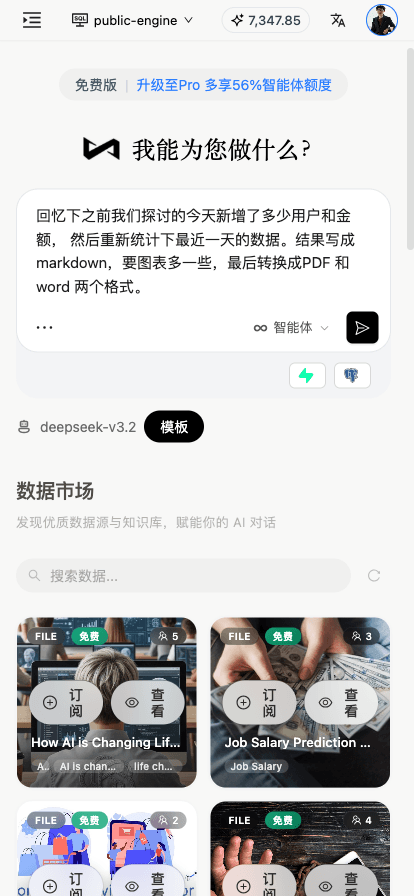
Sidebar collapses into a hamburger. Buttons below the question box reflow. Data marketplace cards go from 4 columns to 2. No horizontal scroll.
This detail seems trivial, but it proves the frontend team actually did responsive design properly. Many SaaS products today collapse outside of desktop 1440. InfiniSynapse clearly counted "analyst glancing at a report on the subway" as a real use case.
My Summary: They're Doing Something Nobody Else Got Right
After using it end-to-end, one thing became clear:
InfiniSynapse isn't building an "AI-enhanced BI" or a "natural-language SQL generator." It's building the "AI Data Analyst" itself.
What's the difference?
| Dimension | "AI-Enhanced BI" / "NL-SQL" | InfiniSynapse |
|---|---|---|
| Goal | Accelerate traditional BI flow | Deliver analysis results directly |
| Output | A chart, a SQL, an answer | Full bundle: md/pdf/excel/html/json |
| Data prep | Build a warehouse / do data governance first | Connect directly to source DB and go |
| Cross-source | Usually can't | Native cross-source per docs (10 sources) |
| Business knowledge | Embedded in BI dimensional modeling | Embedded in InfiniRAG knowledge base |
| Reports | Static screenshots / embedded in BI platform | Downloadable, distributable, re-runnable HTML |
| Persistence | Dashboards / Kanban | Kanban + recommended follow-ups + chat history |
| Chinese DBs | Usually barely supported | Gbase / DM as first-class citizens |
This isn't a faster path. It's a different path.
What Would I Be Concerned About? Let's Be Honest
If I only praise and never criticize, readers will smell a paid post. So here are the real questions I was left with:
First, it still depends on prompt-engineering skill. My question was clearly phrased, so the Agent ran smoothly. If someone who knows nothing about analysis asked "how's our product doing lately," results would definitely suffer. The "Template (smart forms)" feature is designed to solve this — let analysts distill good questions into templates that business users fill in. Direction is right, but template richness and coverage take time to build.
Second, it's slow. One task is not fast. My token-usage question took over 2 minutes. The reason: it has to do the complete delivery (md + pdf + excel + html + json). In serious analysis, this timing is fine. But users coming in expecting "ask a question, instant answer" will feel it's slow. This is a negotiation between product philosophy and user expectation.
Third, enterprise rollout needs a "last mile" on data connectivity. Direct-connect is great for small companies; large enterprises have network isolation, jump hosts, data masking, audit trails. InfiniSynapse needs to solve all of this thoroughly in the private-deployment version to land big customers. From the current maturity of data-source management I see, the work is underway, but needs more time.
Who Should Try It?
After using it, I have a mental list:
- Data leads at small companies / startups — you don't have a data warehouse team, but you do have MySQL, Postgres, MongoDB scattered around. InfiniSynapse connects directly and goes — it's a dimensional downgrade attack.
- Data analysts — you're not being replaced by AI, you're being armed to the teeth by AI. Turn your common semantics into templates so business teams stop pestering you; persist your analysis process into the KB so new hires ramp fast.
- Business leads / ops / PMs — you no longer need to wait in the data team's queue. You ask, it delivers: full report + Excel + PDF.
- State-owned / finance / government data teams — Gbase and DM as first-class citizens, plus private deployment. This combination is rare in China's "compliance-ready AI data analysis" product landscape.
- Heavy Cursor / Claude Code users — you're already using a Code Agent, but every time you ask it to "analyze data" something feels off. InfiniSynapse ships Command Tools — download a binary, drop it into PATH, and your Code Agent can call InfiniSynapse's full analysis capabilities. Let the specialist handle data; let Cursor keep handling code.
How to Try It Fast
SaaS: just open app.infinisynapse.cn, log in, free tier on signup.
Desktop (Windows / macOS): go to infinisynapse.cn, download the client, install locally, connect local data, run analysis locally.
Command Tools (for Code Agents): go to infinisynapse.cn/tools, download the platform binary, put it in PATH. Cursor / Claude Code / WinClaw and other Code Agents can call it directly — no pip install, no Node, no long-running MCP service.
Private deployment: contact sales at zhuhl@infinisynapse.com.
Last Words
Over the past two years I've seen too many "AI data analysis" products stop at the demo stage — looking pretty, crashing after a couple of real steps.
InfiniSynapse is not an "AI that writes two lines of SQL for you" product. It's a team seriously trying to make AI actually act as a data analyst. "Spend a bit more token, do the analysis completely, write the report completely" — that one line of philosophy is backed by three real pieces: InfiniSQL, InfiniRAG, and the Agent framework. Wrapper products can't do this.
I hope China's Data Agent landscape gets more teams like InfiniSynapse — willing to put "complete, professional, serious" above "demo-worthy." Pushing AI data analysis from "bubbly toy" to "a real colleague who can deliver."
Let data drive decisions, let decisions drive business, let business drive the world.