When people first hear about InfiniSQL, the first reaction is often:
"It looks like SQL, but it is not exactly standard SQL. If an AI model has never seen it before, can it really use it well?"
That is a fair question.
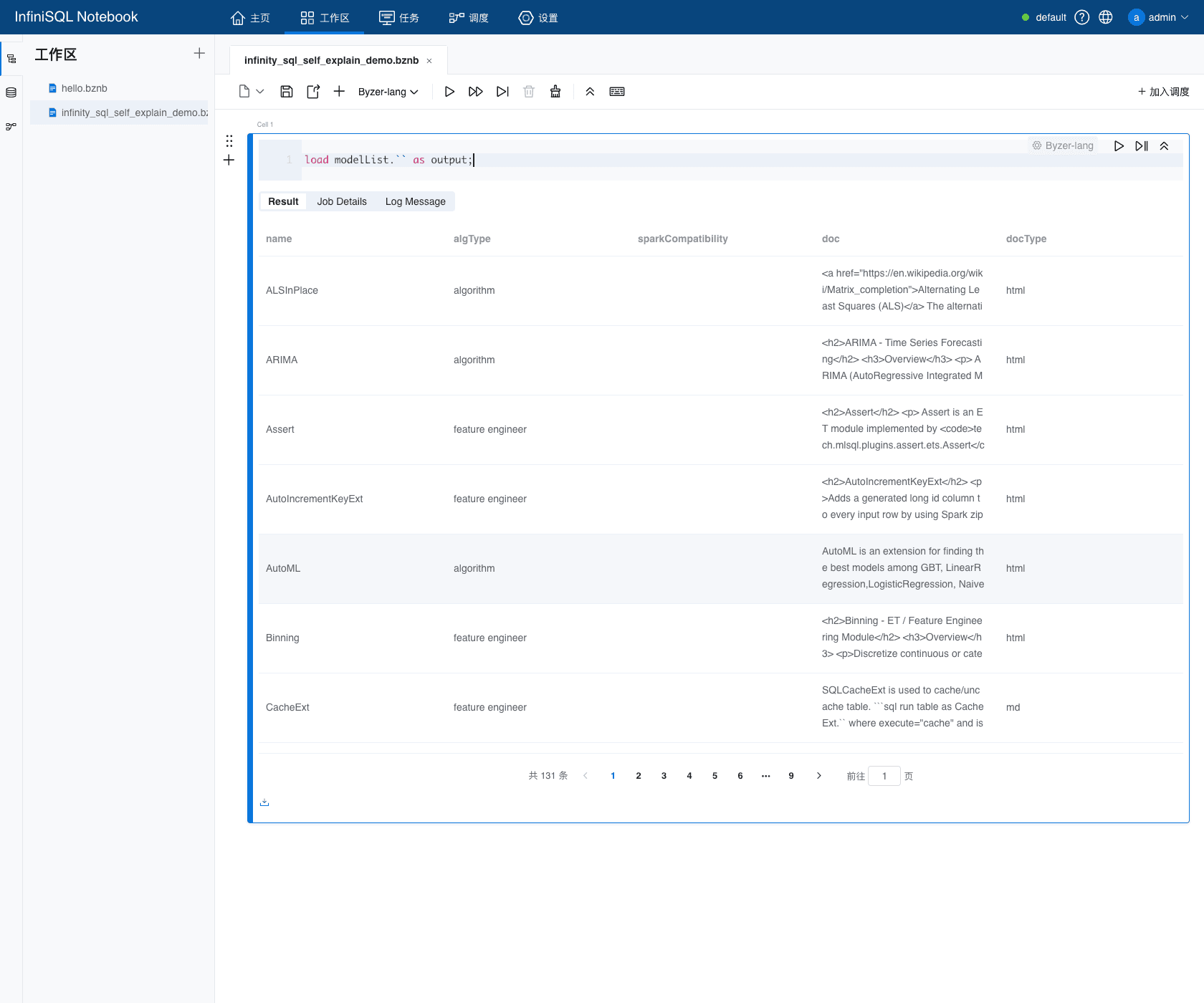
If we treat InfiniSQL as just another new SQL dialect, the concern is real: an Agent may not know the syntax, may not know which data sources are available, may not know which data-processing ETs or algorithms exist, may not know the parameter names, and may not know how to connect one step to the next in a complex analysis.
But the core design of InfiniSQL is not to make the Agent guess. It puts two ideas directly into the language and the runtime:
- Agentic friendliness: every step can be materialized as a named table, and later steps can directly reuse it. Exploration state does not disappear.
- Self-explanation: the language can explain to the Agent what data sources, data-processing ETs, algorithms, parameters, runnable examples, and model explanations are available in the current runtime.
This article explains how InfiniSQL makes an Agent not only able to use the language, but able to use it well.
Separate Two Ideas First
People often mix "Agent-friendly" and "self-explaining" together. They solve different problems.
Agentic friendliness solves the workflow problem. An Agent does not write one giant SQL statement and stop. It explores step by step: inspect data, clean it, aggregate it, train a model, evaluate it, and revise the plan. Each step depends on the previous one, so the system must naturally support multi-step calls, accumulated state, and dynamic decisions.
Self-explanation solves the learning problem. Even if the Agent can work step by step, it may not know which ET to use next, which parameter to set, which action exists, or what a valid example looks like. At that moment, the language itself must be queryable. The Agent should not rely on stale training memories; it should ask the current runtime.
So InfiniSQL is not Agent-friendly merely because "it looks like SQL."
Its real structure is:
- Use
as tableNameto turn every step into reusable state. - Use
!show,modelList,modelParams,modelExample, andmodelExplainto let the system teach the Agent how to continue.
Design 1: Agentic-Friendly Means Every Step Becomes a Table
The essence of the Agentic paradigm is multi-round tool calling. After each call returns a result, the Agent decides the next step.
InfiniSQL's load, select, train, run, and predict statements fit that rhythm. In particular, select ... as tableName makes every result enter the current session as a table that later statements can query.
This is not a small piece of syntax sugar. It is the foundation of an Agentic workflow.
Even sample text data can be brought into that table space directly. For example, put one JSON object per line into a string variable, then use load jsonStr.`variableName` as tableName. InfiniSQL maps the JSON fields into table columns:
set orders_json_demo='''
{"order_id":"o1","product":"milk","amount":12.5}
{"order_id":"o1","product":"bread","amount":6.0}
{"order_id":"o2","product":"eggs","amount":9.8}
{"order_id":"o2","product":"milk","amount":12.5}
''';

load jsonStr.`orders_json_demo` as orders_from_json_demo;

select order_id, product, amount
from orders_from_json_demo
order by order_id, product
as orders_preview;
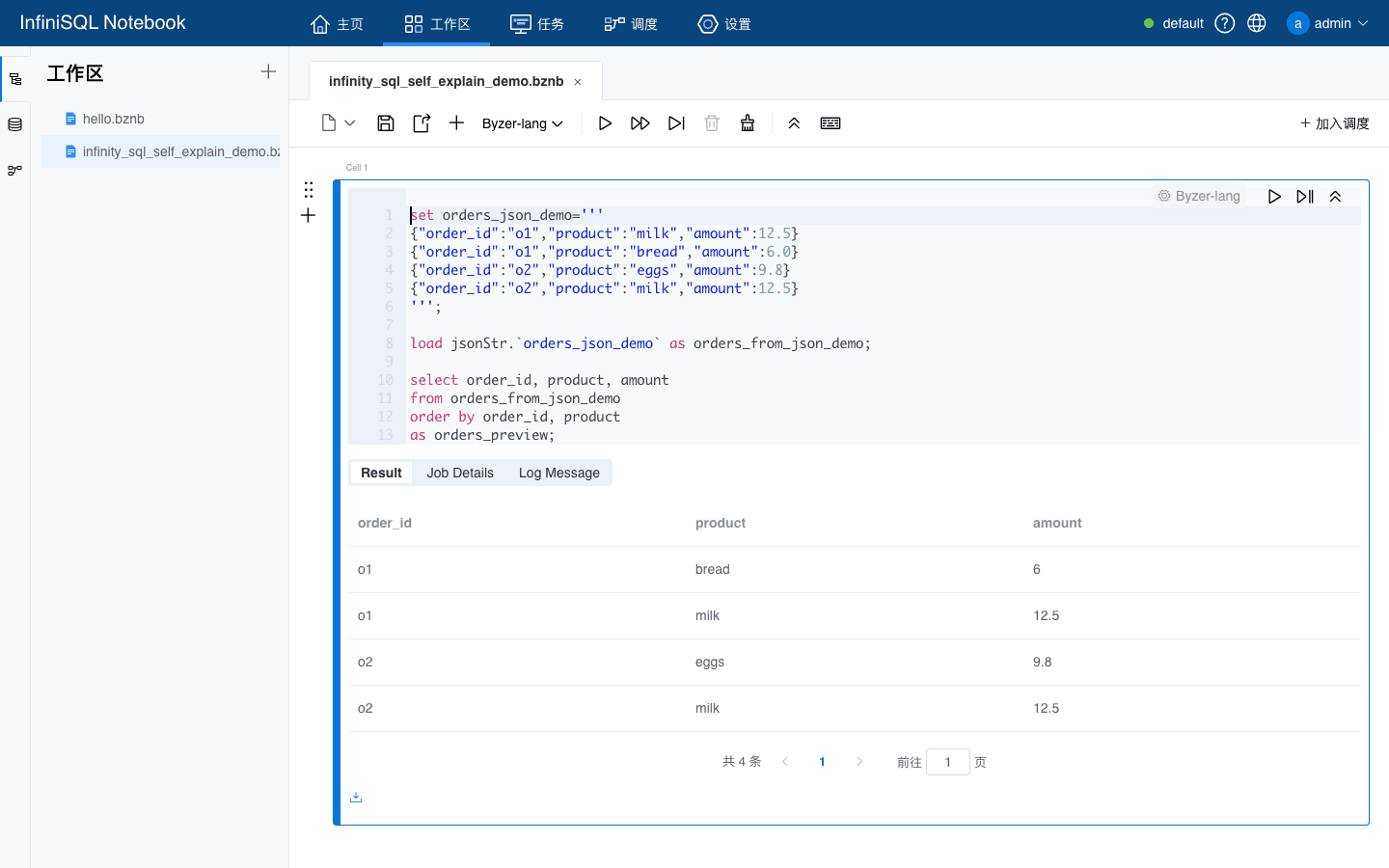
This is friendly to an Agent: it does not need to find a file first, write a Python parser, or guess the schema. If it can express a small sample as JSON lines, the runtime can turn that sample into a table that the next step can query.
Consider a simple market-basket association analysis. The Agent does not need to write the whole workflow at once, and it does not need to paste intermediate results back into the prompt. It can split the task into cells: is the data loaded, what does the cleaned table look like, how are item pairs generated, how often does each item appear, and which pairs have the highest lift?
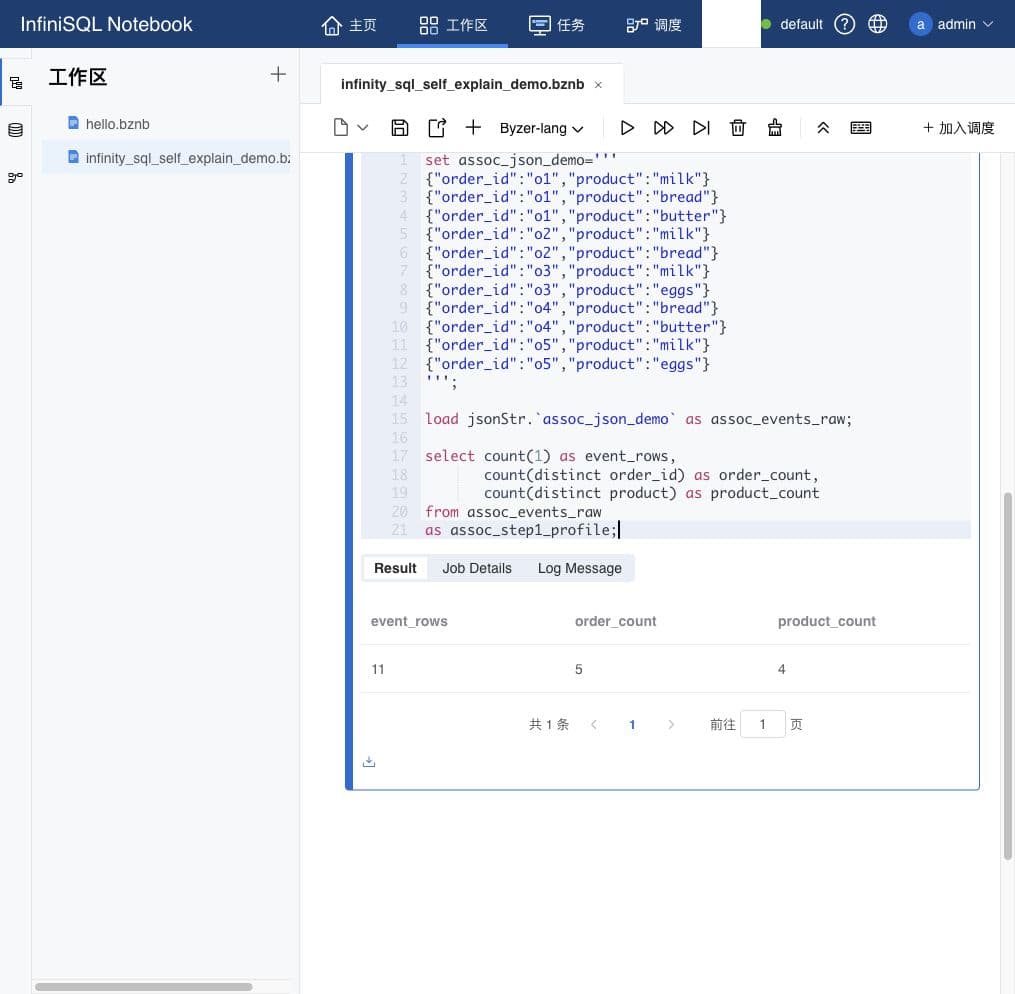
First, load JSON lines and create a profile. The output is not the final answer; it confirms that the runtime now has a table called assoc_events_raw:
set assoc_json_demo='''
{"order_id":"o1","product":"milk"}
{"order_id":"o1","product":"bread"}
{"order_id":"o1","product":"butter"}
{"order_id":"o2","product":"milk"}
{"order_id":"o2","product":"bread"}
{"order_id":"o3","product":"milk"}
{"order_id":"o3","product":"eggs"}
{"order_id":"o4","product":"bread"}
{"order_id":"o4","product":"butter"}
{"order_id":"o5","product":"milk"}
{"order_id":"o5","product":"eggs"}
''';

load jsonStr.`assoc_json_demo` as assoc_events_raw;

select count(1) as event_rows,
       count(distinct order_id) as order_count,
       count(distinct product) as product_count
from assoc_events_raw
as assoc_step1_profile;
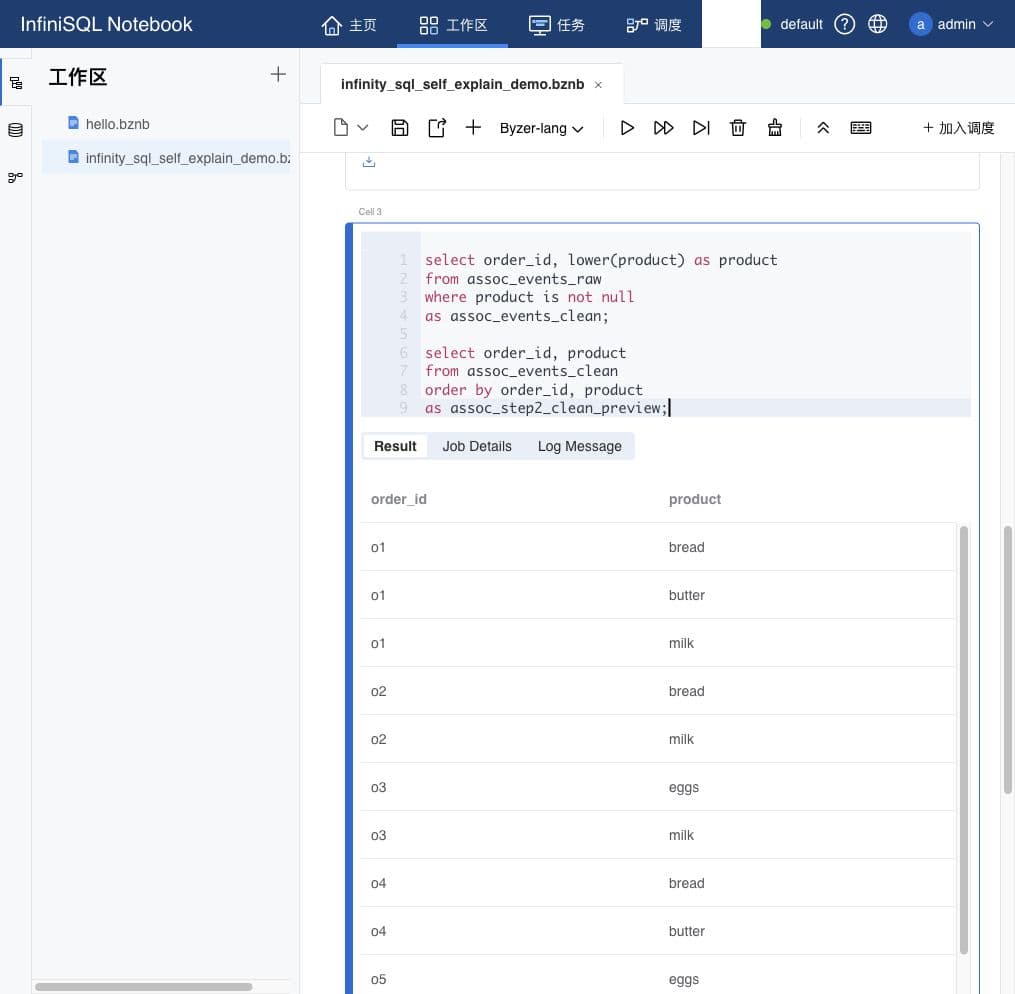
Second, clean the previous table and materialize it as assoc_events_clean. The Agent does not need to copy the profile result back into context; it only needs to remember the table name:
select order_id, lower(product) as product
from assoc_events_raw
where product is not null
as assoc_events_clean;

select order_id, product
from assoc_events_clean
order by order_id, product
as assoc_step2_clean_preview;
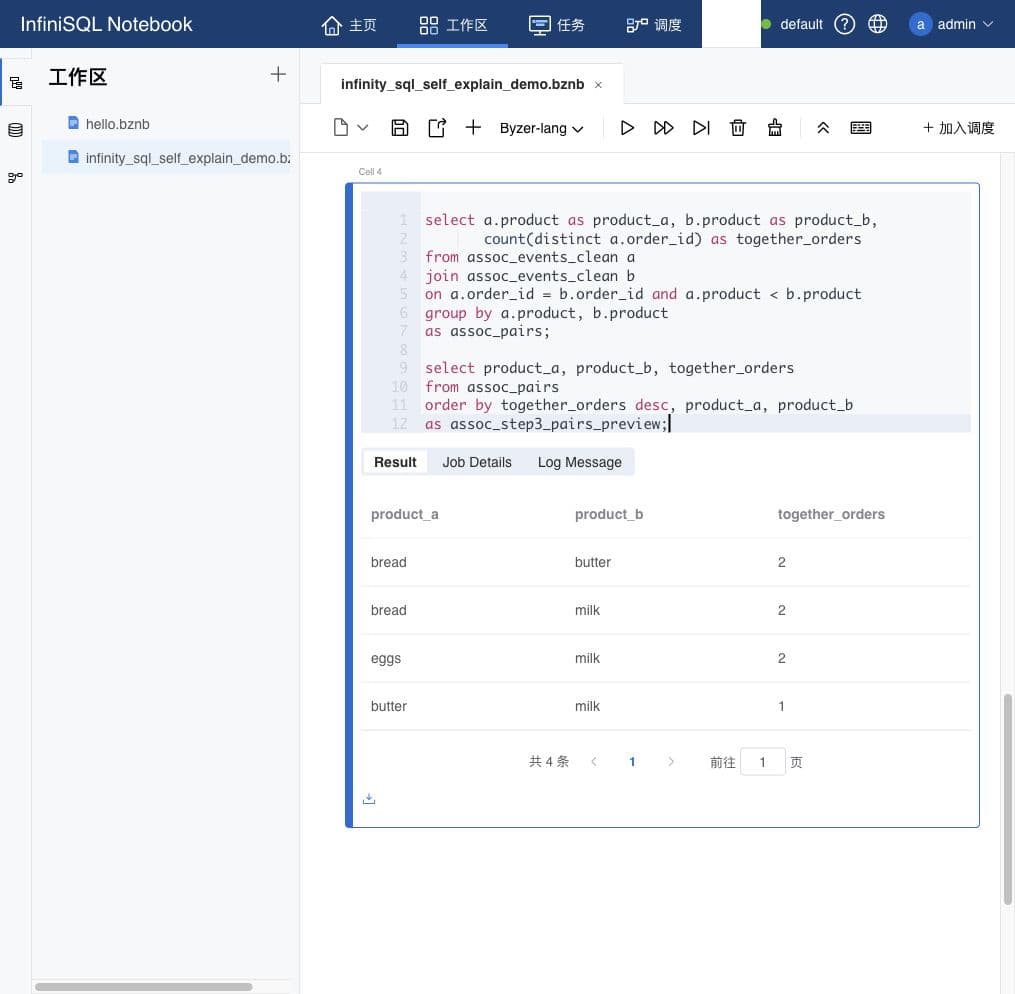
Third, self-join the cleaned table to generate item pairs within the same order. This cell outputs assoc_pairs:
select a.product as product_a, b.product as product_b,
       count(distinct a.order_id) as together_orders
from assoc_events_clean a
join assoc_events_clean b
on a.order_id = b.order_id and a.product < b.product
group by a.product, b.product
as assoc_pairs;

select product_a, product_b, together_orders
from assoc_pairs
order by together_orders desc, product_a, product_b
as assoc_step3_pairs_preview;
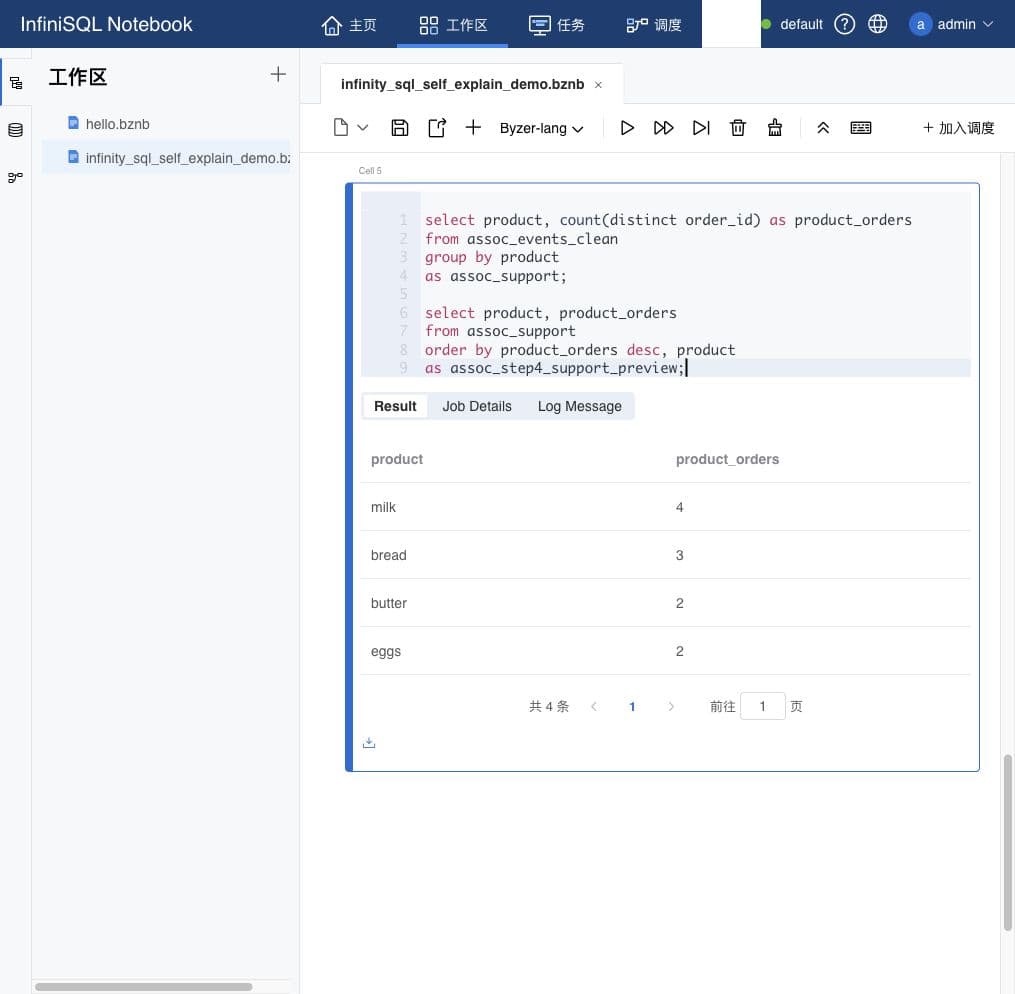
Fourth, continue from assoc_events_clean and calculate how many orders contain each item. The output is assoc_support:
select product, count(distinct order_id) as product_orders
from assoc_events_clean
group by product
as assoc_support;

select product, product_orders
from assoc_support
order by product_orders desc, product
as assoc_step4_support_preview;
Fifth, join assoc_pairs and assoc_support, calculate confidence and lift, and output association_top_rules:
select
  p.product_a,
  p.product_b,
  p.together_orders,
  round(cast(p.together_orders as double) / cast(sa.product_orders as double), 2) as confidence,
  round(cast(p.together_orders * total.total_orders as double) /
        cast(sa.product_orders * sb.product_orders as double), 2) as lift
from assoc_pairs p
join assoc_support sa on p.product_a = sa.product
join assoc_support sb on p.product_b = sb.product
cross join (select count(distinct order_id) as total_orders from assoc_events_clean) total
as assoc_rules;

select concat(product_a, ' -> ', product_b) as rule,
       confidence as conf,
       lift
from assoc_rules
order by lift desc, confidence desc
as association_top_rules;
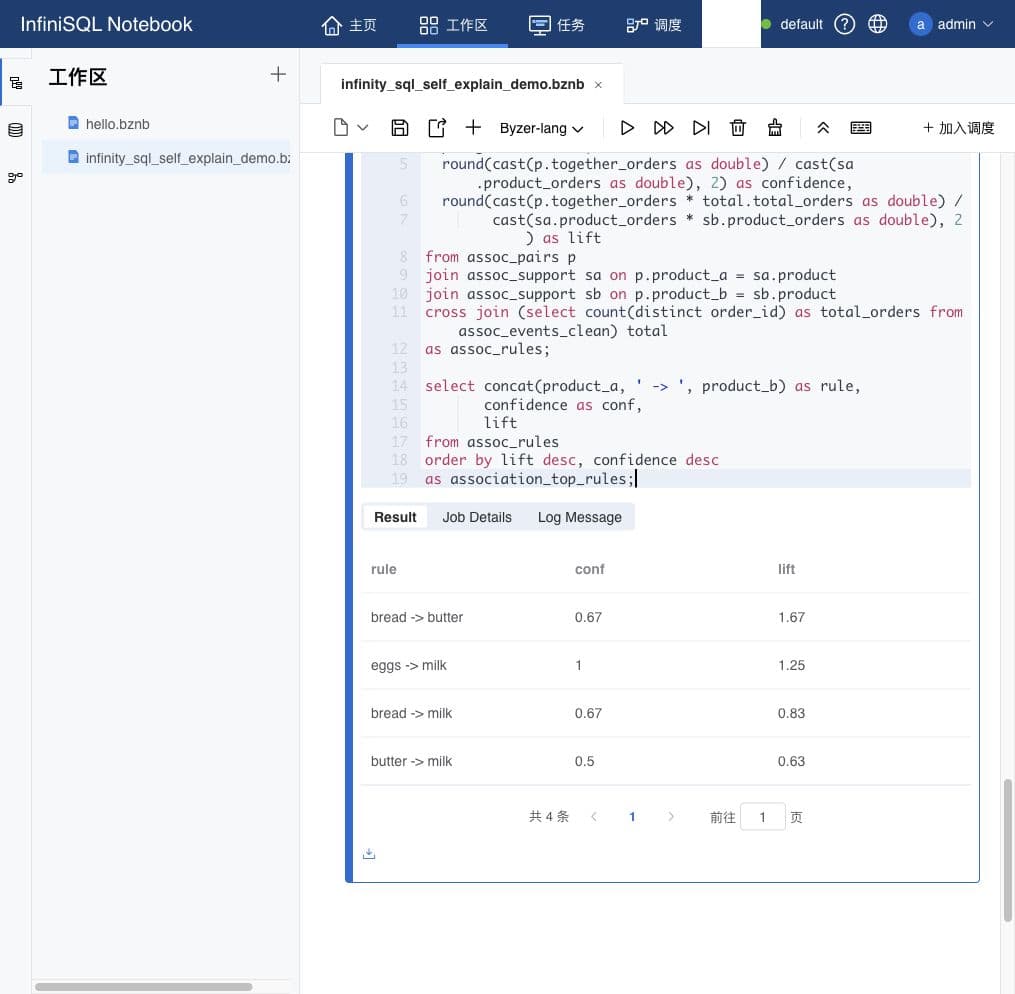
The important part is not that the SQL is short. The important part is that every step has a name: assoc_events_raw, assoc_events_clean, assoc_pairs, assoc_support, assoc_rules, and association_top_rules.
If the Agent wants to explain why bread -> butter has the highest lift, it can query association_top_rules. If it wants to inspect how pairs were generated, it can query assoc_pairs. If it wants to redefine support, it can append another SQL statement. The service-side session owns the state; the Agent only needs to remember table names.
That is the purpose of the first design: InfiniSQL gives the Agentic workflow somewhere stable to stand.
But this alone is not enough.
"Every step can continue" solves the state problem. The harder question is: how does the Agent know what to do next?
Design 2: Self-Explanation Lets AI Learn the Current System
The core of self-explanation is not "more documentation." It is that the system can be queried.
InfiniSQL provides two kinds of entry points.
The first kind is a friendly shortcut for humans:
!show commands;
!show datasources;
!show "datasources/params/csv";
!show et;
!show et/RandomForest;
!show et/params/RandomForest;
!show functions;
!show tables;
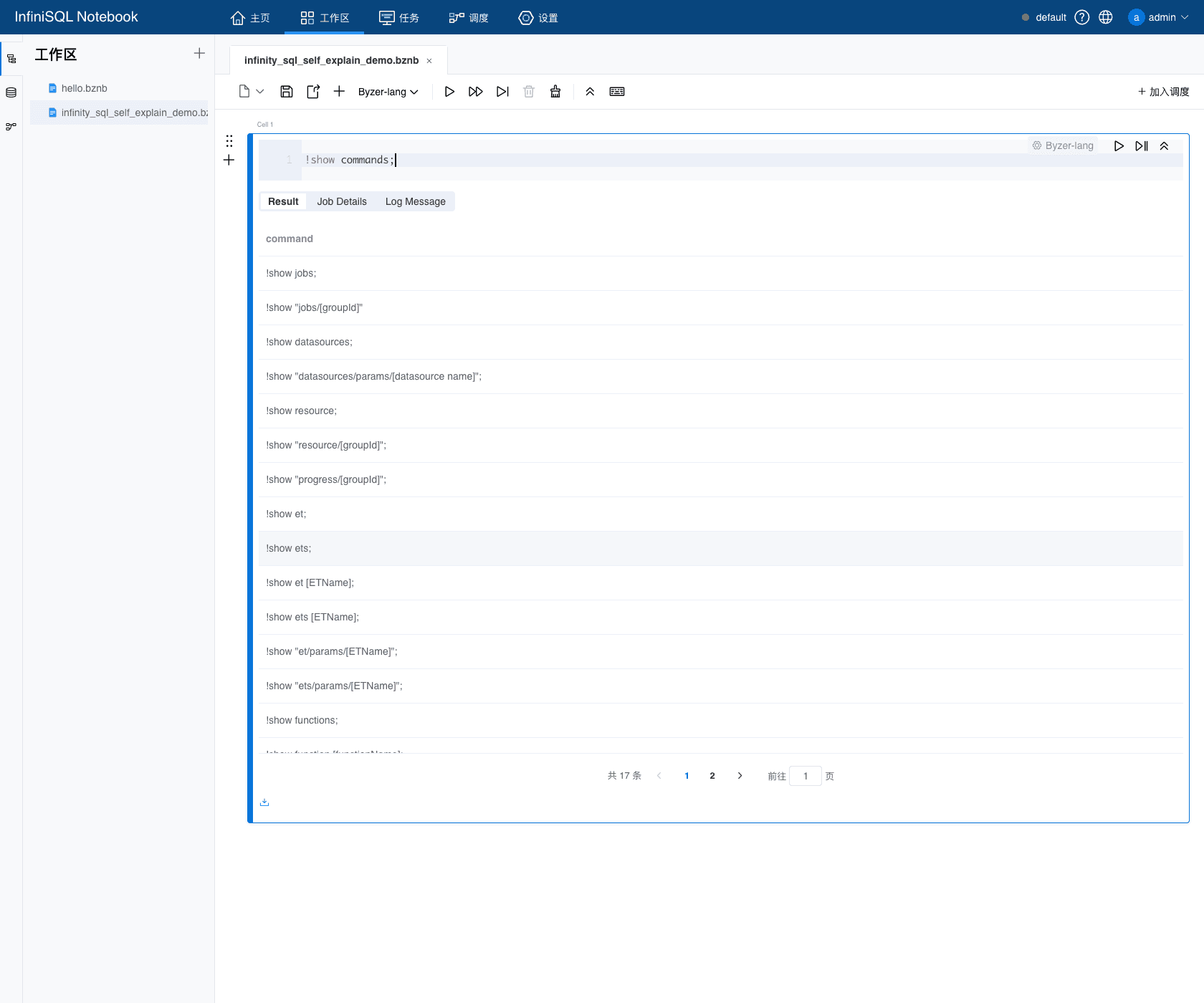
The second kind is a structured interface for systems and Agents:
load modelList.`` as models;
load modelParams.`RandomForest` as params;
load modelExample.`RandomForest` as example;
load modelExplain.`/models/rf_iris` where alg="RandomForest" as explain;
These statements return tables.
That detail matters. The Agent does not receive a loose paragraph of text. It receives structured rows that can be filtered, joined, counted, and queried again. For example, it can use modelList to discover ETs, modelParams to filter the key parameters, and modelExample to retrieve a complete SQL template. For data sources, it can ask !show datasources and !show "datasources/params/...", letting the current runtime explain which sources exist and how each source should be configured.
In the source code, this design is not a side document. ShowCommand.scala maps the shortcut commands into structured queries:
!show et             -> load modelList.`` as __output__;
!show et/Name        -> load modelExample.`Name` as __output__;
!show et/params/Name -> load modelParams.`Name` as __output__;
ModelExplain.scala implements modelList, modelParams, modelExample, and modelExplain. In other words, the human shortcuts and the programmatic queries eventually use the same runtime self-explanation capability.
Data sources follow the same idea. !show datasources enters the _mlsql_ system table and reads the data sources registered in the current runtime. !show "datasources/params/sourceName" asks the specific data source for its own explainParams. So data-source self-explanation also comes from the runtime, not from a static list in an article.
This is very different from stuffing documentation into a prompt.
Documentation can go stale, and it can be pushed out of context. Runtime self-explanation returns what is actually registered, actually available, and actually accepted by the current system.
Self-Explanation Is Not Only for Algorithms: Data Sources Explain Themselves Too
The first step of many data-analysis tasks is not modeling. It is "where does the data come from?"
If the Agent does not know which data sources InfiniSQL can read, it should not guess. It can ask the runtime:
!show datasources;
Or it can turn the data-source catalog into a table and keep querying it:
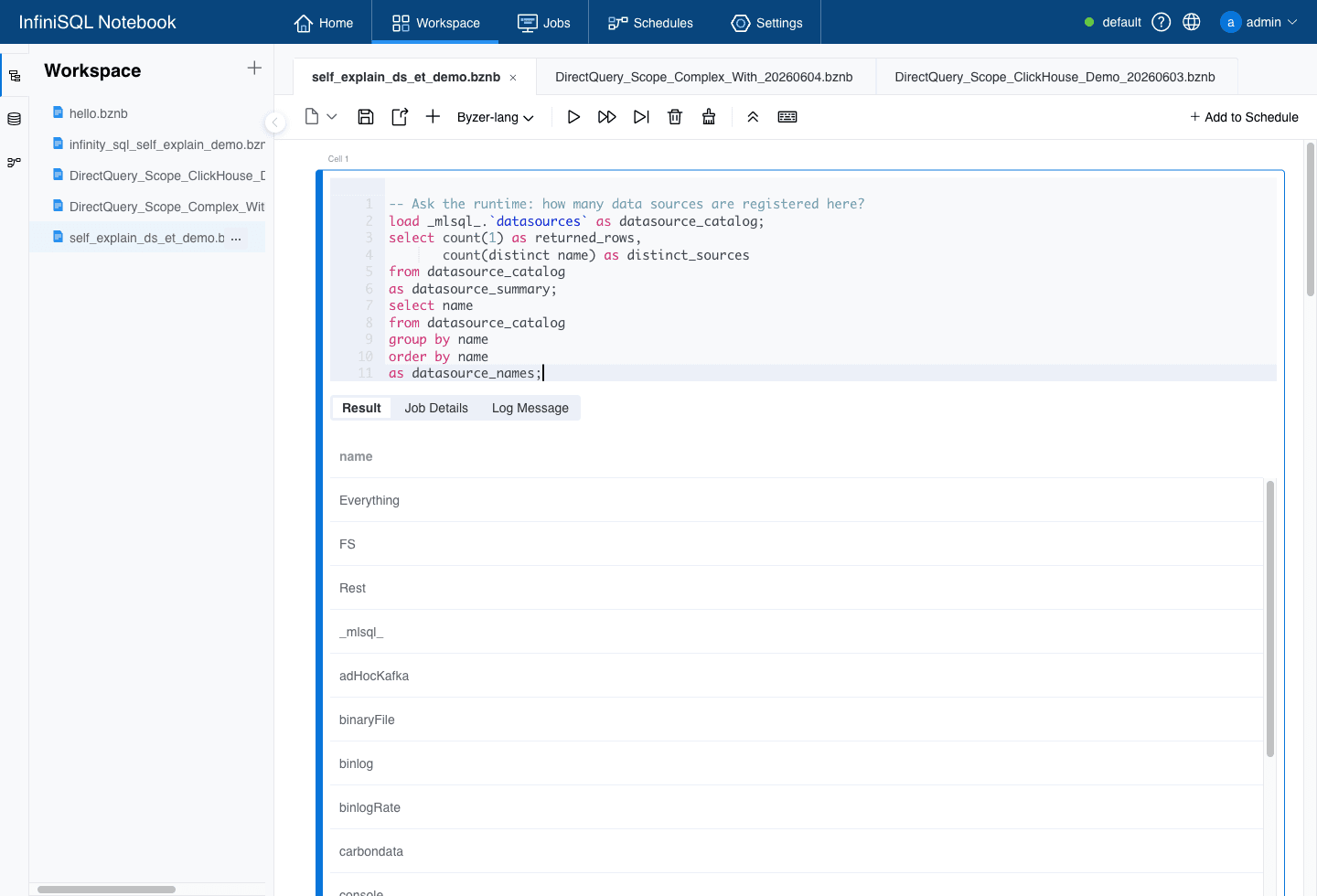
load _mlsql_.`datasources` as datasource_catalog;

select count(1) as returned_rows,
       count(distinct name) as distinct_sources
from datasource_catalog
as datasource_summary;

select name
from datasource_catalog
group by name
order by name
as datasource_names;
In the English 9002 Notebook UI, the current runtime returned 58 data-source registration rows and 45 distinct data-source names. The list includes familiar file-like sources such as csv, jsonStr, parquet, and text, and also connected or extended sources such as jdbc, delta, kafka, mongodb, hbase, redis, solr, and excel.
After "what exists," the next natural question is "how do I use it?"
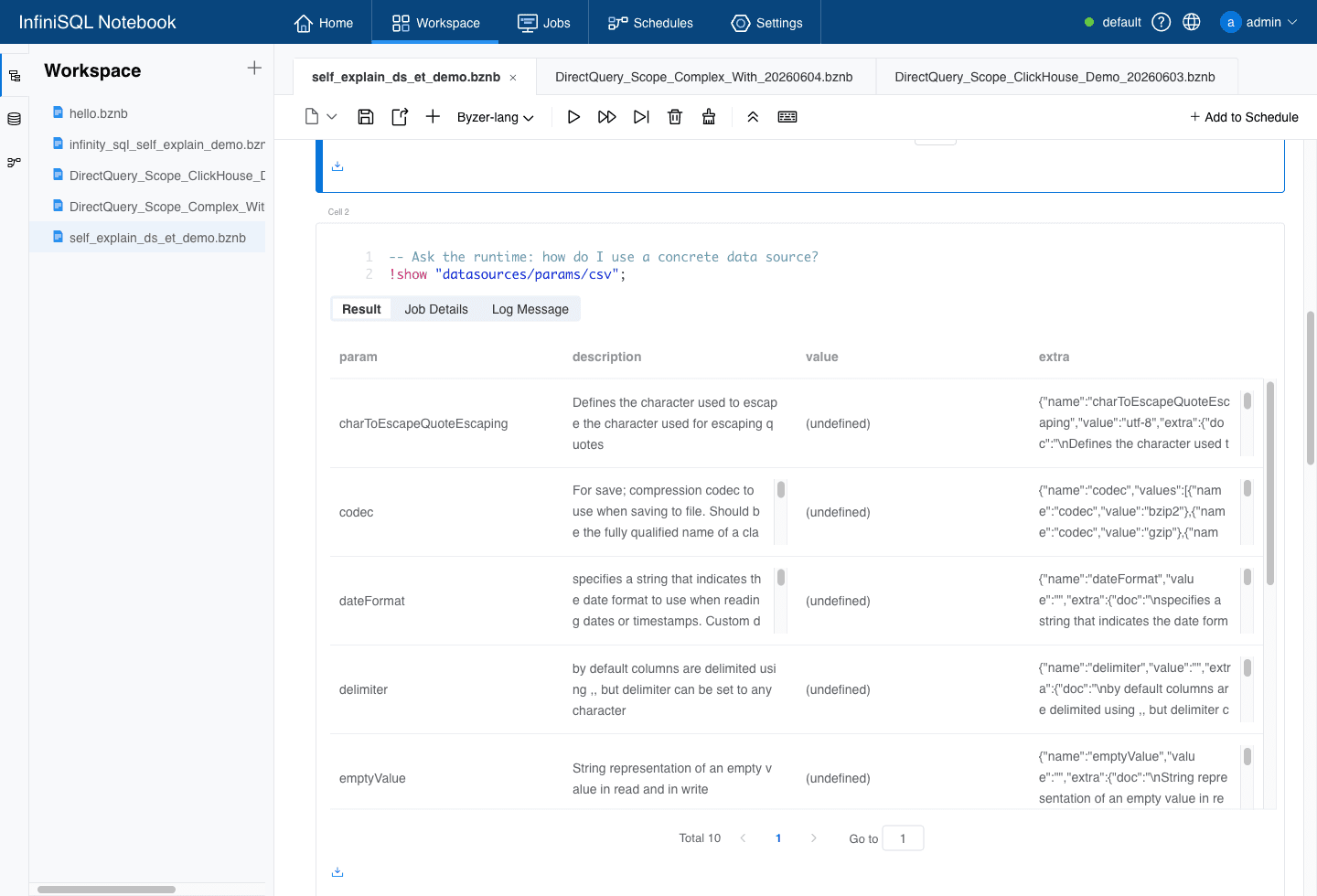
For example, if the Agent wants to read a CSV file but does not know which options this runtime supports, it can ask:
!show "datasources/params/csv";
The runtime returns a structured parameter table with fields such as param, description, value, and extra. From this table, the Agent can see parameters such as header, inferSchema, delimiter, encoding, quote, escape, and codec; it can also read value types, defaults, and candidate options from extra.
The same pattern works for database connections:
!show "datasources/params/jdbc";
This returns JDBC loading parameters such as url, driver, user, password, partitionColumn, lowerBound, and upperBound. For an Agent, this is much more reliable than guessing Spark JDBC options, because the answer comes from the InfiniSQL runtime that will actually execute the query.
That is data-source self-explanation: instead of placing a static data-source list into the prompt, the system answers "what can I read now, and how should each source be configured?"
Data-Processing ETs Explain Their Parameters and Examples Too
After data enters the system, the Agent often needs to clean it, expand JSON, sample it, handle columns, summarize quality, or cache intermediate results. This is where guessing usually becomes dangerous. Is the module called JsonExpand or JsonExpandExt? Is the parameter inputCol or jsonCol? Should a summary use run or predict?
InfiniSQL's data-processing ETs use the same self-explanation protocol. Start with the catalog:
load modelList.`` as all_ets;

select algType, count(1) as n
from all_ets
group by algType
order by n desc
as et_type_summary;
The current runtime returned 108 feature engineer ETs and 25 algorithm ETs. The feature engineer category contains many data-processing, feature-processing, data-quality, and runtime-helper ETs.
Then filter a few typical data-processing ETs:
select name, algType, substr(doc,1,160) as doc_preview
from all_ets
where name in ("JsonExpandExt", "DataSummary", "ColumnsExt", "CacheExt", "RateSampler")
order by name
as data_processing_et_catalog;
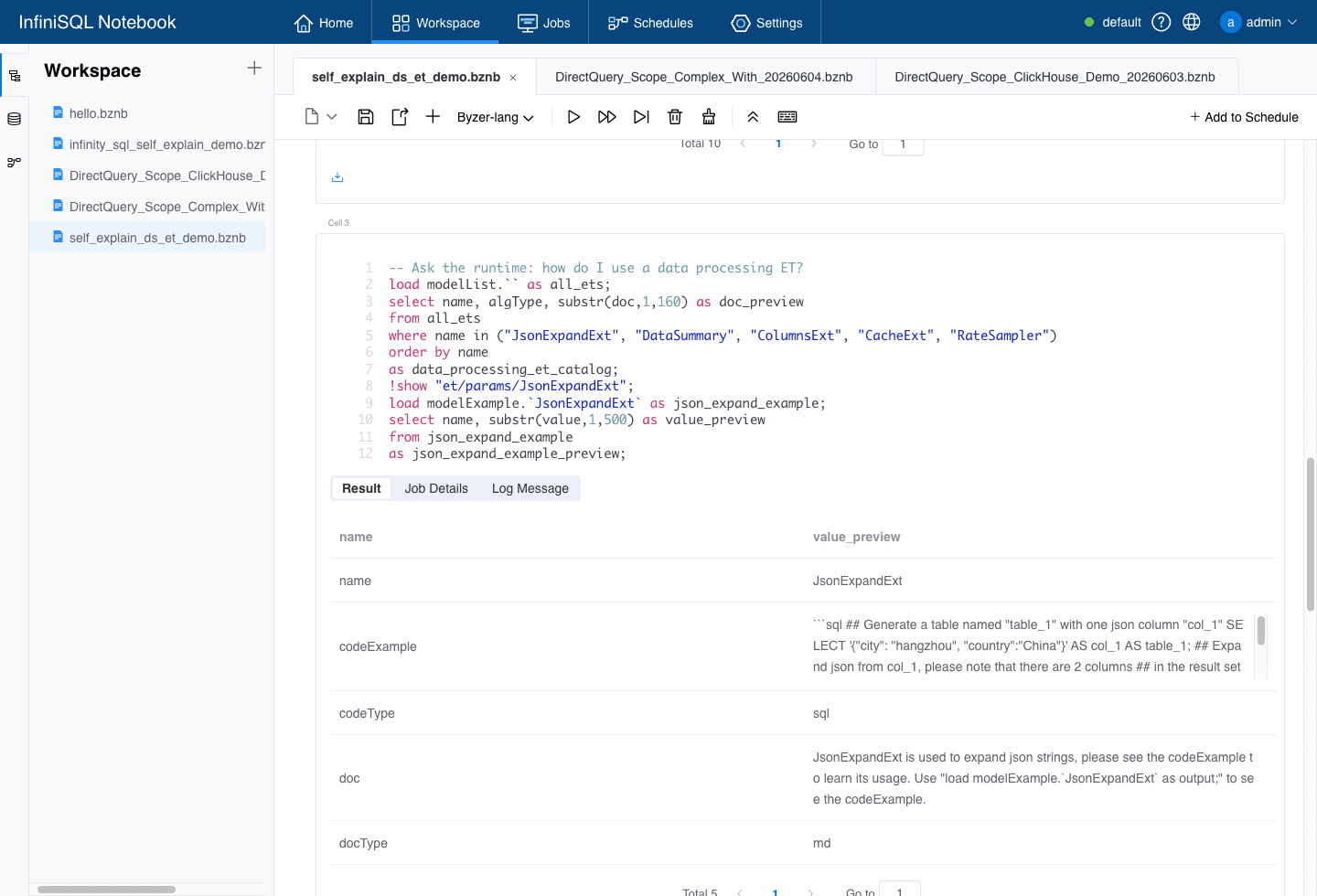
If the Agent is interested in JsonExpandExt, it can ask for parameters and examples:
!show "et/params/JsonExpandExt";

load modelExample.`JsonExpandExt` as json_expand_example;

select name, substr(value,1,500) as value_preview
from json_expand_example
as json_expand_example_preview;
The system tells the Agent that inputCol is required and points to the JSON string column to expand; samplingRatio defaults to 1.0 and is used for schema inference; structColumn defaults to false and controls whether output should be a struct. The example also gives a reusable pattern:
run table_1 as JsonExpandExt.`` where inputCol="col_1" as A2;
Now the Agent can execute a real pipeline based on what the system just explained:
set ticket_json_demo='''
{"id":"t1","payload":"{\"severity\":\"high\",\"score\":91,\"channel\":\"email\"}"}
{"id":"t2","payload":"{\"severity\":\"low\",\"score\":42,\"channel\":\"chat\"}"}
{"id":"t3","payload":"{\"severity\":\"medium\",\"score\":73,\"channel\":\"email\"}"}
''';

load jsonStr.`ticket_json_demo` as tickets_raw;

run tickets_raw as JsonExpandExt.``
where inputCol="payload"
and samplingRatio="1.0"
as tickets_expanded;

select id, channel, severity, cast(score as double) as score
from tickets_expanded
as tickets_clean;

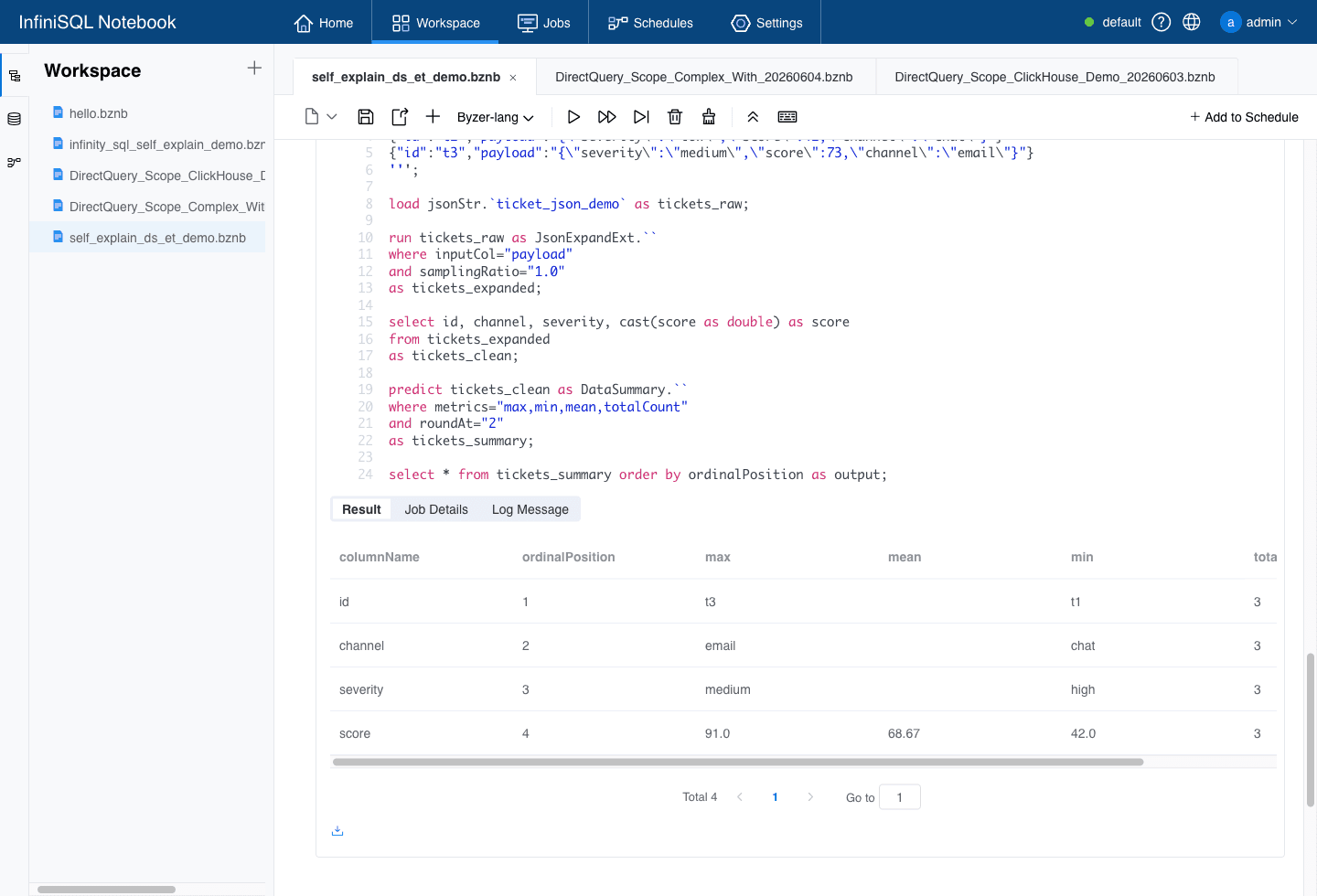
predict tickets_clean as DataSummary.``
where metrics="max,min,mean,totalCount"
and roundAt="2"
as tickets_summary;

select * from tickets_summary order by ordinalPosition as output;
In this chain, self-explanation and Agentic friendliness are connected:
jsonStris the data source that maps inline JSON lines intotickets_raw.JsonExpandExtis the data-processing ET that expandspayloadinto ordinary columns.- The SQL step casts
scoreinto a numeric value and materializestickets_clean. DataSummarysummarizes the cleaned table and outputsmax,min,mean, andtotalCount.
The final result shows score with max=91.0, min=42.0, mean=68.67, and totalCount=3. The Agent did not memorize that workflow. It first asked the system for parameters and examples, then executed the workflow according to the runtime's own explanation.
So InfiniSQL's self-explanation is not narrowly about "algorithms having docs." It covers three layers of the analysis chain:
- Data sources: ask what the current system can read and how to configure each source.
- Data-processing ETs: ask how to clean, expand, sample, summarize, and cache data.
- Algorithms: ask how to train, predict, evaluate, and explain models.
How Self-Explanation Guides AI Through Machine Learning
Use RandomForest as a concrete example.
Assume the Agent only knows the basic InfiniSQL rules: statements end with semicolons, outputs are named with as tableName, and unknown capabilities should be discovered through !show or the model* tables.
From there, the Agent can complete a machine-learning workflow without guessing.
1. Ask: What ML capabilities exist in this runtime?
load modelList.`` as ml_catalog;

select name, algType
from ml_catalog
where name in ('RandomForest', 'Binning', 'ScoreCard')
as ml_capabilities;
This answers "does the capability exist?" modelList returns registered ET names, types, and documentation summaries. The Agent does not assume RandomForest exists; it checks.
2. Ask: Which key parameters does RandomForest need?
load modelParams.`RandomForest` as rf_params;

select param, description, value
from rf_params
where param like '%featuresCol%'
   or param like '%labelCol%'
   or param like '%numTrees%'
   or param like '%maxDepth%'
as rf_key_params;
This answers "how should the parameters be written?" modelParams returns param, description, value, and extra; extra can include defaults, current values, value types, required flags, and candidate options.
The Agent does not need to guess whether the parameter is featuresCol or featureCol, or whether numTrees is supported in the current version.
3. Ask: Is there a complete runnable example?
load modelExample.`RandomForest` as rf_example;

select name, length(value) as example_chars
from rf_example
where name='codeExample'
as rf_example_check;
modelExample returns a codeExample that is not an isolated syntax fragment. It is a complete workflow: prepare data, vectorize features, train, predict, explain the model, and calculate accuracy.
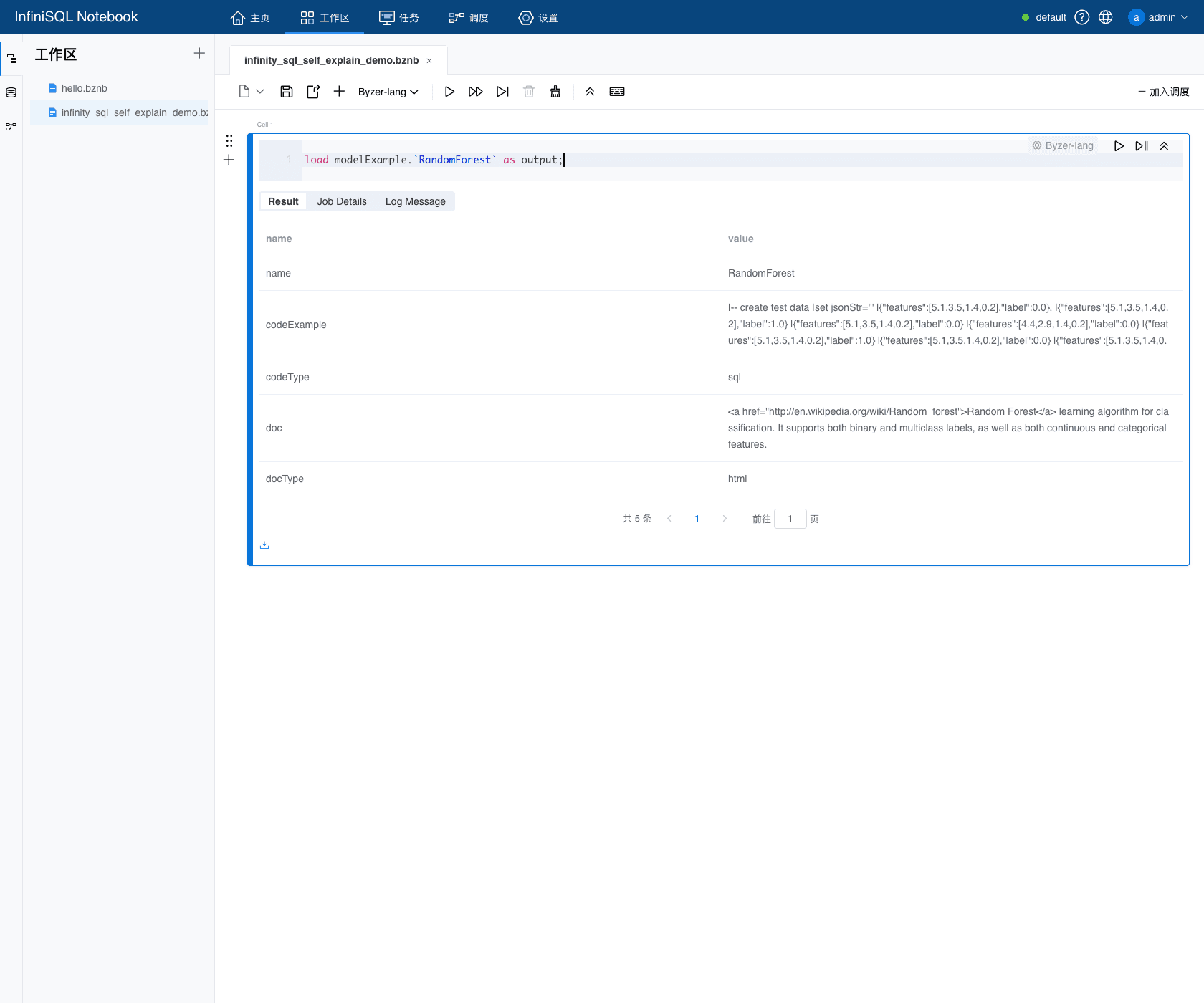
This answers "how do the pieces fit together?" The Agent can use the example as a skeleton and replace the data table, model path, and parameters.
4. Execute training, prediction, evaluation, and explanation from the discovered path
Based on modelParams and modelExample, the Agent can write an actual ML chain:
load jsonStr.`iris_json_demo` as iris_raw_demo;

select name, vec_dense(features) as features, label
from iris_raw_demo
as iris_train_demo;

train iris_train_demo as RandomForest.`/tmp/infinity_sql_self_explain/notebook_rf_iris` where
keepVersion="false"
and evaluateTable="iris_train_demo"
and `fitParam.0.featuresCol`="features"
and `fitParam.0.labelCol`="label"
and `fitParam.0.numTrees`="10"
and `fitParam.0.maxDepth`="4"
as rf_train_result_demo;

predict iris_train_demo as RandomForest.`/tmp/infinity_sql_self_explain/notebook_rf_iris`
as rf_predictions_demo;

select count(*) as total,
       sum(case when label = prediction then 1 else 0 end) as correct,
       round(sum(case when label = prediction then 1 else 0 end) * 100.0 / count(*), 2) as accuracy_percent
from rf_predictions_demo
as rf_accuracy_demo;

load modelExplain.`/tmp/infinity_sql_self_explain/notebook_rf_iris` where alg="RandomForest"
as rf_model_explain_demo;
I ran this chain in the 9002 Console. The summary showed that the discovered model was RandomForest, modelExample returned a runnable example with 11904 characters, all 12 sample predictions were correct, and modelExplain returned 9 rows of model-explanation information.
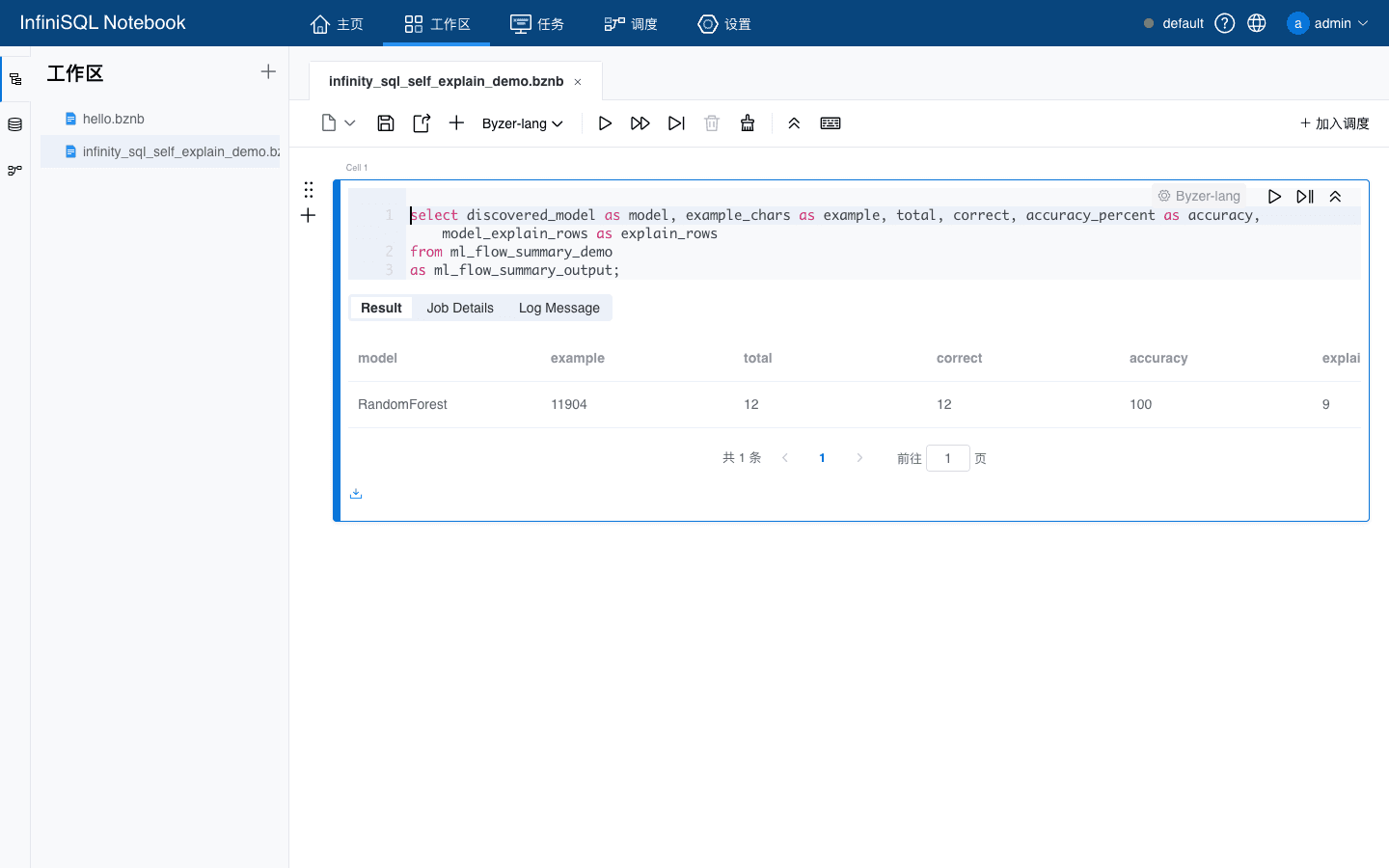
The point is not to prove model quality from 12 samples. The point is more basic: an Agent can ask the language itself for capabilities, parameters, and examples, then turn those answers into executable training, prediction, evaluation, and explanation steps.
That is the real power of self-explanation.
It does not require the Agent to already know how RandomForest is written in InfiniSQL. It lets the Agent ask InfiniSQL, in InfiniSQL, how RandomForest should be written.
Complex Algorithms Need Self-Explanation Even More: ScoreCard Is Not a Black Box
RandomForest already makes the design visible, but self-explanation becomes even more valuable for business algorithms such as ScoreCard.
A credit scorecard is not simply "input data, output model." It involves:
- binning;
- WOE and IV;
- logistic regression;
- score scaling;
- rule tables;
- single-row attribution;
- AUC, Gini, and KS;
- PSI stability monitoring.
If the system exposes only a black-box train, an Agent can easily guess the wrong path.
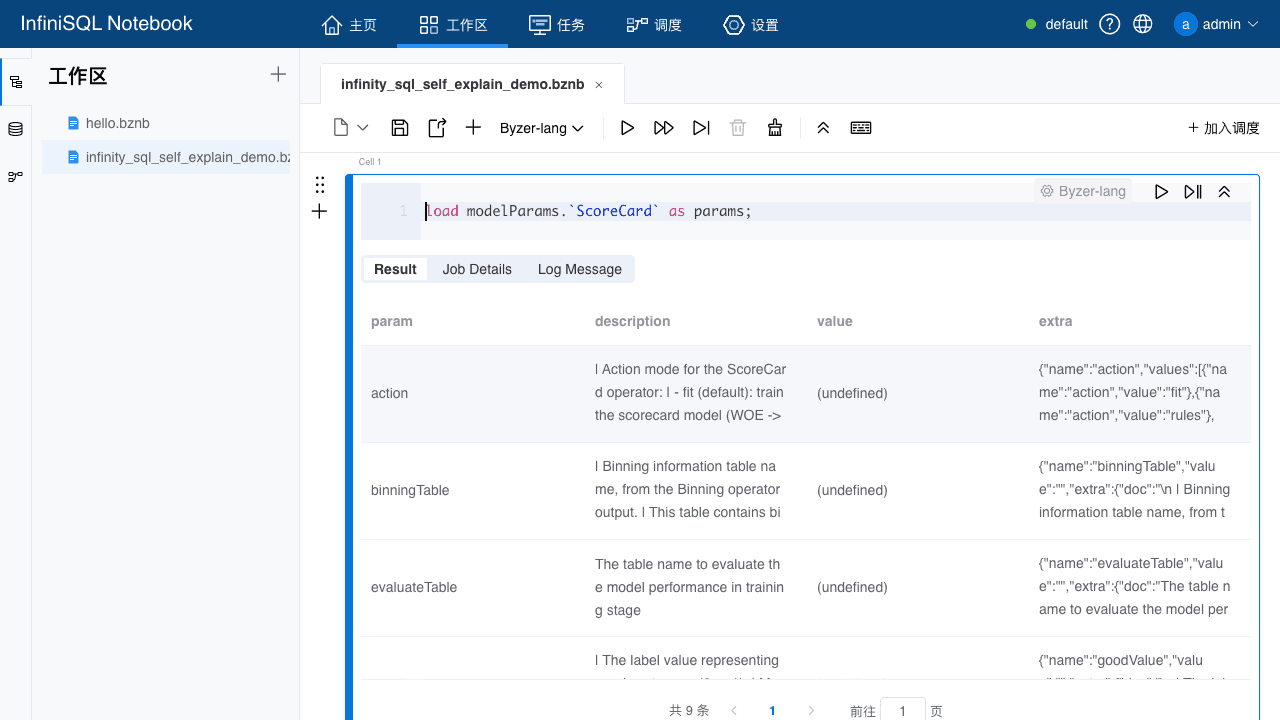
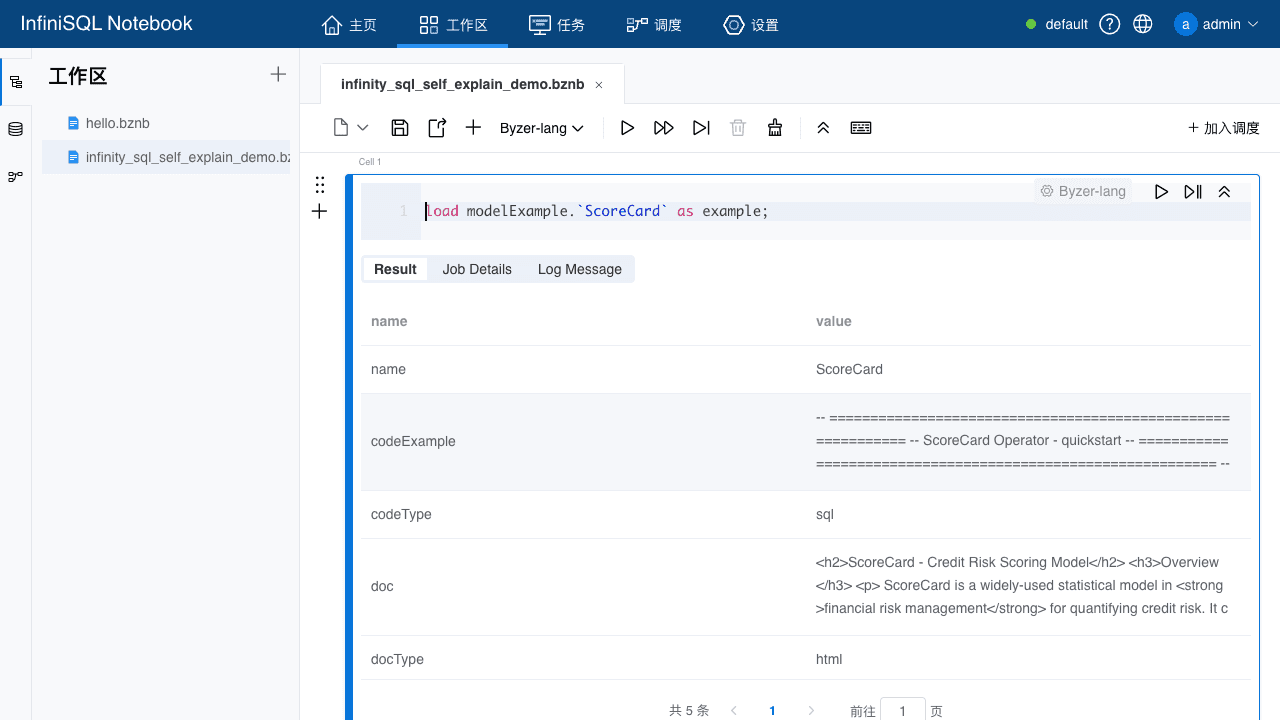
InfiniSQL makes ScoreCard explain its own action protocol. modelParams.ScoreCard tells the Agent that action supports:
fit: train the scorecard;rules: output auditable rules;explain: explain one scored row;evaluate: return metrics such as AUC, Gini, KS, and bad rate;stability: monitor feature-level PSI stability.
It also explains business parameters such as binningTable, pdo, scaledValue, and selectedFeatures.
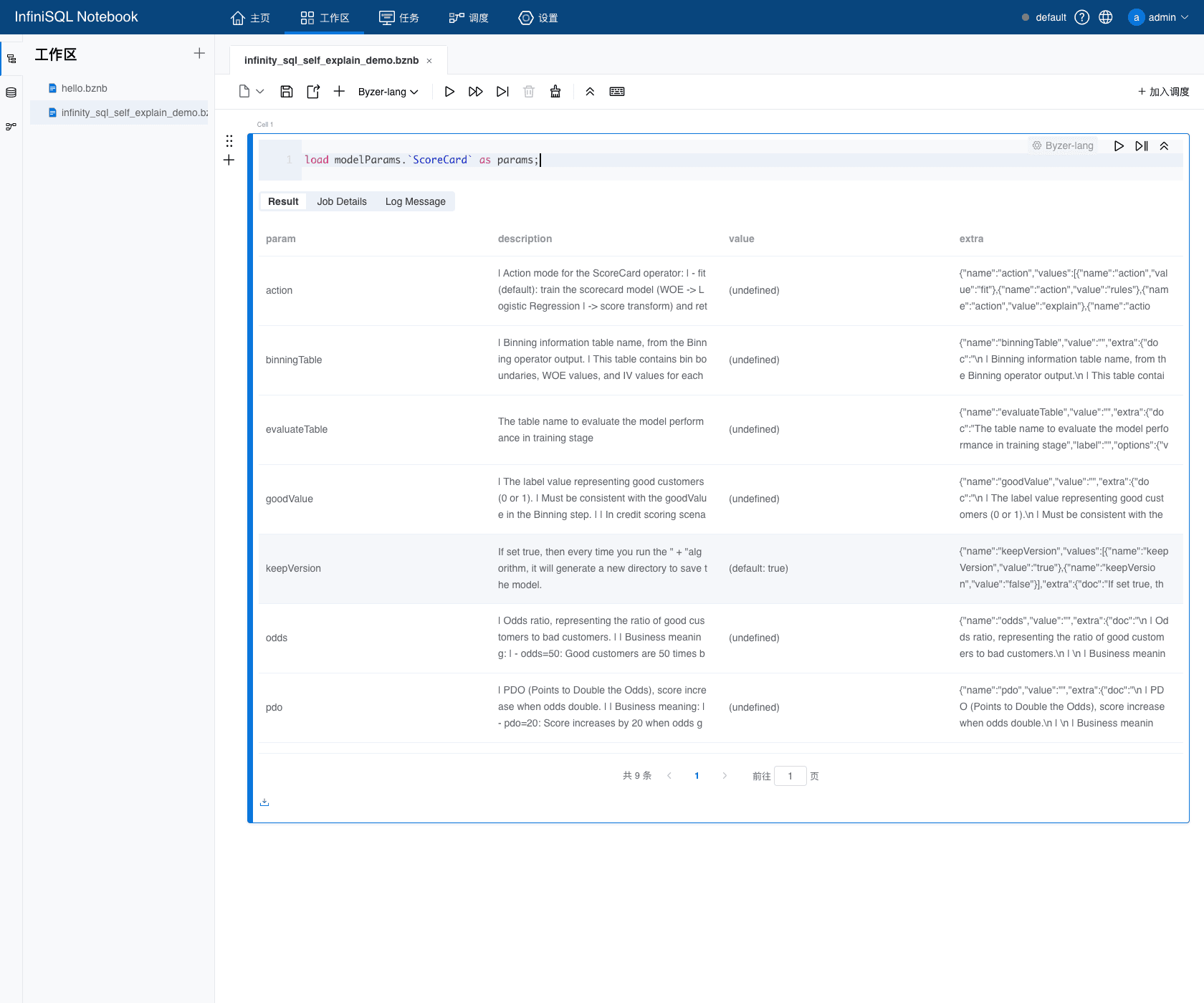
So when an Agent faces ScoreCard, it should not jump straight into a training statement. It can first form a self-explanation-driven path:
!show et/ScoreCard;
load modelParams.`ScoreCard` as scorecard_params;
load modelExample.`ScoreCard` as scorecard_example;
Only then does it execute:
- Standardize the input fields.
- Run
Binningfirst to producebinningInfoTable. - Run
ScoreCard action="fit". - Use
action="evaluate"to inspect model quality. - Use
ruleswhen auditability is needed. - Use
explainwhen a single customer's score needs attribution. - Use
stabilitywhen post-deployment monitoring is needed.
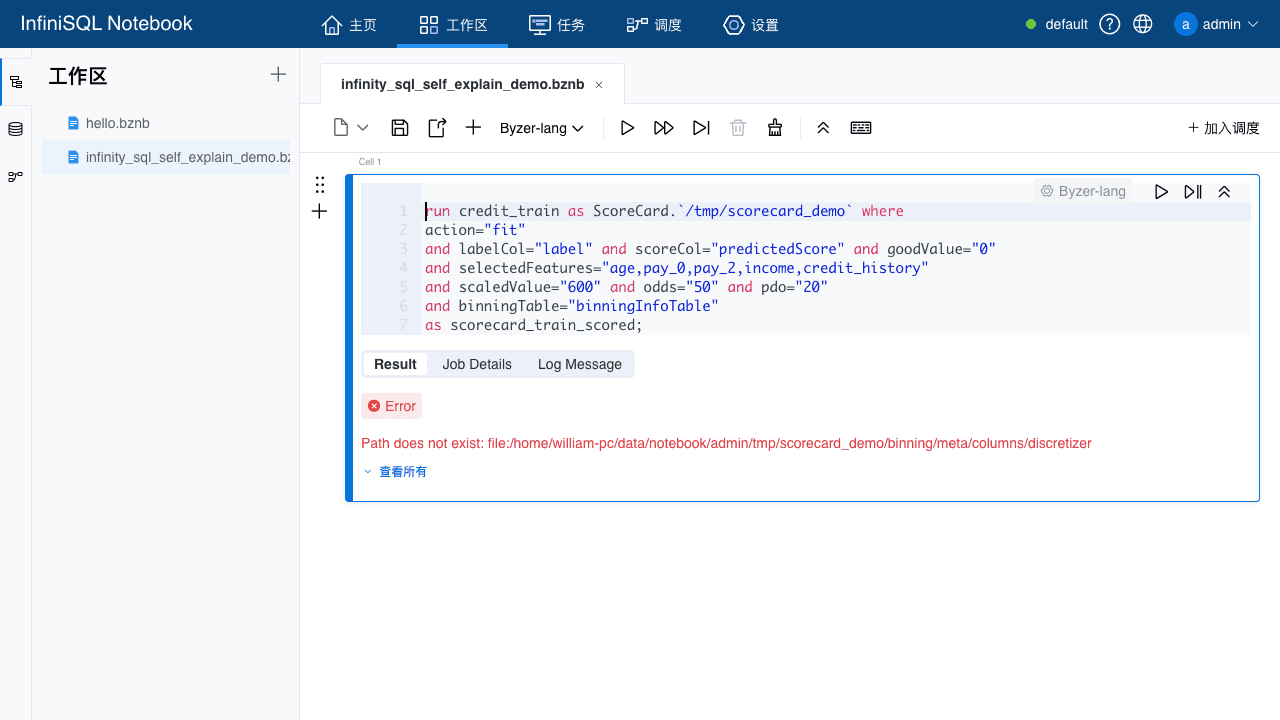
The screenshots below come from actual 9002 Console operations:
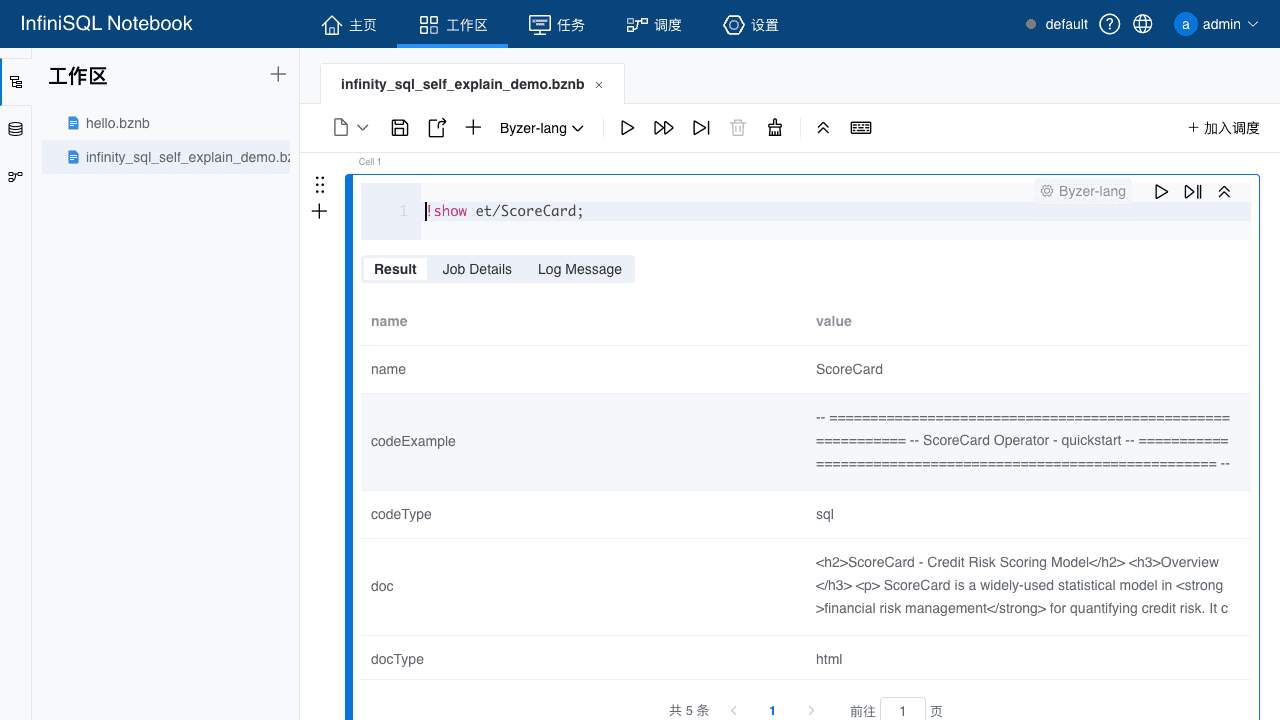
The first training attempt reported that binningTable was missing. That message pushes the Agent back to the right path: run Binning first.
After Binning is added, ScoreCard can continue into training and evaluation:
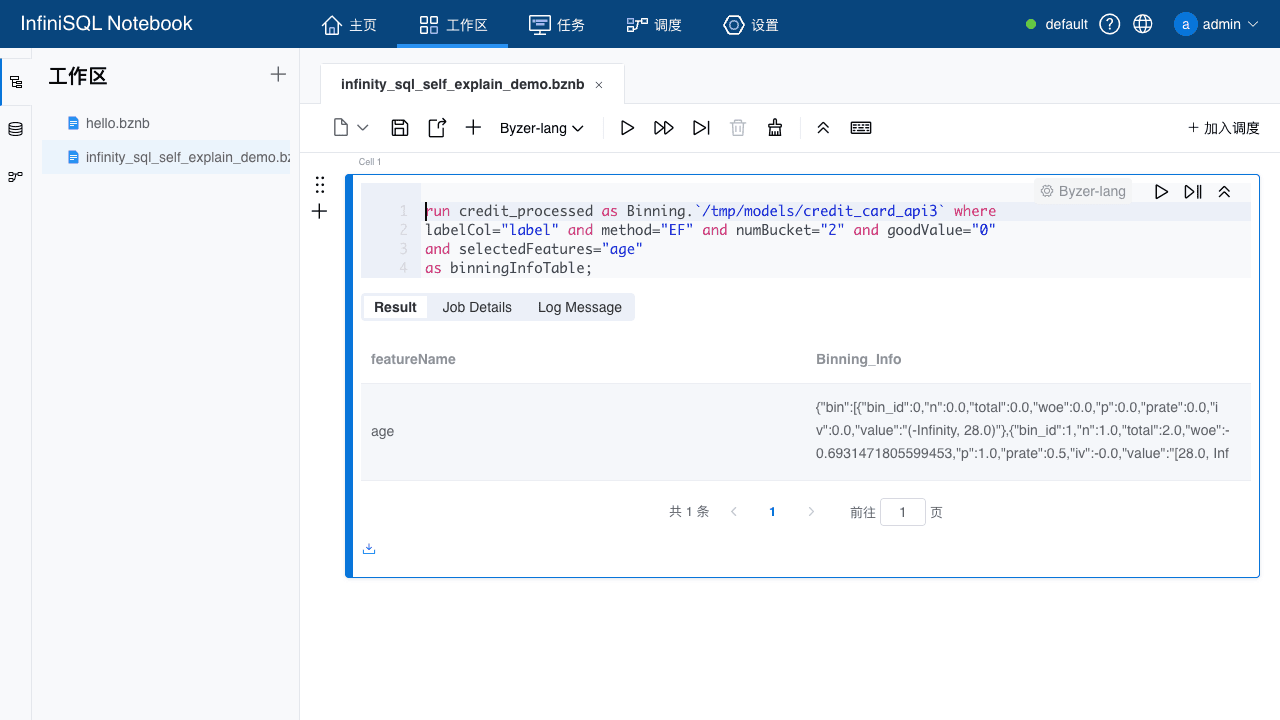
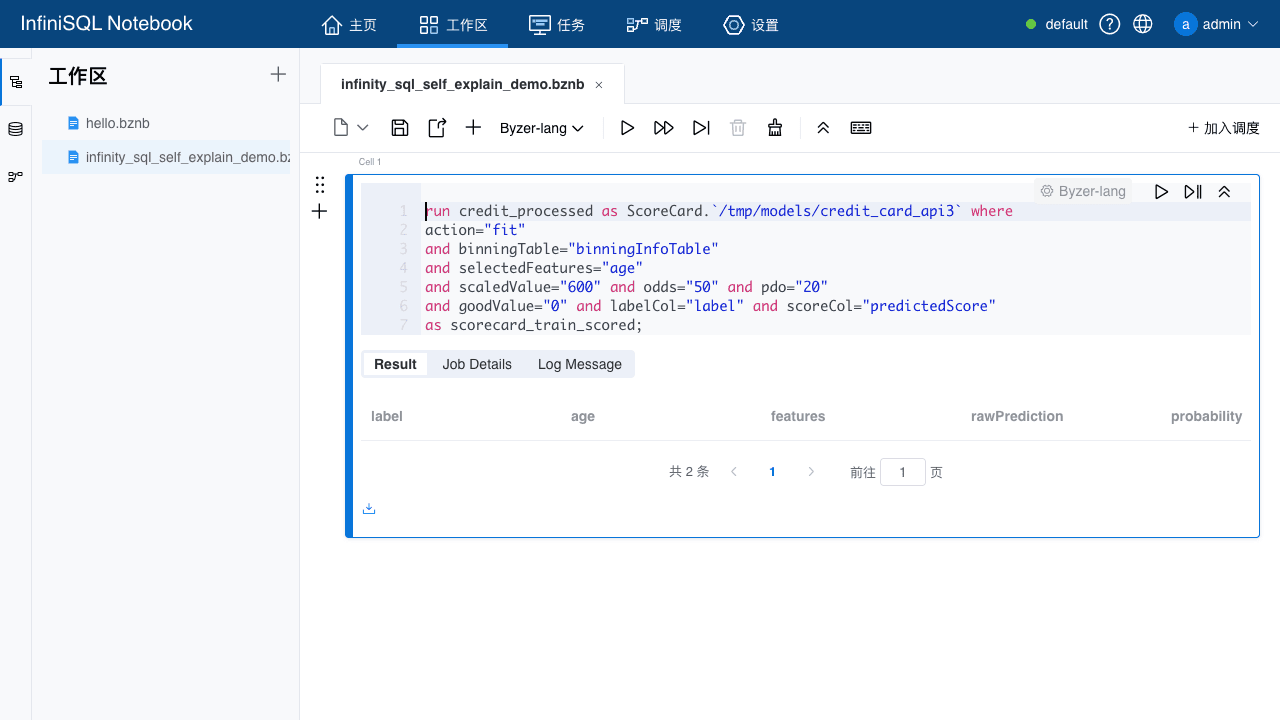
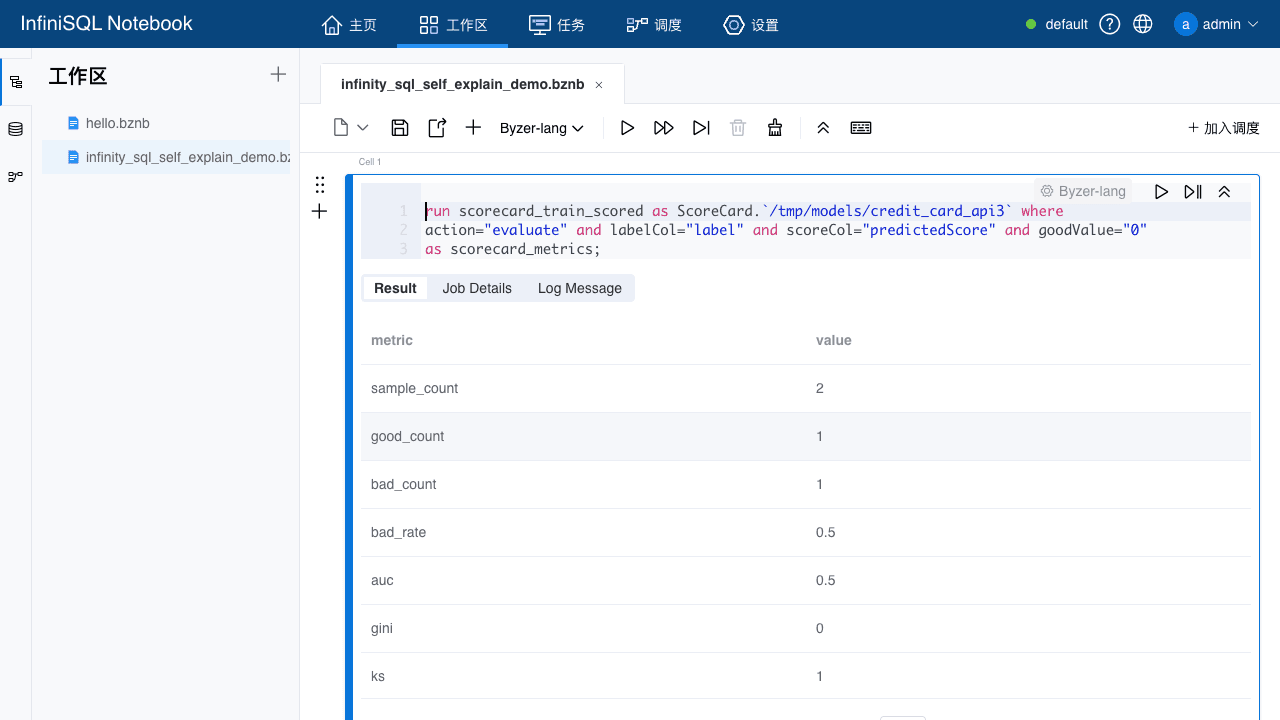
This shows that self-explanation is not merely "an algorithm has a description beside it." The execution protocol of a complex algorithm is itself queryable. The Agent can query that protocol and learn the order of operations, parameter meanings, and next actions.
Why This Is Not Ordinary Documentation
If self-explanation were only a Markdown document, it would eventually become stale.
InfiniSQL turns self-explanation into an engineering contract.
Each module's implementation is not only responsible for doing the work. It is also responsible for answering one product-level question:
Can an AI ask me clearly how I should be used?
That is the point where self-explanation stops being documentation and becomes a product capability.
Back to the Original Question: Can AI Use It Well?
If InfiniSQL is treated as only "a new SQL syntax," the answer is uncertain.
But once you put InfiniSQL's basic syntax into any Agent's system prompt, the Agent can almost magically master the language's many capabilities: not because it memorized everything in advance, but because the system explains its capabilities, parameters, and examples to the Agent.
That is the magic of self-explanation.
The Agent does not need to memorize every algorithm. It only needs one stable routine:
Use as tableName to preserve every step as state.
If data sources are unknown, query !show datasources.
If a data source's configuration is unknown, query !show "datasources/params/...".
If data-processing ETs or algorithms are unknown, query modelList / !show et.
If an ET or algorithm's parameters are unknown, query modelParams.
If an ET or algorithm's syntax is unknown, query modelExample.
After training a model, query modelExplain.
Let every output continue as a table in the next step.
That is InfiniSQL's two-part design:
- Agentic friendliness: the Agent can explore step by step, and every step's state is preserved.
- Self-explanation: when the Agent does not know something, it can ask the system and receive the current runtime's real data sources, data-processing ETs, algorithms, parameters, and examples.
The first lets the Agent keep working.
The second lets the Agent keep learning.
That is why InfiniSQL is not only about making AI able to use a language. It is about giving AI a real chance to use it well.