
There are two directions for the future development of Agents, which we distinguish as dense and sparse. All the Agents we see today are dense. Today, I want to focus on where dense Agents go next: from managing processes and conversations to managing results.
We have built a “Delivery Briefing” page in our Agent client. It brings work from different projects together and shows what needs the user's attention, what has just finished, and what is still running. The client also has a chat panel where the Agent can include conversation cards in its answers. Clicking a card takes the user into the corresponding work conversation in that project.
These two features address a practical problem. Once users have handed work to an Agent, they still need to find that work, understand its results, and continue handling it easily. The number of steps an Agent executes and the time users spend managing that work are two things we need to consider together.
When an Agent is doing just one thing, a chat window is usually enough. The user explains what they need, waits for it to run, then reads the reply or opens an attachment. The whole process is in front of them, with little need to search for anything.
That changes when several things are happening at once. Suppose an Agent is writing an article, another is changing code, and another is building a package on a remote machine. The user steps away for a while and comes back. One task may be finished, another may still be running, and a third may be waiting for the user to sign in. The first thing the user needs to know is how each piece of work is doing.
If all they see is a list of conversation titles, they have to open each one, find the latest reply, and decide whether it needs their attention. Some conversations were already reviewed yesterday. Others have new results today. Some titles no longer quite match the original task. The programs can run at the same time, while the user still has to search and read one item at a time. As the amount of work grows, this time becomes harder to ignore.
We therefore brought the information users need to review into the Delivery Briefing. When they return, they can start with “Needs your attention,” then look at “Just finished, unread” and “In progress.” The September screenshot below brings together ongoing work from three projects.
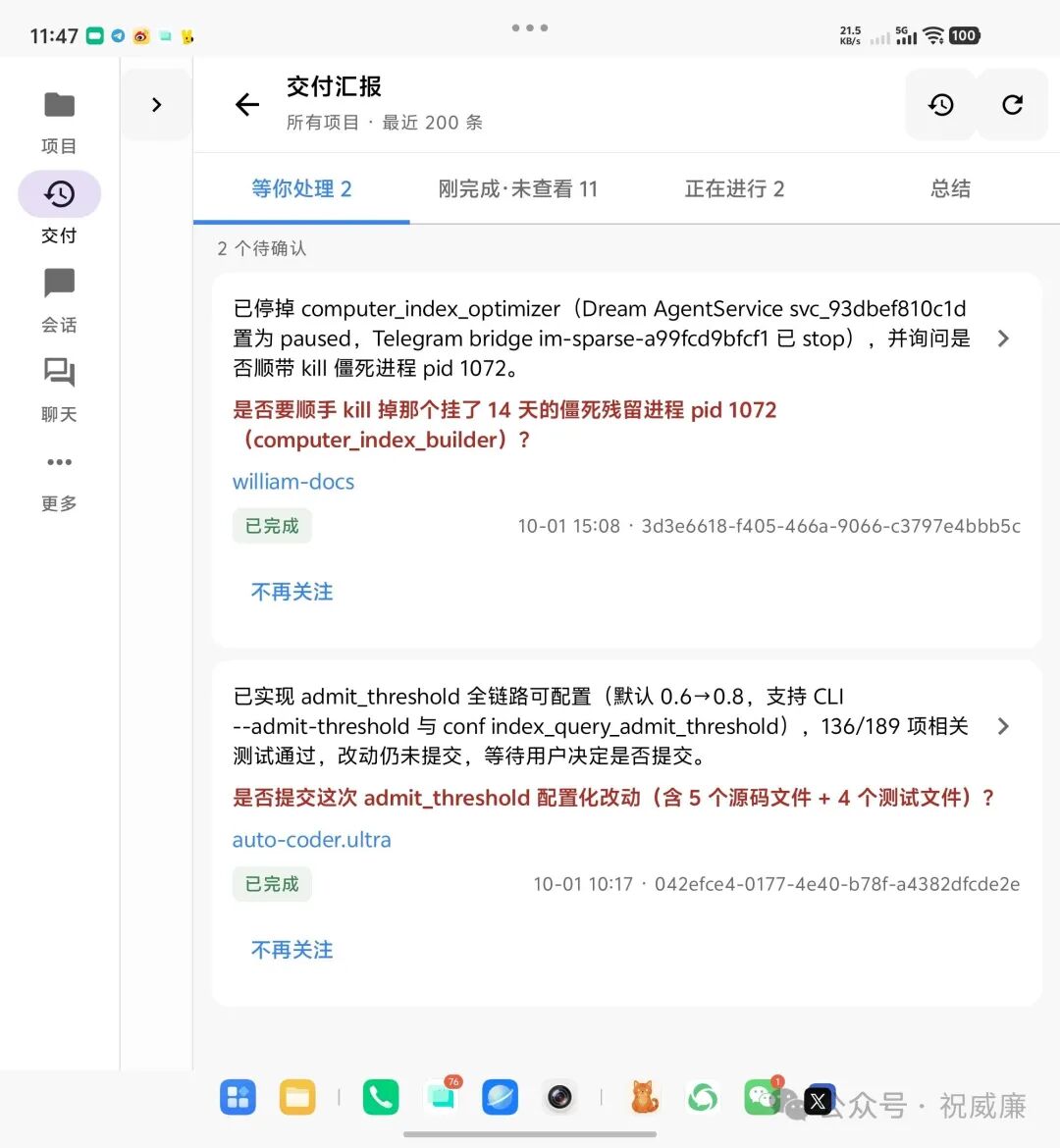
This page helps users decide what to look at first. If work is proceeding normally, they can leave it alone for now. If there is a new deliverable, they can open it. If something is blocked on a condition only they can resolve, they can address that first. Users can decide where to spend their time without first learning what has recently been discussed in every project.
The explanations here also need to be specific. Take a remote packaging task: the user wants a sharing link, but the Agent finds that login credentials are missing and cannot upload the package yet. The briefing needs to say where the user should sign in and which step can continue afterward. If it says only “Needs your attention,” the user still has to enter the conversation and search for the reason.
A briefing cannot solve every search problem, though. Sometimes users are not interested in the progress of all their current work. They simply want to find one thing again. They remember asking a question earlier, but may not remember the conversation title or even which project they asked it in. They may also want to know what they have been focusing on across devices, giving them a global view.
The chat panel can handle this need. Users describe what they remember, and the Agent finds the relevant conversations and includes links to them in its answer. In the screenshot below, I asked the system what I had been focusing on recently. Key conversations also appear as clickable cards.
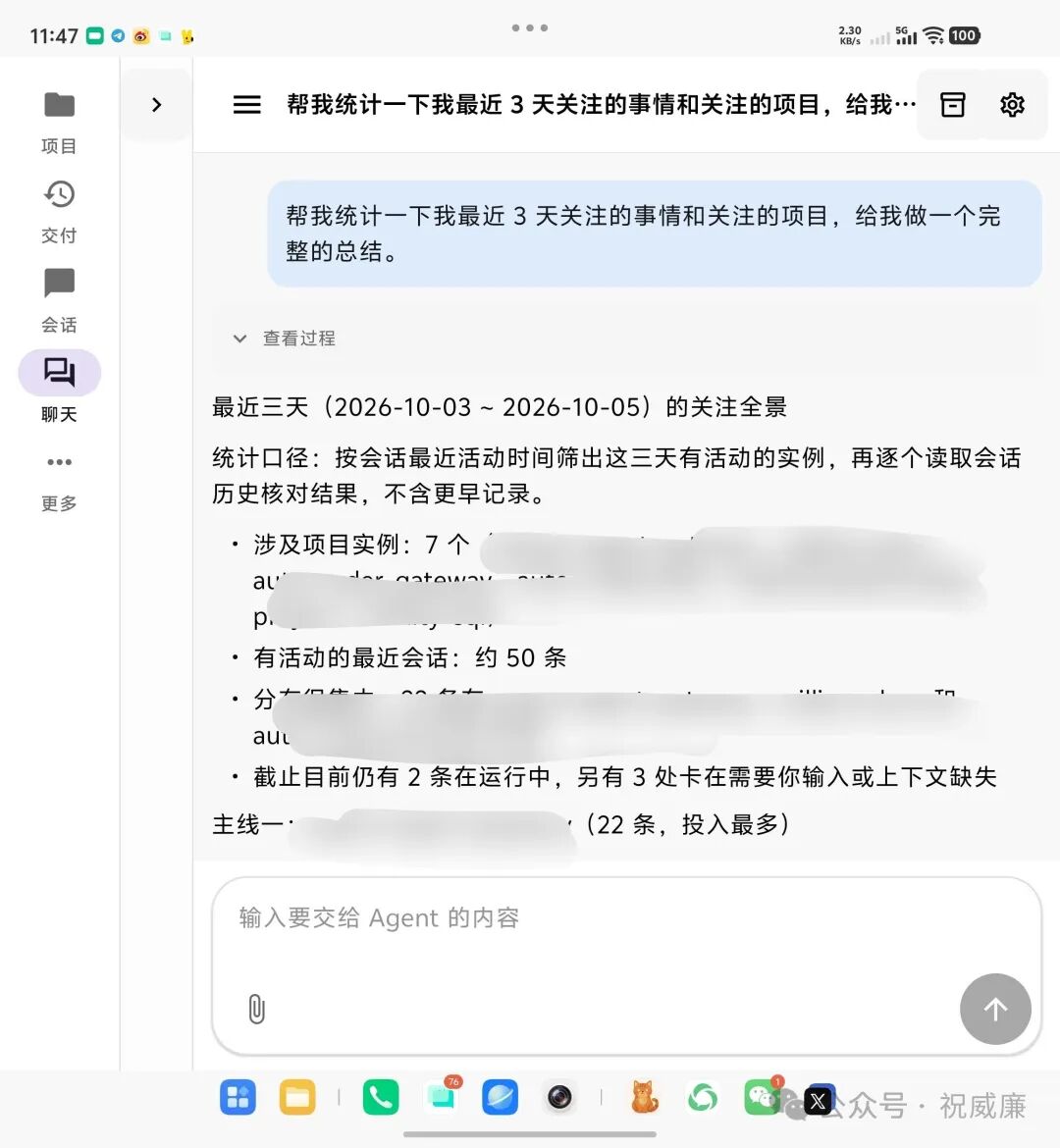
Each card shows the conversation's name, its project, and relevant activity information, so users can first decide whether it is the one they are looking for. Once they have found it, they can click the card and enter the original conversation directly. They do not have to remember the project name, leave the chat, and search the project list again.
The answer gains another use: it can take users to the place where they need to act next. The explanation helps them understand the situation, and the card opens the relevant work. Finding a conversation and entering it become consecutive steps, with one manual search removed from the middle.
Seen this way, the Delivery Briefing and the chat panel suit two different situations. When users have just returned and want to know what needs their attention, the Delivery Briefing is convenient. When they remember something specific and want to find it, they can ask the chat panel directly. Both entry points should make it easy to enter the relevant conversation.
The conversation detail page retains the substance of the work: the original request, changes along the way, the Agent's explanations, and follow-up instructions. The page below keeps a “Back to delivery” link, so that after handling one item, users can return to the briefing and review the rest.
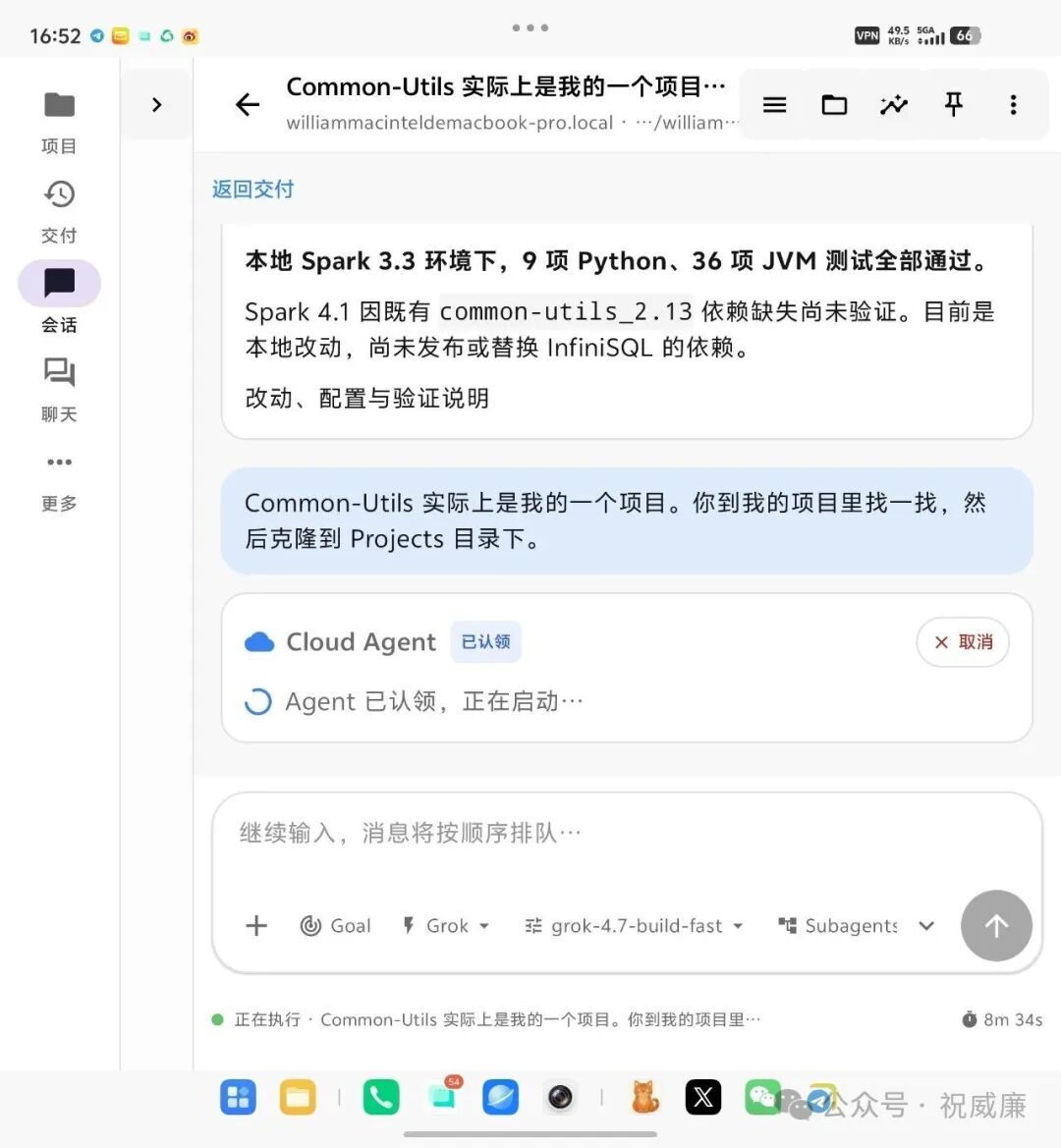
Figure: The conversation detail page from September. The top shows “Back to delivery” and an explanation of the results; below are the original instruction and execution status.
The connections between these pages matter. Users may first notice a piece of work in the briefing, then enter its conversation to add a requirement. Or they may find an older conversation through chat, open it, and continue the discussion. The product needs to let them keep working from what they have already found, reducing the number of times they have to search back and forth between lists.
In this design, chat can become an entry point for managing conversations and results. Users describe what they are looking for in natural language. The Agent helps them find it, explains the situation, and provides cards that lead into the specific work. As long as those links lead to the right place, chat itself can help users manage their work.
Once those entry points are convenient, there is another issue to address: after several rounds of conversation and execution on the same piece of work, can users still see its current result clearly?
Consider editing an article. The user first asks the Agent to write a draft, requests changes the next day, and finally asks for a PDF export. They are still working on the same article. When they open it again, they need to know which version is ready to use, which is still being revised, and which body text the exported file corresponds to. A conversation card helps them return to the work. The relationship between deliverables and versions also needs to remain clear.
Completion status raises the same issue. In September, the remote packaging task entered “Needs your attention” because a login was missing, yet the card also showed “Completed.” That round of investigation had indeed ended, but the sharing link the user wanted had not been created. If the interface tells users only that the program has finished running, they still have to decide for themselves whether the work is done.
In a case like this, the product should explain the progress made, the missing condition, and the next step separately. Once the user signs in, subsequent execution should continue with creating the link. A change in the work's completion status needs to be based on delivery of the agreed output and results from the relevant checks. Viewing a card, or choosing to stop following it, cannot stand in for that judgment.
This is where a focus on results needs to go further. The Delivery Briefing currently brings scattered information together, while navigable chat answers shorten the path to finding work. Building on those features, we also need to preserve a clear account of a piece of work's requirements, current deliverables, and unfinished parts, so that later revisions can pick up where it left off. The interface should make things easy to find, and the records should explain where things stand. Both need to work well.
Of course, when users first begin discussing an idea, they may not yet have clear delivery requirements. They can start with a conversation, then follow the work as it becomes more concrete. There is no need to turn every question into a task form that must be filled out in full.
I prefer to assess this design with direct questions. How many transitions does it take to find an old conversation? How much unrelated content must someone read to decide whether a piece of work is finished? When they see an issue that needs attention, can they follow the page through to resolving it? Time saved in these places is a convenience users can feel.
I believe Agent products need to consider doing work and managing work together. As Agents take on more things at once, users should find it easier to locate that work, understand its results, and follow up. When users spend less time searching and checking, the Agent's additional execution capacity becomes easier to put to use.