In April 2026, two things that looked very similar suddenly appeared in the AI coding community.
One is Vibe Kanban from overseas — an open-source project by the BloopAI team, 24k+ GitHub stars, pitching "orchestrate AI coding agents." One npx vibe-kanban fires up the service; four left-to-right lanes: To Do → In Progress → In Review → Done.
The other is our auto-coder.chat Kanban — five lanes: To Plan → To Do → In Progress → To Review → Done. Every card finishes with a "judgment rationale" and a "linked conversation."
Many friends asked me the same natural question:
"Is your Kanban the same thing as Vibe Kanban?"
Answer: they look alike on the surface, but architecturally they walk two completely different paths.
I've tried both products, and I use auto-coder.chat's Kanban for my own coding. So this article is not going to be a PR piece. I want to seriously explain two things:
- What Vibe Kanban got right. It's one of the earliest and most mature open-source projects in the "AI coding + Kanban" wave. Without it, the whole industry wouldn't have realized this quickly that "Kanban is the right collaboration medium for AI coding."
- The two products made different architectural choices, so they fit different scenarios. Do you want "start a localhost, sit at this machine, experiment with multiple agents in parallel," or do you want "cloud Kanban + local instance, push requirements forward even from a phone on the subway"? That's what determines which one you should pick.
First, Let's Introduce Vibe Kanban
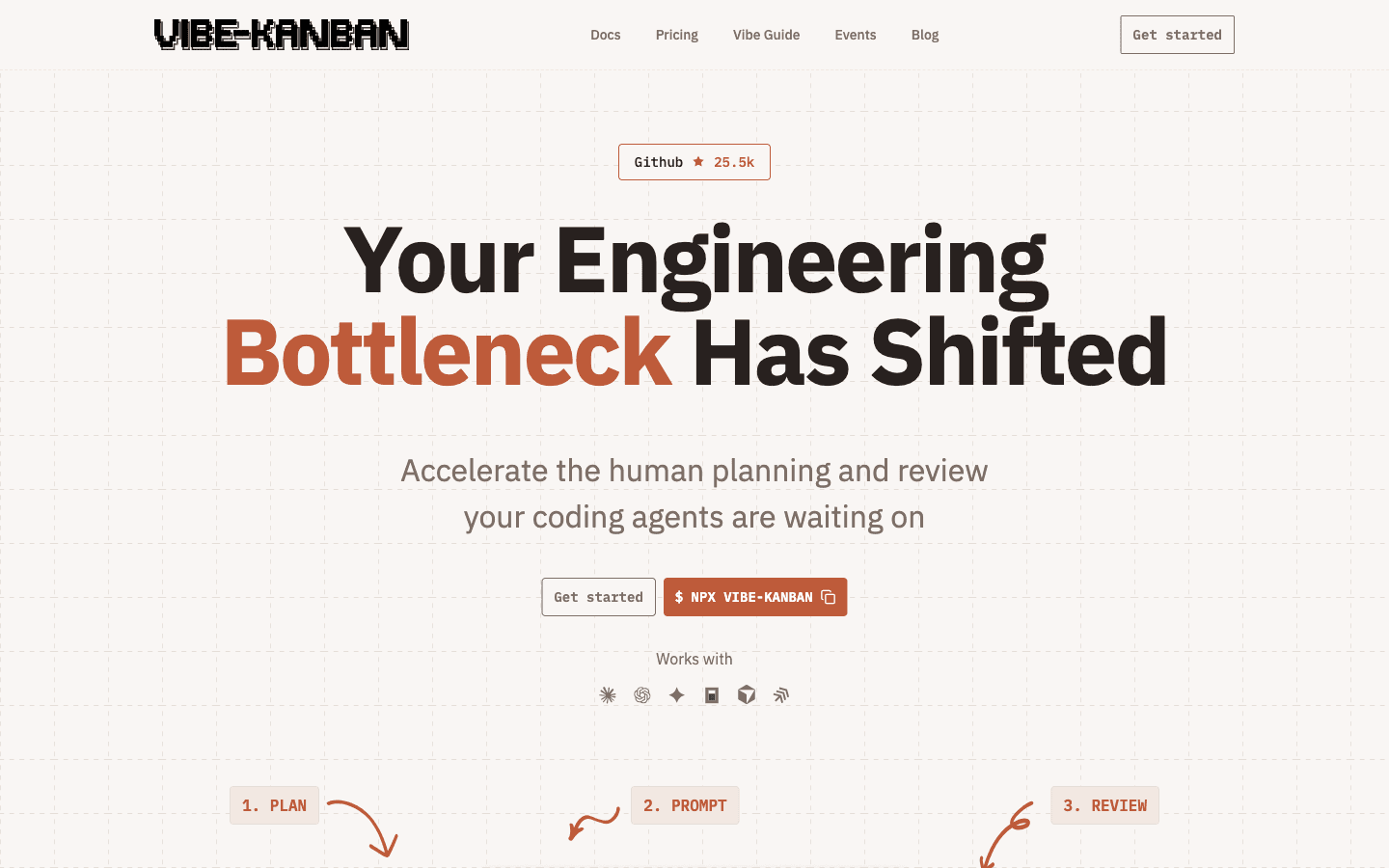
I played with Vibe Kanban hands-on and read through its official docs. Its tagline is "Your Engineering Bottleneck Has Shifted" — meaning that in the AI coding era, the engineer's bottleneck has moved from "writing code" to "planning + review," so a tool should focus on accelerating planning and review.
Its core mechanism can be summarized in three words: Plan / Prompt / Review.
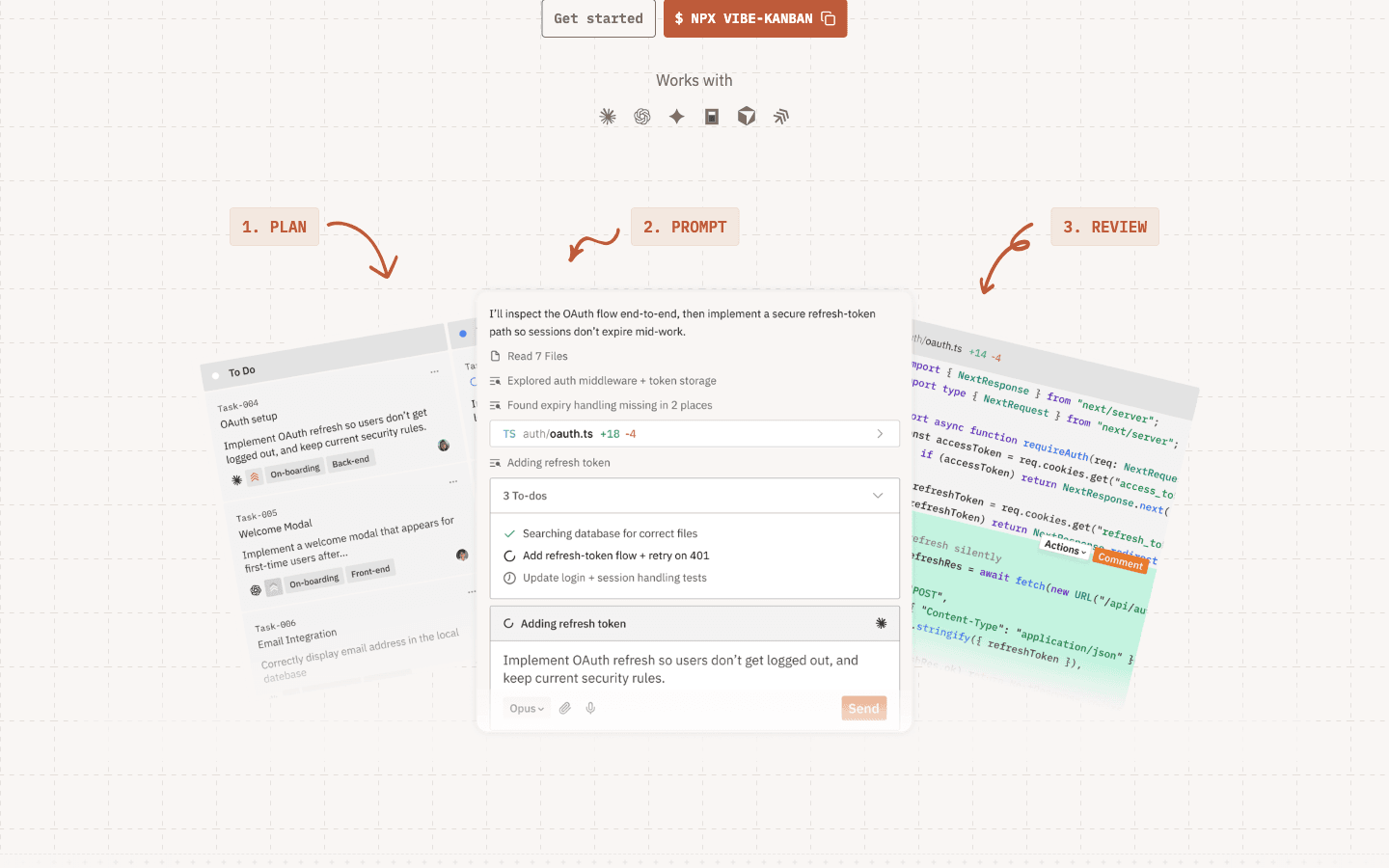
- Plan: file issues on the board — title, description, priority, tags; split into subtasks; add blockers.
- Prompt: when an issue enters In Progress, Vibe Kanban doesn't do the work itself. It dispatches to the already-authenticated third-party CLI agents on your local machine — Claude Code, Codex, Cursor, Gemini CLI, Amp, Copilot, OpenCode, Droid, Qwen Code, etc. Each task gets its own git worktree (its own working directory, its own branch). Multiple agents run physically isolated in parallel.
- Review: when an agent finishes, the card enters the In Review column. You click in, see the diff, comment inline like reviewing a PR, send feedback to the agent, the agent edits, comes back, you review again, and when you're satisfied, Create PR → push to GitHub → CI → merge.
Several things are genuinely well-executed, and I have to call them out:
- Parallel multi-agent physical isolation is rock-solid. One worktree per task. Agent A editing
auth.ts, Agent B editinguser.ts— they never step on each other. This is the killer feature, and the real reason for the 24k stars. - It doesn't lock you to any one Agent. Its slogan is "Don't get locked in while the SOTA is constantly changing." Today's SOTA is Claude, tomorrow might be Codex, a month later might be an open-source agent. Vibe Kanban positions itself as the orchestration layer, so you can switch agents at will, or even run the same task with multiple agents in parallel ("Attempt" mode) for comparison.
- PR workflow loop. It integrates directly with GitHub — auto-generated PR descriptions, draft PR creation, then the standard "Open PR → CI → reviewer → Merge" path.
- Open-source + self-hostable. Apache 2.0, free for individuals, free for team self-hosting; cloud hosting charges only for Pro ($30/user/month).
- Ecosystem momentum is real. Scroll down their homepage and you'll see a stream of real PRs merged through Vibe Kanban —
anchapin/portkit,footnote-ai/footnote,Real-Solutions-PH/full-stack-fastapi-template... not demos, but real things running in production.
If your need is "I have 8 parallel tasks, and I want 4 different agents to each take a shot, then I quickly review and pick the best one" — Vibe Kanban is today's most mature open-source tool for that, bar none.
Now, What auto-coder.chat's Kanban Tries to Do
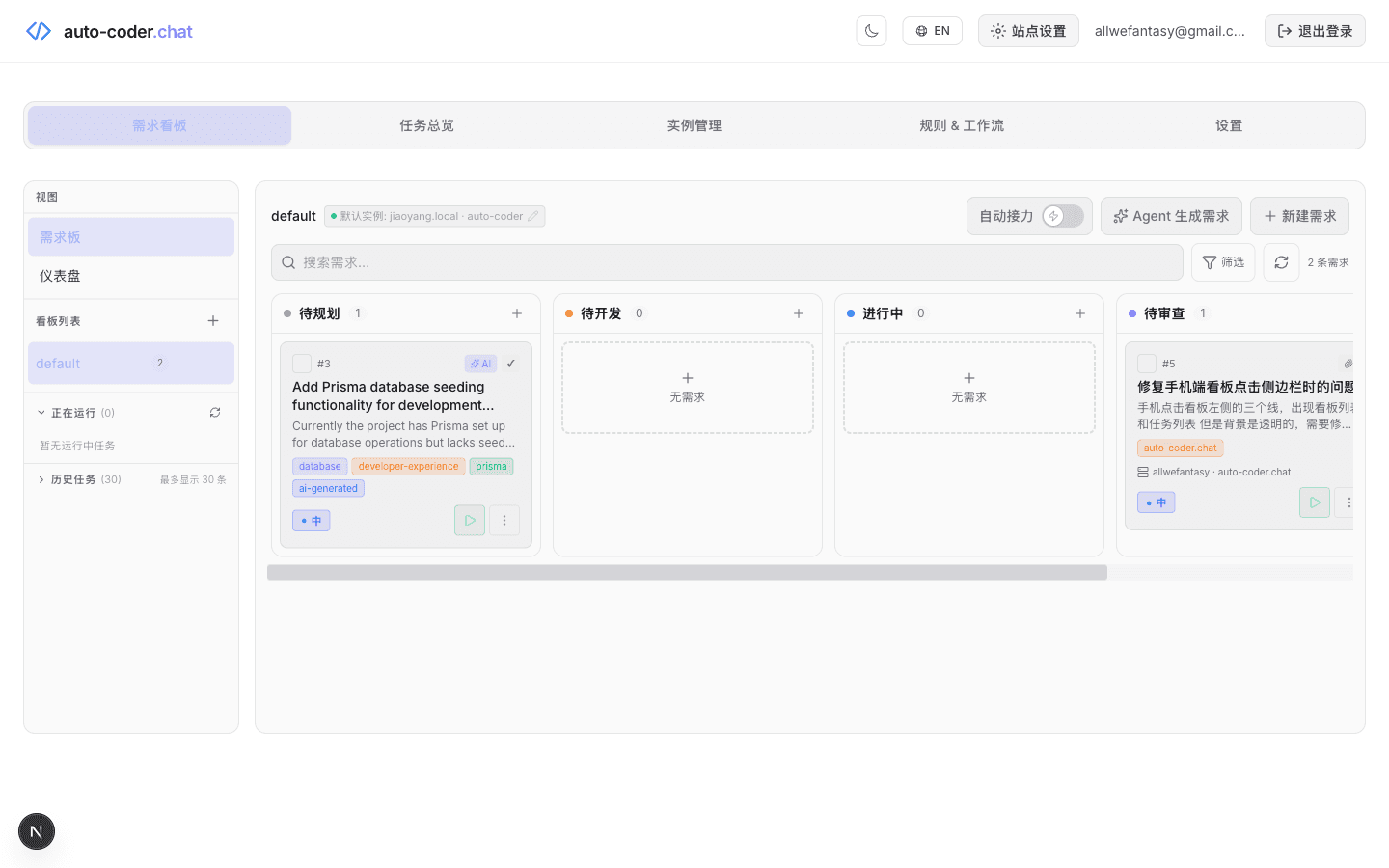
We started from a different angle.
From open-sourcing Auto-Coder in March 2024 to April 2026, two full years have passed. I've watched AI coding evolve from "completing snippets" to "delivering complete requirements independently." After Claude Opus 4.7, the model crossed the threshold — you can now safely hand a complete requirement to a Code Agent.
The moment the model crossed this threshold, two questions surfaced —
- Once Code Agents can deliver independently, chat-style collaboration can no longer support real software development.
- Once Agents can deliver independently, why must I still sit at the machine running the Agent to push work forward?
So what we wanted to build was two things stacked together —
First: "A pipeline that turns a sentence from a human into a commit in a git repo."
Second: "Make this pipeline's entry point live in the cloud, and its execution body live on your own machine." You start auto-coder.chat.lite on your work laptop, run /connect ak_xxxx, and that machine is registered as a cloud instance. After that, from any phone / tablet / any browser on the road, you open auto-coder.chat, log in, see your own Kanban, create a card, pick "Bind Instance" to the machine at home, tap ▷, and the work actually runs on the machine at home.
This "cloud Kanban + local instance" architecture is exactly what the homepage line means — "your laptop just runs; development happens in any browser."
The pipeline has 6 stations:
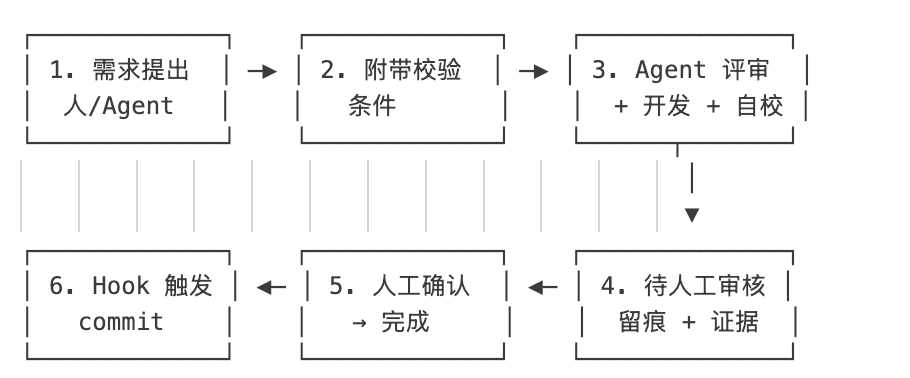
Every card that runs through the pipeline goes through:
- Requirement proposed (human OR Agent proposes) — the Agent can auto-generate draft requirements from one big goal, and humans only handle "aha moment."
- Fill in acceptance criteria — this is the ruler of the whole pipeline. It determines who judges at step 4.
- Agent reviews + develops + self-verifies — tap ▷ on the card and the Agent takes over. Under the hood is a Subagent layered architecture: the main Agent uses Opus 4.6 / GPT-5.4 for task decomposition; Subagents use cost-efficient models like doubao-seed for parallel execution. Cost per requirement drops into the "pennies" range.
- Agent gives a "judgment rationale" against acceptance criteria — not just "pass/fail," but explains "why it passes."
- Humans do the final gating in the "To Review" column — AI verdict ≠ delivery accepted; we leave a human-review slot.
- Hook auto-commits — the moment a card enters "Done," changes auto-commit to the target git repo. Combined with the "Auto-Relay" switch, the next card auto-starts.
Along this chain, each step has a clear "deliverable" and a clear "state-change signal."
List a week's worth of requirements before bed, and half may already be committed by morning.
Same Kanban on the Surface, Two Different Products Under the Hood
By now the architectural gap is clear. I made a comparison table:
| Dimension | Vibe Kanban | auto-coder.chat Kanban |
|---|---|---|
| Where the control plane runs | Local. npx vibe-kanban starts localhost:8080 on your machine. You must sit at this machine to operate. | Cloud. auto-coder.chat is the Kanban. Any device / any browser can log in and operate. |
| Where the executor runs | Local (same machine as control plane) | The auto-coder.chat.lite instance on your own machine. Registered via /connect ak_xxxx. One machine + one project = one instance. |
| Cross-device / multi-machine relay | Not supported. Switch devices and you re-run npx; no shared context. | Native. /connect on your home machine, file a card from your phone, pick "Bind Instance" to the home machine, and the card runs on the home machine. |
| Brings its own Agent? | No. Delegates to locally authenticated Claude Code / Codex / Cursor / Copilot and 10+ others. | Bundled Agent, with Subagent layering (main Agent decomposes, Subagents execute in parallel). Cards can also specify Cursor etc. as external executor. |
| Lane count | 4 (To Do / In Progress / In Review / Done) | 5 (To Plan / To Do / In Progress / To Review / Done) |
| Acceptance-criteria field | None. Issues have title + description + priority + tag + subtasks. | Yes, strongly recommended. The more mechanical the criteria, the more accurate the AI's judgment. |
| Who judges | Humans only — agent finishes, card enters In Review, human reads diff, comments inline, sends to agent. | Agent self-verifies against criteria first, writes a "judgment rationale," then hands to human in the "To Review" column for final gate. |
| Isolation | git worktree (each task gets its own directory + branch) | Conversation isolation (runs in the user's own local repo, isolated by conversation_id) |
| Multi-task relay | No auto-relay. Each workspace requires manual startup. | "Auto-Relay" switch — when one card finishes, the next enters "In Progress" automatically; no manual dragging. |
| Code merge path | Create PR → GitHub CI → reviewer → merge | Hook auto-commit to the repo (PR path also supported) |
| Cost control | Doesn't manage cost — your choice of agent, your token bill. | Subagent layering — main Agent (premium model) only decomposes and verifies; execution is always delegated to cost-efficient models. |
| Comparison / experiment mode | Strength: "Attempt" mode lets multiple agents run the same task in parallel for diff comparison. | Weakness: one agent per card at a time, but can be re-run infinitely (add stricter criteria → re-run). |
| PR integration | Core feature. PR description, draft PR, CI, reviewer — full suite. | Supported, but commit/PR is the "last station" of the pipeline, not the core interaction. |
| Does code / keys leave your machine? | Never leaves. Control plane is also localhost. | Code and keys never leave (execution is only local). But scheduling and results go through the cloud (the cloud only stores promptText / resultText / card metadata — never your code). |
| Enterprise tier | Cloud Pro $30/user/month, Enterprise custom (SSO/SAML/SLA) | Private deployment + team edition |
| Ecosystem / stars | 24k+ GitHub stars, open, active | China Code Agent toolchain |
The three most important rows in this table are "where the control plane runs," "brings its own Agent?," and "who judges." Every other difference is downstream of these three choices.
Difference 1: Where the Control Plane Lives — Local localhost vs Cloud Dashboard
This is the deepest architectural split, and also the one that most previous comparisons glossed over.
Vibe Kanban is "local-everything." You npx vibe-kanban and the control plane + executor run on the same machine. Good: simple. No cloud, no keys, no login. When this machine shuts down, both the Kanban and the agents stop.
Price: you have to stay at this machine.
- See a bug on your phone? Write it down, go home, run
npx. - On a work trip with a different machine? No context carries over, no Kanban state either.
- Agents running overnight? This machine has to stay on; closing the lid stops them.
- Want to show your Kanban to a teammate? They can't reach your
localhost:8080.
auto-coder.chat's Kanban takes the "control plane in the cloud, executor on your machine" architecture:
[Any browser opens auto-coder.chat] ─→ [Cloud Kanban] ─→ CloudBridge HTTP
                                                              ↓
[Your home machine runs auto-coder.chat.lite, already /connect-ed]  ↓
                                      ↑── claim task ←───────────────┘
                                      └── return results ─────────→ Cloud refreshes
Only three steps:
- On your work machine, start
auto-coder.chat.lite(Python CLI, or bring up auto-coder.web for a Web UI). - On the website, go to "My API Key," click "Create Key," get a string like
ak_xxxx, back in the terminal run/connect ak_xxxx. - This machine + this project is now registered as a cloud instance, and appears in
auto-coder.chat/dashboard/instances.
This machine doesn't need an IDE open, doesn't need you sitting at it, doesn't even need to be unlocked — as long as the auto-coder.chat.lite process is alive, it's an executor on standby.
What happens next is where it gets interesting:
- See a bug on the subway on your phone → open the browser, log into auto-coder.chat → create a card → under "Bind Instance" pick "Home Mac · auto-coder.chat" → tap ▷
- Cloud dispatches the card →
auto-coder.chat.liteon the home Mac claims it → SubAgent runs real code, real tests, real commits in your local repo - Results return to the cloud → refresh Kanban on your phone, card is in "To Review"
This is the architecture underneath the "8-minute bug fix" story from a couple of days ago — I was out running errands, a user sent me a screenshot in the group chat, I didn't go home, didn't open my laptop, and dispatched the entire bug card to Cursor on my home machine right from my phone.
This is physically impossible on Vibe Kanban — there's no "cloud" layer. You can't npx from a phone, and even if you SSH from an iPad into your home machine to manually start Vibe Kanban, the next time you switch phones you'd have to repeat it all.
One-line summary:
Vibe Kanban binds all state to "this one machine you have turned on." auto-coder.chat's Kanban puts scheduling state in the cloud and keeps execution + code local.
On the security and privacy of this cloud architecture, to be clear: code and keys never leave your machine. The cloud only stores "task promptText, result resultText, card metadata, conversation_id mapping" — scheduling info only. Every file you change and every git commit happens on your own machine. The LiteRun table in the Prisma schema stores prompt text and final answer text; it does not store code.
Difference 2: "Agent Orchestrator" Path vs "Self-Contained Agent + Full Pipeline" Path
Vibe Kanban is an Agent orchestrator — it doesn't do work itself. It lines up, isolates, and collects diffs from the third-party CLI Agents already installed on your machine.
The upside of this positioning is clear: naturally robust to SOTA drift. Today Claude Code, tomorrow a new Codex, next month Gemini 3.5 — Vibe Kanban doesn't need to upgrade.
The downside is equally clear: it can't be accountable for the final delivery.
Example. You file an issue in Vibe Kanban: "Add rate limit to the login API, 60 requests per IP per minute." Claude Code runs for 8 minutes in the worktree, submits 18 file changes, enters In Review.
What Vibe Kanban does next is: lay out the diff and ask you to judge whether the change is correct.
It can't tell you "whether this change aligns with your requirement" — because it has no idea what your requirement actually is. It just forwarded the issue description verbatim to Claude Code; everything else is inside Claude Code's session.
This is the physical boundary of the orchestrator path — you can't ask a tool that has no business context to judge business correctness.
auto-coder.chat walks the other path: bundled Agent, which means it can be accountable for final delivery.
This path requires an explicit field on the card — acceptance criteria. Looks like just a multi-line text box, but in the pipeline it plays the role of the ruler. After the Agent finishes, a fresh read-only verification turn is started on the same conversation, checking each criterion one by one, outputting structured PASS / FAIL judgments + rationale + timestamps, all written back to the card alongside the execution summary.
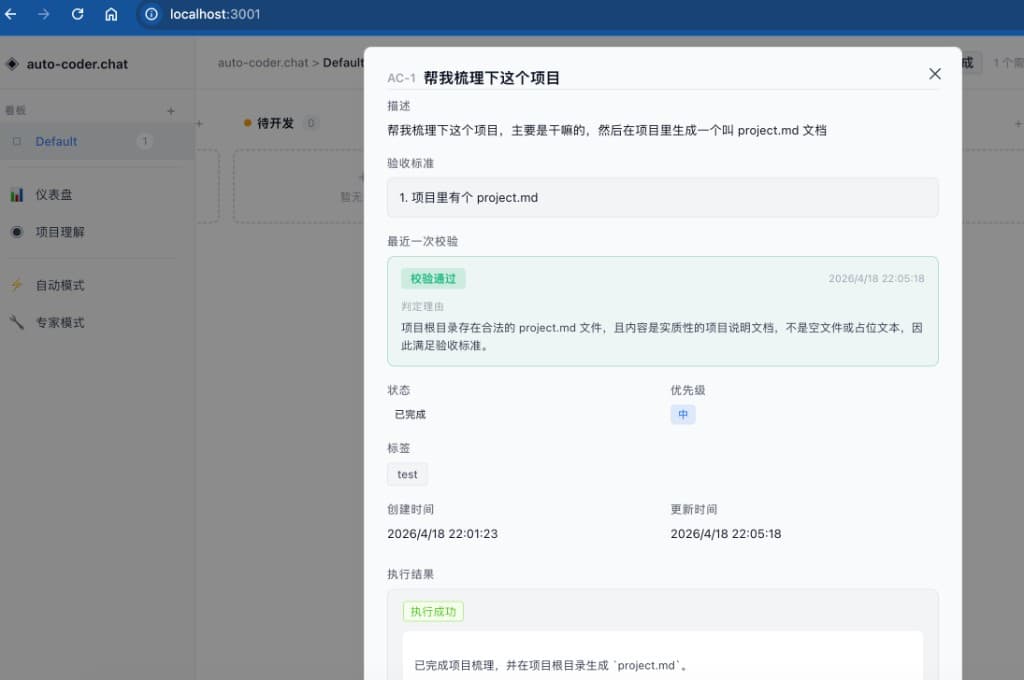
Look at the card screenshot above —
- Acceptance criteria are listed as the ruler you originally defined;
- Most recent verification shows a second-precision timestamp + green "Verification Passed";
- Judgment rationale is a paragraph explaining "why it passes" — "The project root contains a valid project.md file, and the content is substantive project documentation rather than an empty file or placeholder, therefore meets the acceptance criteria";
- Execution result is the Agent's own delivery summary.
This turns AI from a "black-box executor" into an auditable collaborator.
Neither the orchestrator path nor the bundled Agent path is "right" — they answer different needs.
If you want to seamlessly switch agents as SOTA drifts, orchestrator path. If you want the tool to judge and record whether "this delivery is actually done," bundled Agent path.
Difference 3: One Review Station vs Two (Agent Self-Verify + Human Review)
Vibe Kanban's In Review column is a single station — agent finishes, hand to human. Human either sends feedback to the agent, or Create PR → GitHub → CI.
This works great in "human = engineer + senior colleague" scenarios. But it has a hidden cost: all review attention lands on you.
I've seen this myself: when 5 worktrees sit in In Review simultaneously, each with 12–30 file changes, review itself becomes the bottleneck. Vibe Kanban acknowledges this — their homepage quote is literally "the speed of shipping is now limited by how quickly you can plan and review."
auto-coder.chat's Kanban does a two-station split:
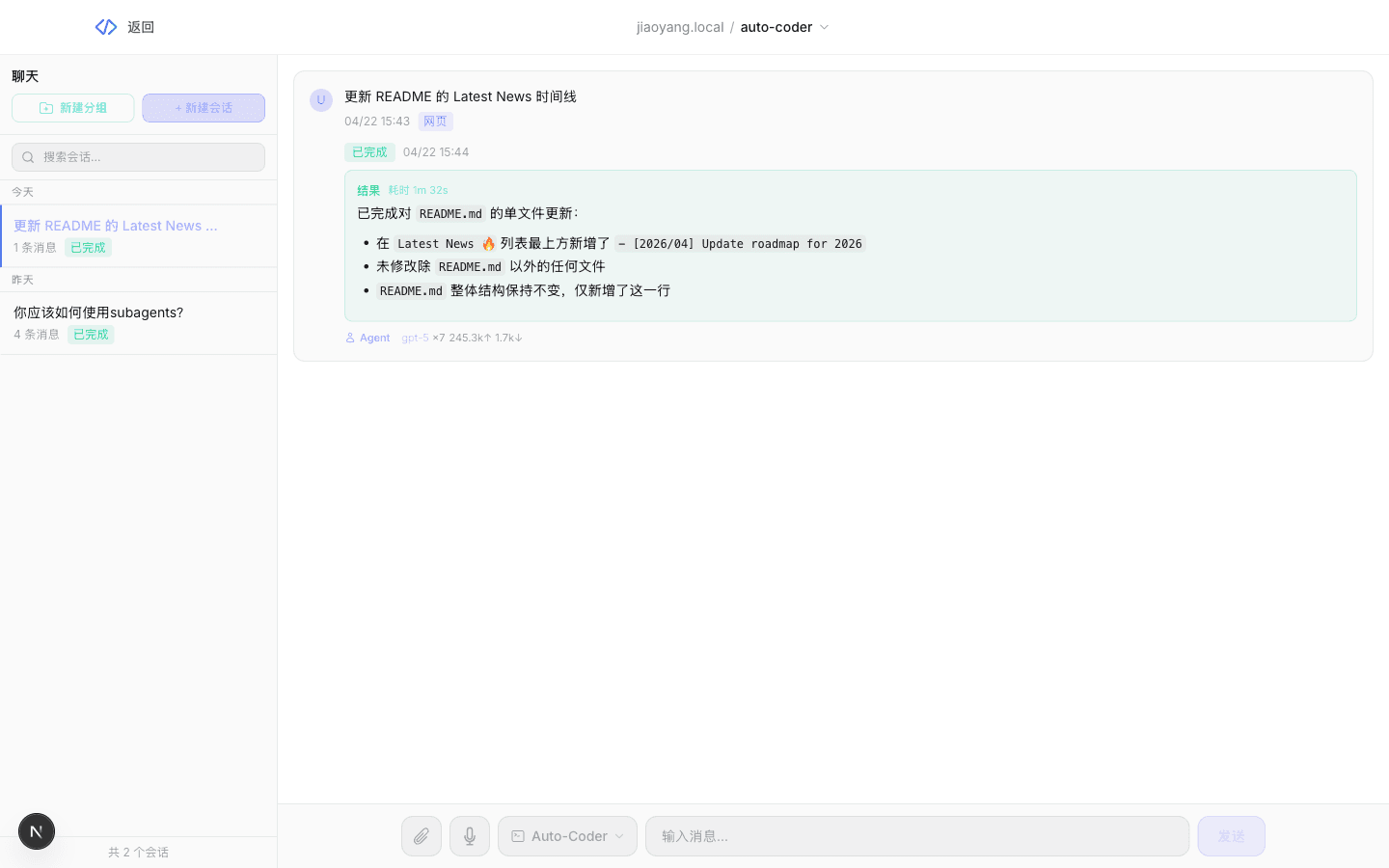
- Station 1: Agent self-verification. The moment the agent finishes, a read-only verification turn starts, checking each criterion. It doesn't just check "file exists" — it also judges "is the content substantive, or is it an empty file or placeholder?" This filters out almost all "agent claims it's done but actually hasn't" cases before they ever reach human review.
- Station 2: Human review. Only cards that PASS Agent self-verification sit in "To Review." FAIL cards come back with rationale immediately, without wasting your review attention.
This is the difference between an industrial pipeline and a small workshop — the pipeline runs an Agent self-check before the final human QA station.
Prerequisite: you can write mechanical, verifiable acceptance criteria. If your requirement is inherently exploratory ("see if this dataset reveals any patterns"), you won't be able to write such criteria, and this pipeline doesn't fit you — in that case, Vibe Kanban's "all human review" path is actually a better match.
Difference 4: Manual Parallelism vs Auto-Relay
Vibe Kanban's parallelism is manually controlled. To run 5 issues in parallel, you manually start 5 workspaces. This is the necessary consequence of "not SOTA-locked" — it doesn't know which agent you'd pick for the next card, with what effort level, with what plan mode, so it daren't start on your behalf.
auto-coder.chat's Kanban has an ⚡ Auto-Relay switch. Once on:
- Previous card verified and moves to Done
- Scheduler picks the next card from "To Do" by priority + manual order
- Auto-submits for execution — no one drags cards
Under the hood this is an auto_run flag. It works automatically because we bundle our own Agent — we know how to start the next card, because the executor is us.
List a week's worth of requirements before bed, and half may already be committed by morning.
This productivity picture is impossible on products where "each workspace requires manual startup."
Not saying Vibe Kanban can't go this direction — it's just not the direction they chose. They put that attention on "making multi-agent parallel experiments smoother" instead.
Difference 5: Cost Control — Is Subagent Layering Part of the Product?
Vibe Kanban doesn't manage your cost at all — how many tokens you burn with Claude Code or Codex is between you and the agent vendor.
This is not a flaw of Vibe Kanban. It's determined by its positioning: it's the orchestration layer, not the execution layer.
But when you really make "AI coding into a team's everyday productivity," cost becomes unavoidable. One engineer filing 30 cards a day, all running top-tier models, can produce a monthly bill bigger than the engineer.
On auto-coder.chat we built Subagent layering:
- The main Agent only understands requirements, decomposes tasks, and verifies results — using
Opus 4.6orGPT 5.4. - Subagents handle all execution — uniformly on cost-efficient models like
doubao-seed-2.0-pro. - The main Agent is Rule-constrained to only work through Subagents.
Result: premium models become "rare earth" — indispensable, but used sparingly. Per-requirement cost drops into the "pennies" band, with only slight quality loss.
This layering isn't part of the Kanban per se, but it's the substrate that lets the Kanban "industrialize throughput." Without a Subagent layer pushing cost down, even the prettiest Kanban is an expensive toy.
Vibe Kanban doesn't have this layer, because it doesn't need one — it externalizes cost to third-party agent vendors. That's both an advantage (lightweight) and a limitation (your cost is your problem) of its positioning.
Difference 6: Code Merge as PR Workflow vs Pipeline's Last Station
Vibe Kanban's code merge path is PR-first:
- Finish changes in worktree → Create PR (AI-written description) → push to GitHub → CI → reviewer → merge
This works great in team collaboration + public repo + strong review culture — every change has a PR trail, CI gates it, team members can discuss.
auto-coder.chat's Kanban's code merge path is Hook-first:
- The moment a card enters "Done," a hook triggers and auto-commits changes to the target repo
- No more manual
git add && git commit && git push - Tap "Accept" against the acceptance criteria, and the code is already in the repo
This suits solo development + private repos + high-frequency small-batch delivery better. PR path is also supported — we just don't treat PRs as the primary interaction, because: PRs are fundamentally about "letting humans review," and we've already moved that upstream to "Agent self-verify + human review in the To Review column."
No conflict. Two flows serve different collaboration densities.
Not Zero-Sum — Division of Labor
You might be expecting me to say "therefore auto-coder.chat's Kanban is better than Vibe Kanban." I won't, because that's not fair.
Here's a reasonable division of labor:
Vibe Kanban fits when —
- You're already a heavy Claude Code / Codex / Cursor user. You don't want to switch agents, you just want a better "batch dispatch + physical isolation" tool.
- You want to do "multi-agent bake-off" experiments — same task, different agents, compare outputs.
- Your team's engineering culture is strong PR review — every change goes to a GitHub PR, through CI, with a reviewer sign-off.
- You prefer focused office-at-desk work and don't need "file requirements during commute."
- You're OK with "I review all deliveries" as the price of SOTA-agility.
- You're OK managing your own cost (which agent, how many tokens — your call).
auto-coder.chat's Kanban fits when —
- You want requirements to have structured acceptance criteria so the agent can self-verify, rather than relying entirely on human review.
- You want "list cards before bed → half are committed by morning" once Auto-Relay is on — no manual startup per card.
- You want "your laptop just runs; development happens in any browser" — push engineering forward from the subway, from a café with a tablet, from a hotel on a work trip.
- You accept a single agent (ours, bundled) + Subagent layering for cost control; you don't need to swap third-party agents.
- You want code changes to commit directly to the local repo (PR path also supported), with high delivery density.
- You need private deployment, or cloud-machine relay in team scenarios.
You can also mix them — run your regular iterations on auto-coder.chat (especially those "I'm not at my desk" cards), and open Vibe Kanban with 3 worktrees when you hit an experimental "let 3 agents bake off" task. Both products have a place in my personal workflow.
A Deeper Claim: The Kanban Format Is Going to Win
Setting aside the specific differences between the two products, here's a bigger claim —
Starting from Opus 4.7, the dividing line in AI coding is no longer "how well it writes," but "does it have a requirement-management collaboration format."
The chat window (the default format in Claude Code, Cursor, Codex) can't solve three things:
- State is scattered — yesterday's half-chat is gone; today I start over.
- Requirements are linear — I must line them up and dictate one at a time.
- Acceptance is verbal — "does this look right?" works, but there's no structured record.
These three aren't the chat window's model problem — they're the medium problem.
The Kanban solves all three at once — cards give each requirement its own state and context; lanes enable parallel scheduling across many requirements; structured fields (whether Vibe Kanban's description + priority + tag, or ours including acceptance criteria) pass information in a standard format.
So whether you end up choosing Vibe Kanban or auto-coder.chat, the Kanban format itself is the right evolution direction for AI coding. Vibe Kanban validated this at the 24k-stars scale; we're validating it in the Chinese practice.
The rest is a matter of path choice and fit.
How to Try Both Quickly
Vibe Kanban:
npx vibe-kanban
Make sure you've already authenticated Claude Code / Codex / Cursor or any CLI Agent. Open http://localhost:8080.
Homepage: vibekanban.com
GitHub: BloopAI/vibe-kanban
auto-coder.chat's Kanban:
Three steps (different from Vibe Kanban — you're not "starting a local server"; you're "registering your local machine into the cloud"):
1. Install auto-coder on your work machine
pip install -U auto-coder auto_coder_web
2. Start a lite instance in your project directory
cd your-project
auto-coder.chat.lite
3. Get an API Key and /connect to the cloud
Log in at auto-coder.chat → "My API Key" → create a key in the form ak_xxxx.
Back in the auto-coder.chat.lite terminal:
/connect ak_xxxx
This machine + this project is now a cloud instance.
After that, on any device (phone, tablet, any computer), open auto-coder.chat in a browser, log in, go to Dashboard → "Requirement Kanban." When creating a card, pick the registered machine under "Bind Instance," tap ▷, and work starts running on that machine.
Detailed docs: docs.auto-coder.chat/docs/connect-cloud
Questions welcome on GitHub issues or email allwefantasy@gmail.com — I read them personally.
Last Words
Every wave of productivity tools evolves not as "one product wins all" — but as "multiple paths each find their own space."
The local-orchestrator path and the cloud-control + local-execution + bundled-Agent path are two adjacent lanes on the industrialization road of AI coding. Vibe Kanban has brought the first lane to today's ceiling; we want to deepen the second lane — "cloud Kanban + local instance + full pipeline."
What the second lane cares about is not just "can AI write code right" — it's "does the engineer have to sit at the computer." On the subway, at dinner, in a hotel on a work trip — one card on your phone, and the laptop at home gets it done.
Our vision is simple — let every developer have their own AI pipeline, from a sentence on any device to a commit in a git repo, end-to-end industrialized, every card carrying its own proof of delivery.
Make software development rhythmic, evidence-backed, and scalable — like manufacturing.
Try auto-coder.chat's Kanban: auto-coder.chat
Try Vibe Kanban: vibekanban.com