Here's a take I'm willing to defend:
A software industrial pipeline cannot be built out of "one person + one Agent" alone.
Almost all the AI-coding progress of the past year has been concentrated on a single relationship: one person, one chat box, AI helps me write code. The slightly more ambitious version is the personal Kanban — one person, one board, AI runs each requirement down its swimlanes by itself.
We've shipped pieces of this story before: Two Kanbans for AI Coding — auto-coder.chat and Vibe Kanban Walk Two Different Paths covered why "Kanban as the load-bearing beam of AI coding" is the right shape, and One Bug, One Phone, 8 Minutes covered what it looks like to take a requirement from "noticed" to "delivered" entirely from a phone — but in both, the only roles in play are "me" and "my Agent."
A real software team is not one person, and there's never just one Agent on the line. A production engineering pipeline contains at least three collaborations happening at the same time:
- Human ↔ Human — PMs file requirements, developers triage them, reviewers approve the delivery
- Human ↔ Agent — humans write down intent and acceptance criteria, the Agent picks it up and executes
- Agent ↔ Agent — a main Agent decomposes a task while Subagents execute in parallel; one Agent drafts requirement cards, another Agent self-checks against the acceptance criteria
Take any one of these three out and the industrial pipeline stops turning.
So this round of work on auto-coder.chat ships the Organization Kanban — and it is not "the multi-user version of the personal Kanban." It's the first time these three collaborations are all formally landed inside the same product.
The entry: organization management is now a first-class citizen
Open the auto-coder.chat Dashboard and you'll see a new top-level entry: Organization Management. Click in and you don't get yet another board — you get a full team-collaboration console:
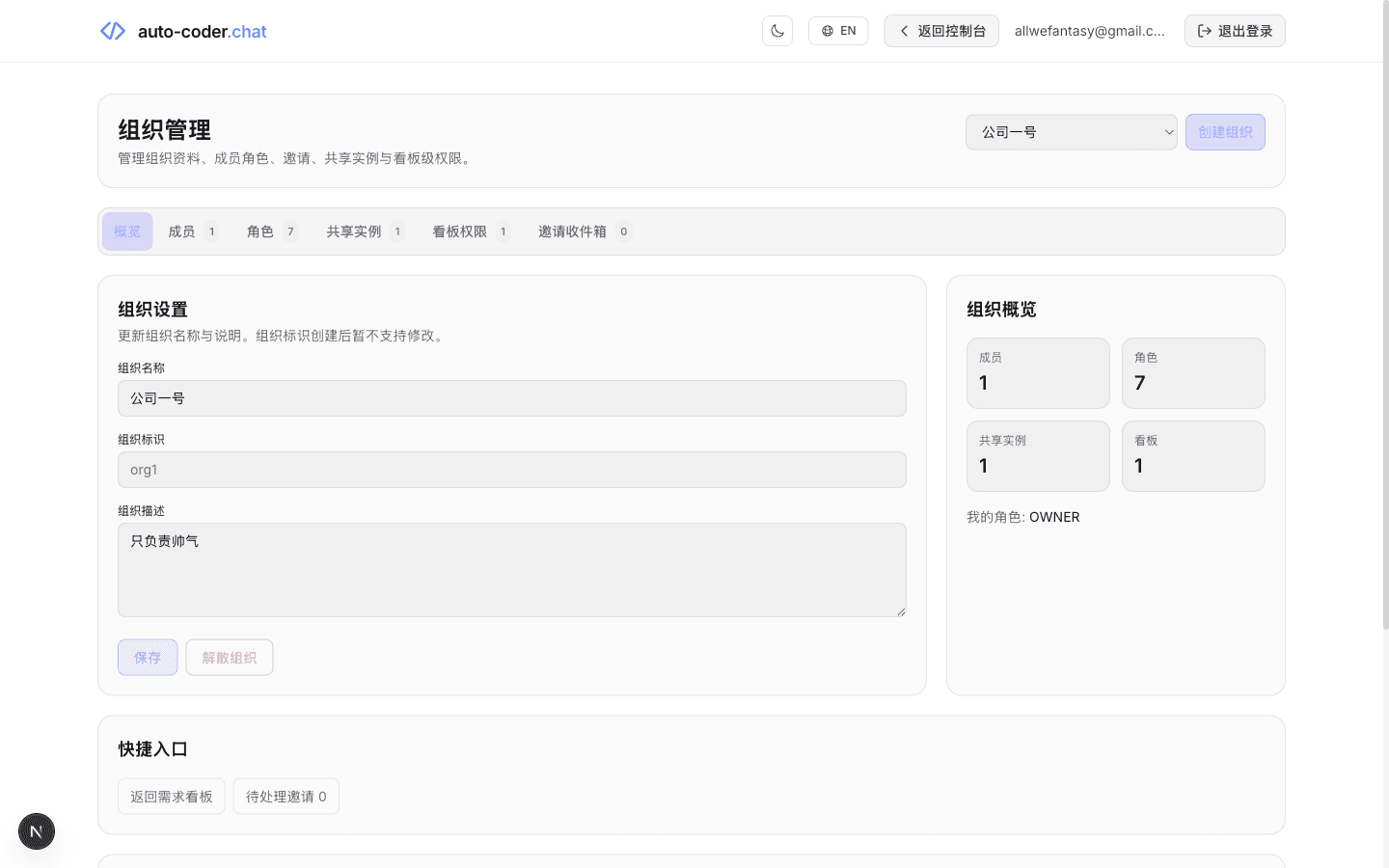
The page lays out every concept the organization needs:
- Overview — organization settings, organization ID (
org1), description ("only responsible for being handsome" was a placeholder I scribbled in) - Members 1 / Roles 7 / Shared Instances 1 / Board Permissions 1 / Invitation Inbox 0 — five tabs at the top; the number after each tab is this organization's current bill of materials
- Organization overview on the right — 1 member, 7 roles, 1 shared instance, 1 board, "My role: OWNER"
This console maps directly onto the three collaborations above:
- Members + Roles → handle the boundary for Human ↔ Human
- Shared Instances + Board Permissions → handle the boundary for Human ↔ Agent
- 7 default roles + role matrix → leave a hook for Agent ↔ Agent (which Agent reports to which lane under which identity)
This page is the table of contents for the rest of the article — every section below is just one of these tabs expanded.
Step 1: organization first, collaboration after
The first action in an Organization Kanban isn't "create a card" — it's "create the organization."
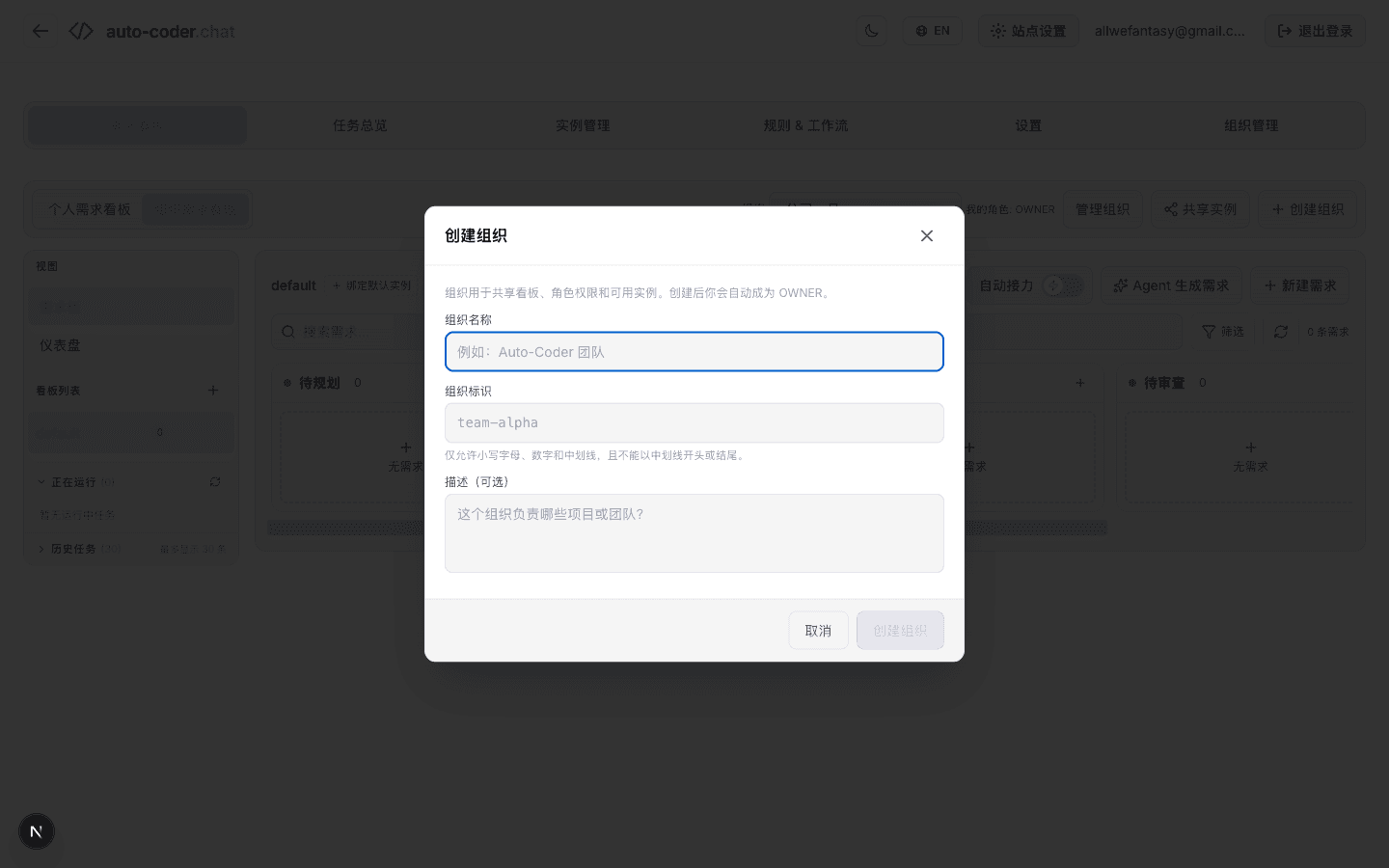
The form has three fields:
- Organization name — the human-readable name, e.g.
Auto-Coder Team - Organization slug — the system identifier, e.g.
team-alpha, immutable after creation - Description (optional) — which projects or teams this organization serves
The fine print at the bottom says it plainly:
Organizations are used to share boards, role permissions and available instances. Once created, you'll automatically become OWNER.
In other words, an "organization" in auto-coder.chat isn't an empty container. From birth it is welded to boards / roles / instances. That's the biggest difference from the typical SaaS "create an organization, configure later" model — auto-coder.chat tells you up front: this is the container of an industrial pipeline, not a chat group.
Step 2: 7 default roles, ready out of the box
Right after creation, the system seeds 7 roles:
| Category | Role | Typical job |
|---|---|---|
| System | OWNER | Founder / project lead |
| System | ADMIN | Team admin |
| System | MEMBER | Regular member |
| Custom | DEVELOPER | Engineer |
| Custom | PM | Product manager |
| Custom | QA | Tester |
| Custom | REVIEWER | Code or business reviewer |
Back in the top tabs of organization management, click "Members 1" — you'll see yourself sitting as OWNER:
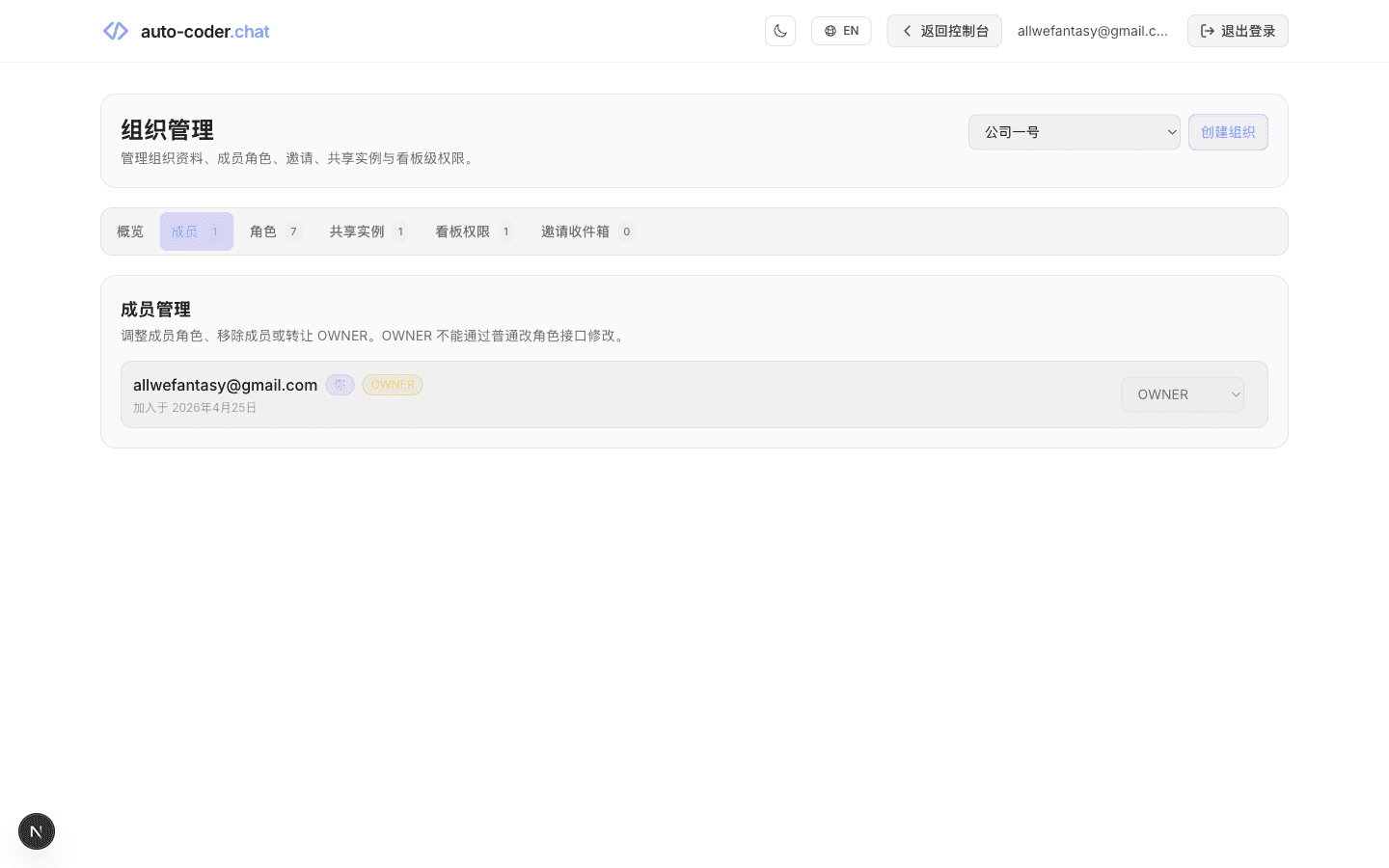
Note the small print on the page:
Adjust member roles, remove members or transfer OWNER. OWNER cannot be modified through the regular role-change endpoint.
This single sentence is the boundary of Human ↔ Human collaboration — OWNER is the supreme veto, and cannot be silently overridden. Changing the OWNER must go through an explicit "transfer OWNER" path. Other roles can be freely adjusted.
As we'll see in a moment, those 7 roles aren't decorations — they are the columns of the board permission matrix, with each column saying "what this role is allowed to do in which swimlane."
Step 3: share a local instance with the organization — give the Agent somewhere to actually work
People are in. The second prerequisite for an Organization Kanban is a real machine to run the work on.
Click into the "Shared Instances" tab:
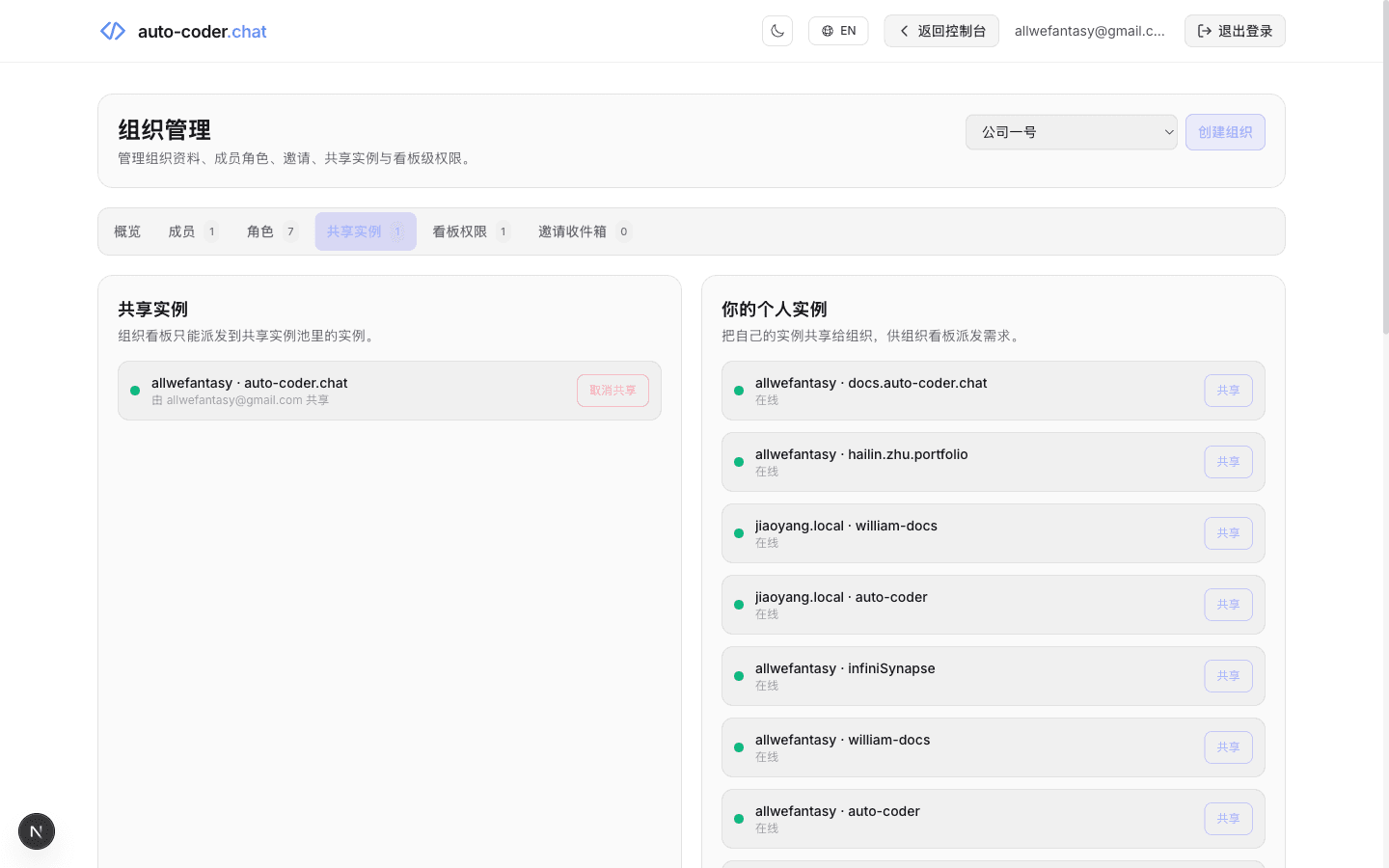
The page is split into two columns with very clear responsibilities:
- Left column — Shared instances — the pool currently exposed to the organization. Organization boards can only dispatch tasks to instances in this pool.
- Right column — Your personal instances — every instance registered under your account (local or remote), each with a "Share" button.
In my case I've shared exactly one instance — allwefantasy · auto-coder.chat, contributed by me. Below it sit 6~7 other candidate instances like docs.auto-coder.chat, hailin.zhu.portfolio, jiaoyang.local · william-docs, infiniSynapse — and without explicit sharing, none of them are visible to the organization scheduler.
This column is what separates auto-coder.chat's Organization Kanban from almost every "cloud Agent SaaS":
Code, secrets, engineering environments never leave your machine; the cloud only does scheduling.
Instances are explicitly shared by members. When the organization dispatches a task, it re-validates that the instance is still in the shared pool. When a member leaves, their instances are auto-unbound.
This rule simultaneously sustains all three collaborations:
- Human ↔ Human — for any card on the board, everyone knows exactly which physical machine will run it
- Human ↔ Agent — a human-filed requirement is dispatched to a real local instance and the Agent does the actual code change there
- Agent ↔ Agent — a main Agent decomposes work on the shared instance, child Agents run in parallel either on the same machine or on others in the same pool
Step 4: bind a default instance to the organization board
Once an instance is shared, the next step is to bind it to a specific board.
Click into the "Organization Kanban" tab — on the left you can see the organization name Company One, my role OWNER, and a board called default in the board list:
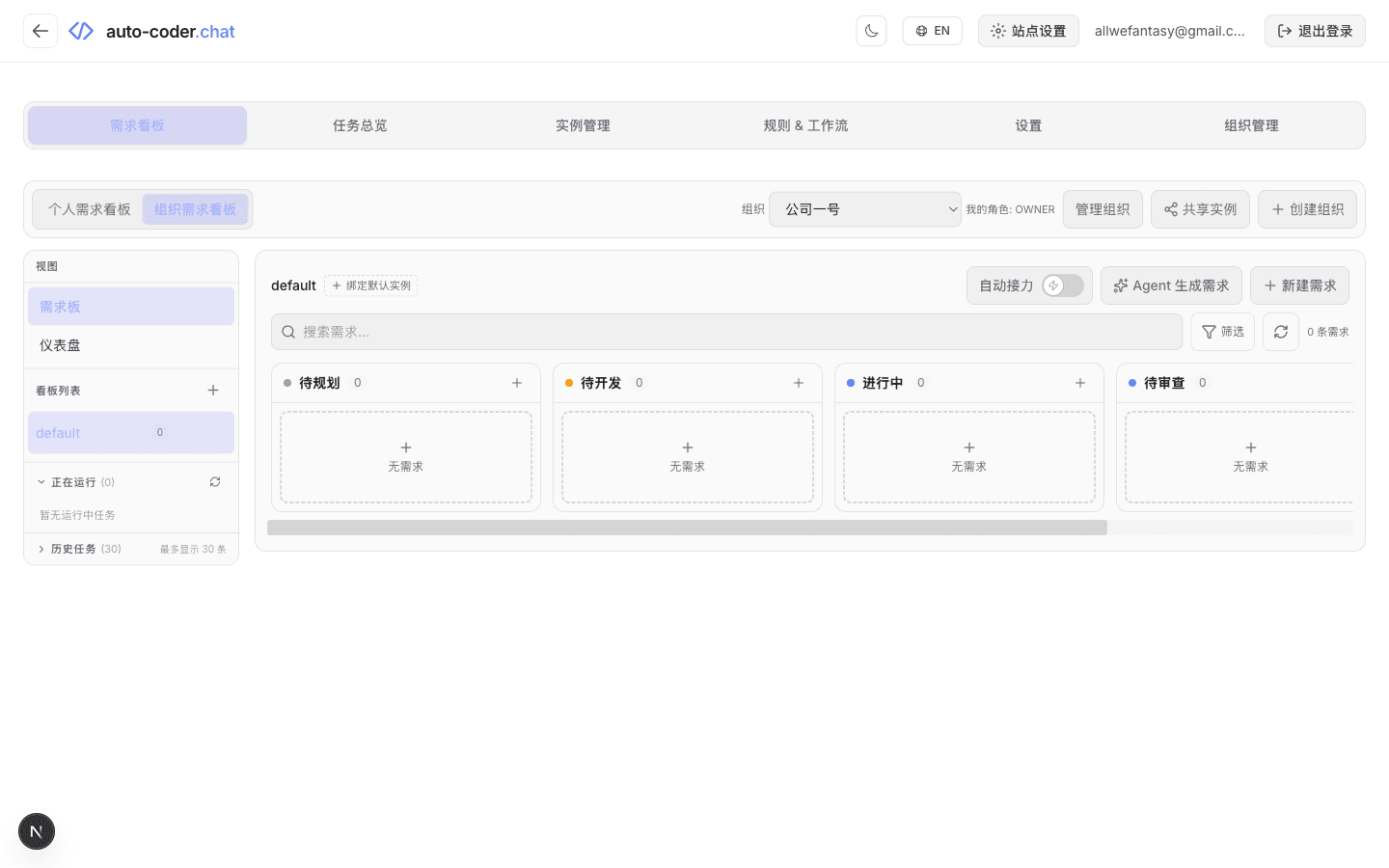
Note: this screenshot only shows 4 lanes (Backlog / Todo / In Progress / In Review), because at this viewport width the "Done" lane has been pushed off the right side. The Organization Kanban has the same 5 lanes as the personal Kanban: Backlog / Todo / In Progress / In Review / Done.
Next to the default board title, there's a "+ Bind Default Instance" button. The modal looks like this:
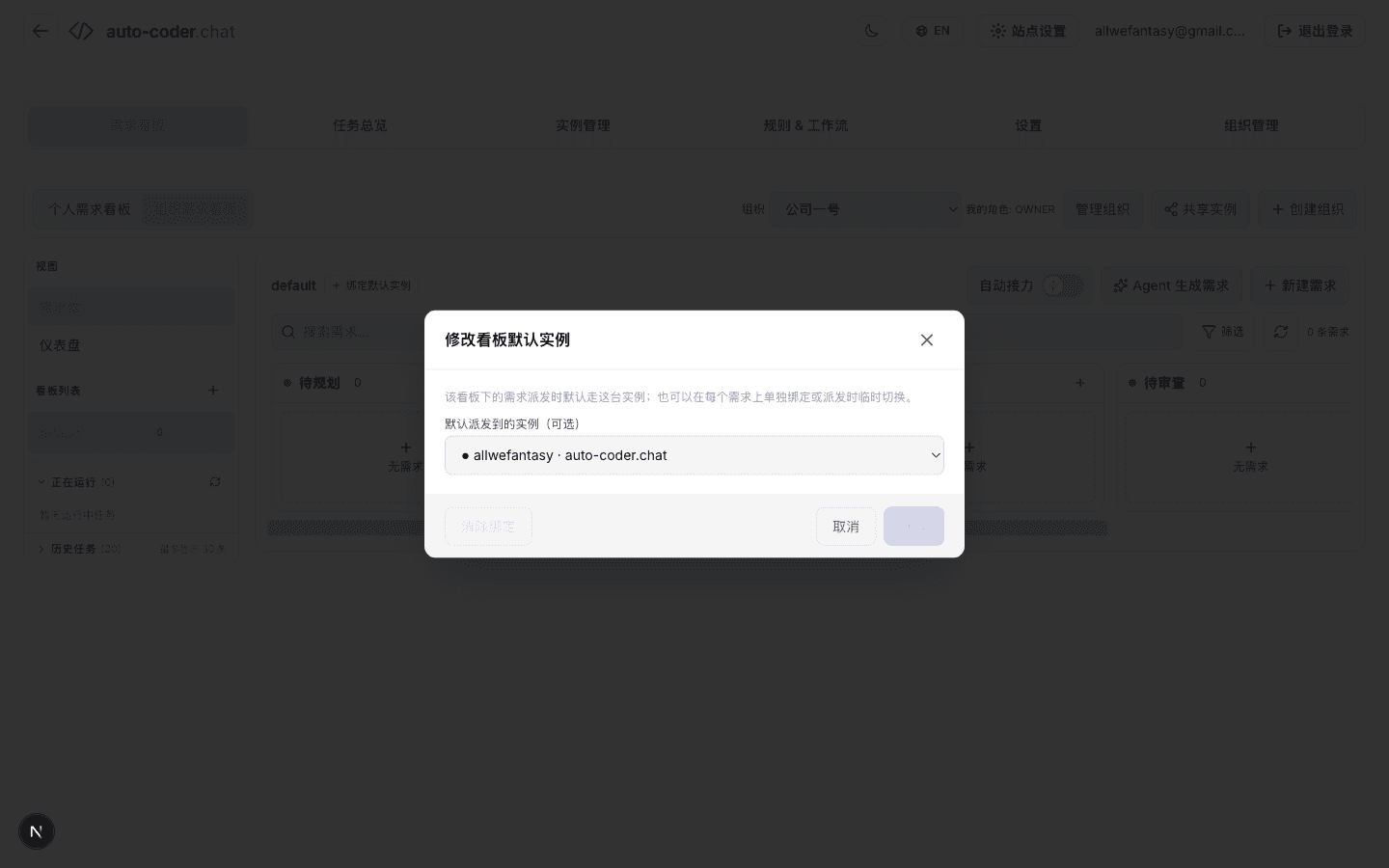
The dropdown only contains machines from the shared pool — allwefantasy · auto-coder.chat is the one I just shared. If no one has shared an instance yet, this list is empty.
This locks in one promise:
Organization boards never silently use a member's private instance. Any task dispatched by the organization must land on an instance that was explicitly shared in advance.
Step 5: the board permission matrix — "who can do what" pinned down per lane
This is where Organization Kanban truly pulls away from "regular team Trello."
Click into "Board Permissions":
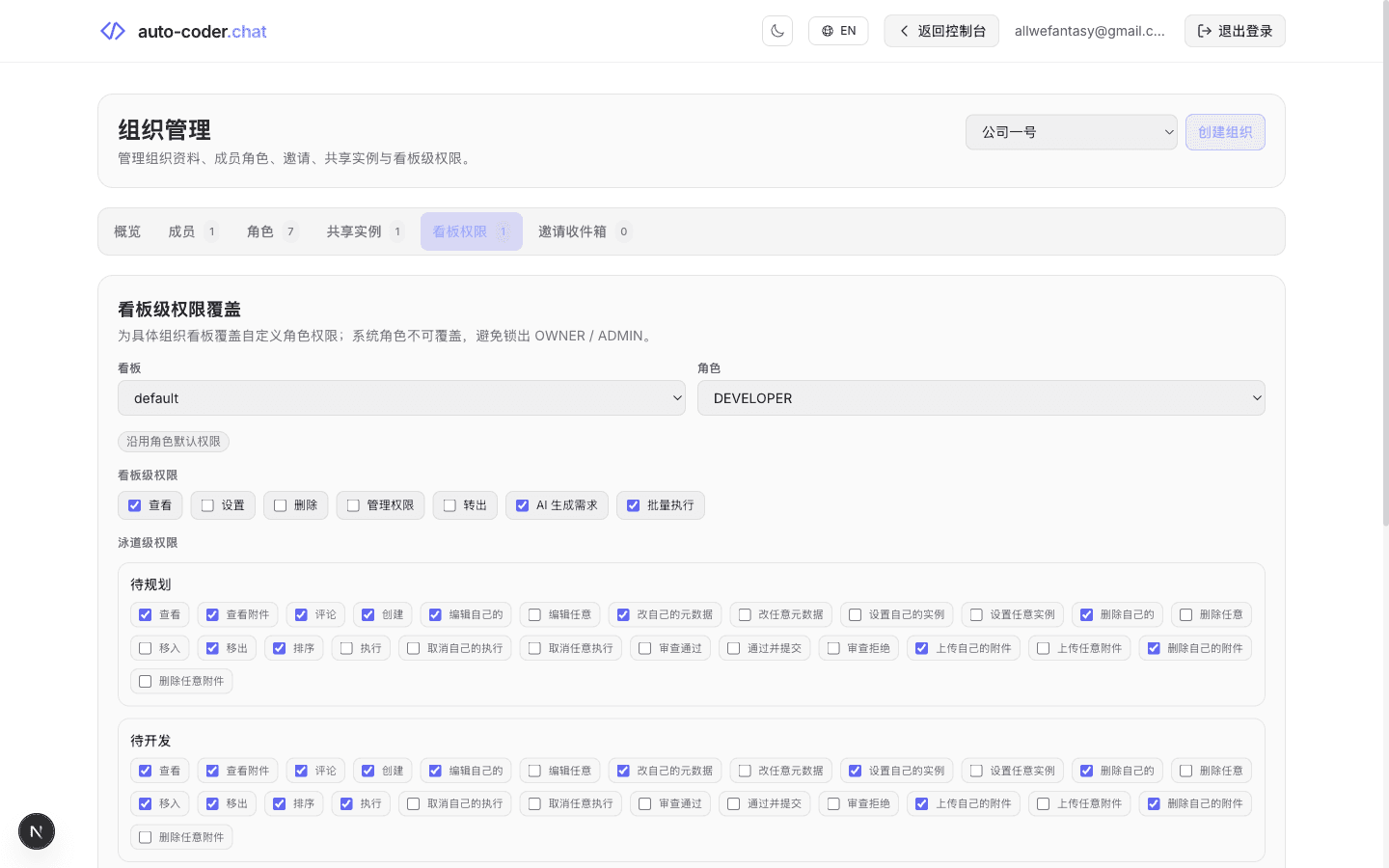
The matrix has two layers.
Layer one — board-level permissions, deciding what a role can do for the board as a whole:
- View
- Settings
- Delete
- Manage Permissions
- Transfer Out
- AI Generate Issues
- Batch Execute
Layer two — lane-level permissions, deciding what a role can do in a particular column. The screenshot is for the default board + DEVELOPER role; here are just the Backlog and Todo lanes side-by-side:
| Action | Backlog | Todo |
|---|---|---|
| View / View attachments / Comment | ✅ | ✅ |
| Create | ✅ | ✅ |
| Edit own / Edit own metadata | ✅ | ✅ |
| Edit any / Edit any metadata | ❌ | ❌ |
| Set own instance / Set any instance | ❌ | ✅ / ❌ |
| Delete own / Delete any | ✅ / ❌ | ✅ / ❌ |
| Move in / Move out | ❌ / ✅ | ✅ / ✅ |
| Reorder | ✅ | ✅ |
| Execute | ❌ | ✅ |
| Cancel own execution / Cancel any execution | ❌ | ❌ |
| Approve / Approve & commit / Reject | ❌ | ❌ |
| Upload / Delete own attachments | ✅ | ✅ |
You can read out a very specific design:
- A
DEVELOPERin Backlog can create, edit their own, and move cards out — but cannot directly execute. Backlog hasn't earned an Agent shift yet. - Once a card moves to Todo, the
DEVELOPERis allowed to hit Execute — the physical action of "developer triaged it, hand it to the Agent." - But the
DEVELOPERhas no review power — review belongs to theREVIEWERline further down the pipeline.
Similarly, PM, QA, and REVIEWER each get their own checkbox templates. A reasonable team setup:
PM— create, fill in description, attach files in Backlog; cannot directly executeDEVELOPER— triage Backlog, move ready cards to Todo, push the Agent execute buttonQA— view attachments, comment, add acceptance criteria in In Review; doesn't touch codeREVIEWER— push "Approve / Approve & commit / Reject" in In ReviewOWNER / ADMIN— manage organization, members, instances and permissions
By this point, the boundary between humans is no longer a verbal agreement in a meeting — it's a checkbox in a matrix.
Step 6: file a real card from the Organization Kanban
With permissions set up, go back to the Kanban and click "New Issue" in the top right:
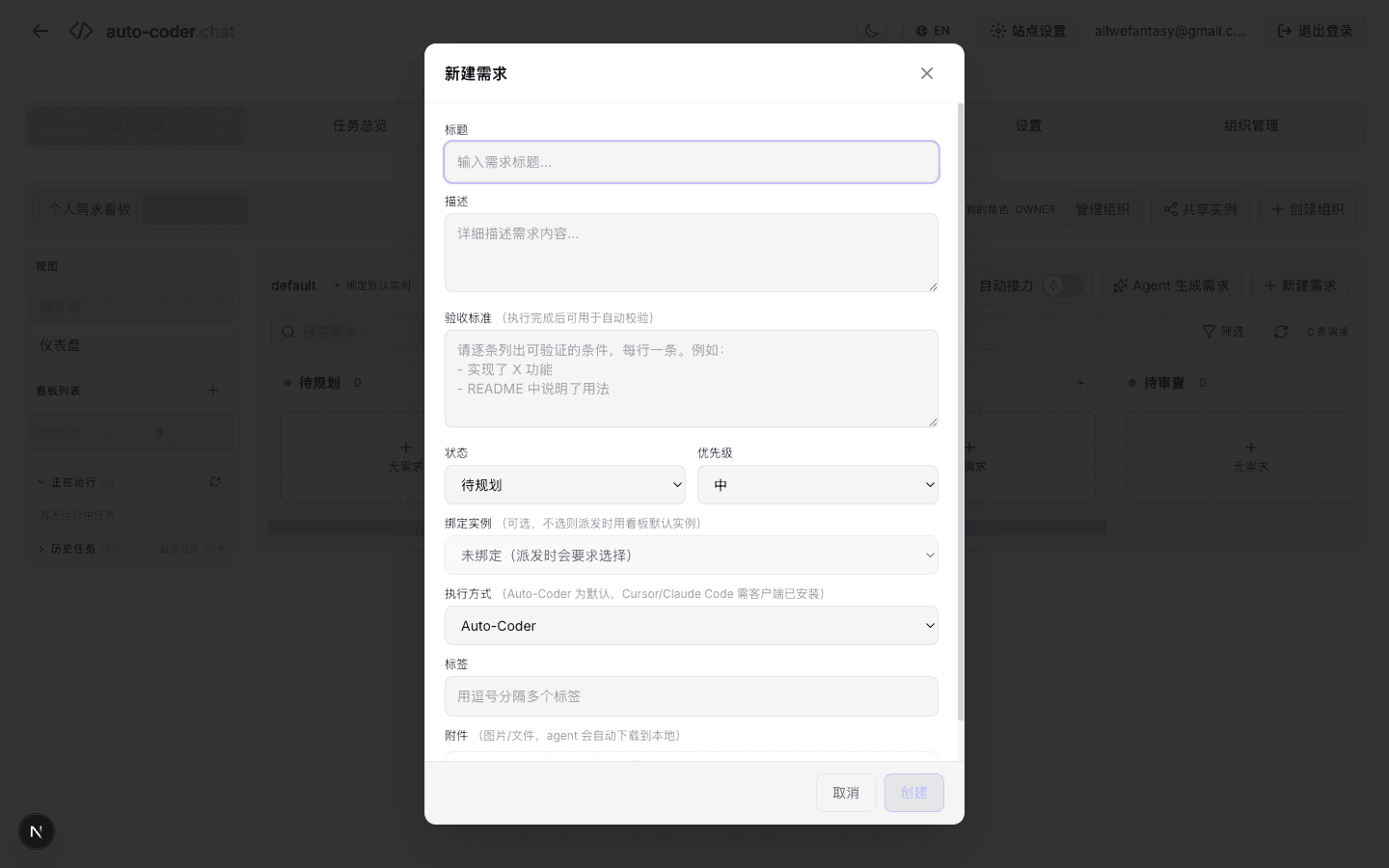
The fields look familiar:
- Title
- Description
- Acceptance criteria ("can be used for automatic verification once execution finishes" — that line is for the Agent)
- Status / priority
- Bound instance ("optional; if unset, the board's default instance is used at dispatch time")
- Execution method:
Auto-Coder/Cursor/Claude Code - Tags
- Attachments
But put inside an organizational context, the semantics shift:
- "Bound instance" is no longer "pick any of my own machines" — it must come from the shared pool
- "Execution method" is no longer purely your call — the team can standardize on Auto-Coder or Cursor
- "Acceptance criteria" is no longer just a yardstick for the Agent — it's also the contract for the QA, the REVIEWER and yourself a few weeks later
I filled in a card about this very article, on the spot:
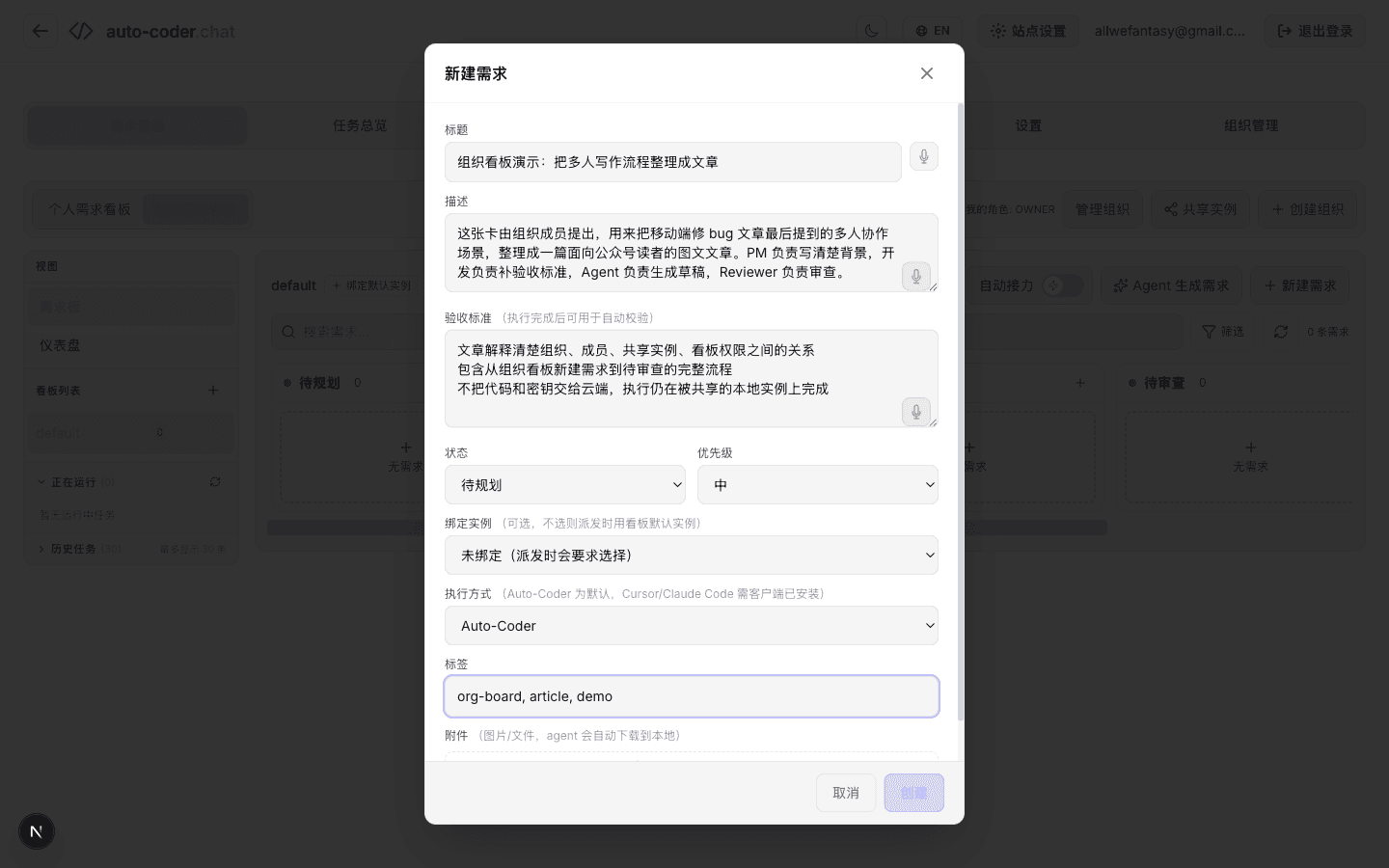
- Title — Organization Kanban demo: turn the multi-person collaboration story into a published article
- Description — This card is filed by an organization member to take the multi-person collaboration scenario hinted at the end of the mobile-bugfix article and turn it into a public-facing illustrated post. PM owns the background, dev owns the acceptance criteria, the Agent generates the draft, the Reviewer signs it off.
- Acceptance criteria:
- The article clearly explains the relationship between organizations, members, shared instances and board permissions
- It contains the full flow from filing a new card on the Organization Kanban to "In Review"
- Code and secrets never leave the local machine; execution still happens on a shared local instance
- Tags —
org-board, article, demo
This card is this article. I could of course fill it in alone in one sentence, but in a real multi-person scenario the same card would walk through PM draft → dev acceptance fill-in → Agent generates a first draft → Reviewer signs off → Done — the full chain.
The three collaborations, mapped onto the platform
Let me re-walk the steps above through the lens of the three collaborations:
Collaboration 1: Human ↔ Human
Lands on Organization + Members + Roles + Board Permission Matrix.
| Question | Decided by |
|---|---|
| Who can enter this Organization Kanban? | Organization member roster |
| Once they're in, who are they? | Roles (PM / DEVELOPER / QA / REVIEWER…) |
| What can they do in which lane? | Board permission matrix |
| Who has the final say? | OWNER |
This isn't decoration. It moves "review rights / execution rights / approval rights" — the things teams used to settle by Slack @-mentions — onto a checkable matrix.
Collaboration 2: Human ↔ Agent
Lands on the chain Acceptance Criteria + Execution Method + Shared Instance.
- Human writes — acceptance criteria, the work order the Agent reads before starting
- Human picks — execution method, whether it's the built-in Auto-Coder Agent, Cursor, or Claude Code
- Human decides — shared instance, which physical machine the task ends up on
- Agent does — the actual code change on the shared instance
- Agent self-checks — ticks each acceptance criterion and writes a verdict
- Human reviews — clicks "Approve / Approve & commit / Reject" in the In Review lane
This is the highest-frequency loop on the Organization Kanban.
Collaboration 3: Agent ↔ Agent
This is the form of collaboration the Organization Kanban is finally able to talk about with a straight face.
It lands in three concrete ways:
- The ✦ Agent Generate Issues button in New Issue — one Agent reads the project, drafts 5~10 cards with title, description and acceptance criteria pre-filled; another Agent then executes them one by one on the shared instance
- Subagent layering — a main Agent on a top-tier model (Opus / GPT) decomposes work on the shared instance, while Subagents on cost-efficient models (e.g. doubao-seed) execute in parallel (full story in SubAgent Is All You Need: Better Results at Lower Cost)
- Batch execution + auto-relay — once the
⚡ Auto-Relayswitch is on, the scheduler automatically pulls the next card from Todo by priority, hands it to the Agent, and after the card lands in In Review, immediately starts the next one
Put the three together and you've got Agents with real upstream/downstream relationships — one Agent files the requirement, another decomposes the work, a batch of Agents on cost-efficient models execute in parallel, and a final Agent self-checks.
The "protocol" they share is exactly the Organization Kanban's own field set: status, lane, acceptance criteria, linked session, verdict.
One pipeline, two workstations: read on the web, write in WinClaw
At this point the skeleton of the Organization Kanban is fully laid out — members, roles, shared instances, permission matrix, requirement cards.
But the pipeline is still missing one thing: the entry point.
The Organization Kanban is excellent at reading — you can see 6 boards, 22 cards, 4 online instances and who's stuck in which lane all at once.
It is decidedly not great at writing — especially on a phone, in the subway, in the moment someone @-pings you in a meeting. Pulling out your phone to tap "New Issue" and fill in title + description + acceptance criteria on a long form is anti-human.
That's why we wrote a companion article specifically for this: The auto-coder.chat Kanban Is Great for Reading, Bad for Writing — So We Let WinClaw Do the Writing.
The mechanism in that article:
- Generate an API Key in auto-coder.chat's settings
- Configure that key into
accchat(a Command Tool) from WinClaw's tool market - Then, in WinClaw's chat box, one Chinese sentence queries boards, files requirements and triages bugs — and via WinClaw's WeChat entry, you can even file a card from the subway
This closes the collaboration loop of the Organization Kanban:
| Job | Where to do it | Why |
|---|---|---|
| Read the entire pipeline | auto-coder.chat web | Kanban view is the most direct |
| Review a single card | auto-coder.chat web | Detail page has full diff, logs, attachments |
| Drag cards, edit fields | auto-coder.chat web | Just a few mouse clicks |
| File a new requirement / triage a batch of bug cards | WinClaw + accchat | One sentence does it |
| File a card / chase a status from a phone | WinClaw (incl. WeChat entry) | No long form, no app switching |
| "Review my backlog for me" | WinClaw + accchat | AI-style conversational summary |
Read on auto-coder.chat, write in WinClaw — together they finally make the Organization Kanban behave like a real factory line:
- Kanban (auto-coder.chat Organization Kanban) = the pipeline itself — status, lanes, permissions, execution traces, verdict evidence
- WinClaw + accchat = the writing workstation — anyone (you, the PM, customer support, the boss, a developer in the subway) can push cards in with one Chinese sentence
- Agents + Subagents = the execution workstations — running code, writing root-cause analyses, self-checking on shared instances
- The web dashboard = the central control screen — read, decide, release
How is this fundamentally different from past "AI coding collaboration"?
Two years into Auto-Coder, I've seen plenty of approaches to "team-level AI coding." Most of them stop at one of two layers:
- Layer one — "Buy every team member a Cursor / Claude Code seat." Effectively still "one person + one Agent" multiplied by N. Everyone runs solo, Agents don't collaborate, and there's no formal contract between humans either.
- Layer two — "Set up a multi-user Kanban for the team," e.g. Linear / Jira / Vibe Kanban. People can share requirements, but the Agent is still "a chat box on some engineer's laptop" — no formal post on the line, no Agent-to-Agent collaboration.
What auto-coder.chat's Organization Kanban is going for is layer three:
Land all three collaborations — Human ↔ Human, Human ↔ Agent, Agent ↔ Agent — inside the same Kanban, each with its own contract and boundary.
Concretely:
- Between humans, roles + the permission matrix define the boundary
- Between humans and Agents, acceptance criteria + shared instances define the contract
- Between Agents, lanes + auto-relay + Subagent layering define upstream and downstream
When all three are live, software engineering finally has every requirement of a true "industrial pipeline" — standardized, pipelined, auditable — instead of the cottage-industry shape that "AI helps me write code" still wears today.
Closing
Two Kanbans for AI Coding — auto-coder.chat and Vibe Kanban Walk Two Different Paths explained why Kanban is the load-bearing beam for AI engineering pipelines.
One Bug, One Phone, 8 Minutes showed what it looks like for one person to take a bug from "noticed" to "delivered" entirely from a phone.
The auto-coder.chat Kanban Is Great for Reading, Bad for Writing covered how we upgraded the writing entry from a graphical form to a single Chinese sentence.
This article — Organization Kanban — is the step that wires those threads into a real industrial pipeline:
- Roles and members give Human ↔ Human its boundary
- Shared instances and acceptance criteria give Human ↔ Agent its contract
- Auto-relay and Subagents give Agent ↔ Agent its upstream and downstream
- WinClaw + accchat brings the pipeline's entry down to one Chinese sentence
- The auto-coder.chat web brings the pipeline's read view to a single glance
Next time someone @-mentions you in a group chat with "who's gonna pick this up" — you don't have to ask "who's free" first.
Open the Organization Kanban, file a card, and let the line take it from there.
Try the auto-coder.chat Organization Kanban: auto-coder.chat.
Companion writing entry: install accchat from WinClaw's tool market — see Let WinClaw Do the Writing.